
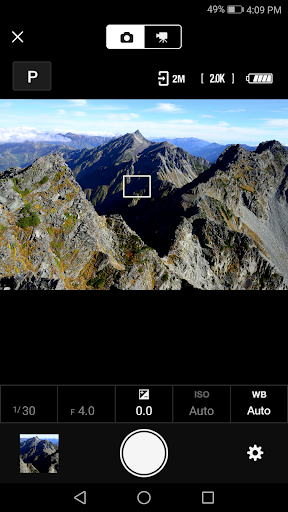
Overview of the SnapBridge App
Have you ever been out in the wild, capturing the beauty of nature with your Nikon camera, only to wish you could instantly share those stunning shots with your friends? Well, let me introduce you to the solution: SnapBridge. This innovative app seamlessly connects your Nikon camera to your smartphone, making photo transfers feel effortless and instant. Whether you're a casual photographer or a professional, SnapBridge enhances your photography experience by simplifying connectivity and photo sharing.
Effortless Connectivity and Seamless Integration
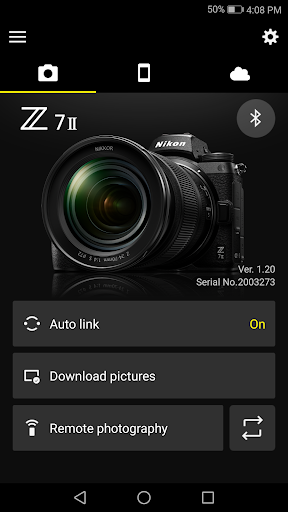
One of the standout features of SnapBridge is its ability to establish a constant connection between your Nikon camera and smartphone. While maintaining a persistent link might seem like a drain on your device's battery, SnapBridge cleverly uses Bluetooth Low Energy (BLE) technology to minimize power consumption. This means your devices stay connected without significant battery drain, creating what could be called a magic bridge that keeps your camera and phone in sync efficiently.
Smart Photo Transfers and Easy Sharing
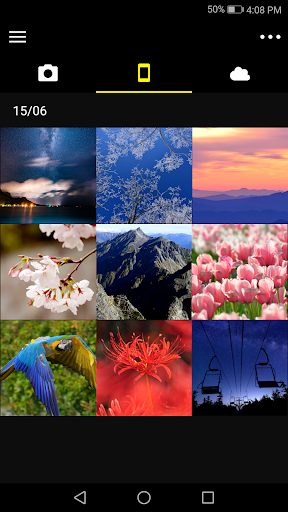
Gone are the days of fumbling with SD cards or USB cables. With SnapBridge, transferring photos is as simple as tapping your screen. Once your device is paired, new images are automatically downloaded to your smartphone as you take them. Imagine capturing a moment at a family gathering or during a scenic outdoor adventure, then sharing those stunning shots with friends almost instantly. The app makes photo sharing seamless, supporting export via email, social media platforms, or directly to cloud services like Nikon Image Space.
Remote Shooting Capabilities
Another impressive feature is the ability to turn your smartphone into a remote control for your Nikon camera. Want to include yourself in a landscape shot or set up a long-exposure shot from a distance? Simply connect the devices and use your phone to trigger the camera remotely. This functionality makes group shots, astrophotography, or tricky angles much easier, providing the flexibility of a personal photographer right in your pocket.
Photo Management and Cloud Integration
With SnapBridge, organizing your photos becomes less of a hassle. The app automatically tags your images with location data and timestamps, simplifying the process of sorting through vacation photos or recent shoots. Additionally, you can add notes or text to your images for better context.
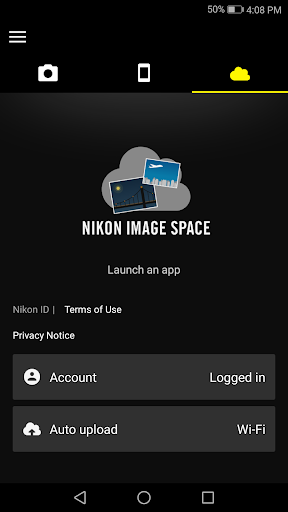
For users seeking a safe storage solution, SnapBridge integrates seamlessly with Nikon Image Space, Nikon’s cloud storage platform. This feature allows you to back up your photos effortlessly, freeing space on your device while keeping your memories protected and accessible from anywhere.
System Requirements and Tips for Better Performance
To get the most out of SnapBridge, ensure your device meets system requirements:
- Android 11.0 or later
- A device supporting Bluetooth 4.0 or higher (supporting BLE)
- At least 100 MB of free memory on your device
Note that certain features like remote movie recording are only supported on compatible cameras. Also, for features such as firmware updates, it is essential to keep your camera firmware up-to-date. You can download the latest firmware from the Nikon Download Center—sometimes directly via SnapBridge depending on your camera model.
Final Thoughts: Enhance Your Nikon Experience with SnapBridge
In today’s fast-paced world of digital photography, capturing, organizing, and sharing your moments effortlessly is vital. SnapBridge makes this possible by providing a reliable, feature-rich connection between your Nikon camera and smartphone. Its ability to automate photo downloads, control your camera remotely, and integrate with cloud storage transforms how you interact with your images.
Whether you’re a professional photographer wanting quick access to your latest shoots or an enthusiast eager to share your adventures, SnapBridge is a must-have app that elevates your photography experience. Remember, consistent updates and proper device configuration ensure optimal performance. Next time you're out exploring, let SnapBridge be your digital assistant, helping you to capture and share your world, one photo at a time.
Pros
- Seamless camera connectivity
- Automatic photo transfer
- Remote camera control
- Easy social media sharing
- Battery-efficient operation
Cons
- Requires Nikon camera
- Limited editing features
- Occasional connection drops
- No cloud storage option
- App interface needs improvement











