
Introduction to Ductulator Pro
Have you ever needed to calculate duct sizes quickly and accurately? Whether you're an HVAC professional, engineer, or a DIY enthusiast working on ductwork, having a reliable tool at your fingertips is invaluable. Introducing Ductulator Pro, a powerful and user-friendly app designed to simplify the process of duct sizing on the go. Available for both Android and iOS platforms, this app acts as your personal mini-engineer, helping you determine optimal duct dimensions based on airflow, friction loss, and velocity – all within seconds.
What is Ductulator Pro?
Ductulator Pro is a professional-grade duct sizing application crafted to streamline the complex calculations involved in duct design. It replicates the traditional duct sizing charts used by top HVAC manufacturers but with enhanced speed and versatility. The app is built based on surveys of engineering needs, ensuring it provides practical, reliable, and quick results. Its core function is to assist users in determining appropriate duct sizes—be it rectangular or round—by inputting various parameters like airflow rates and friction rates. The app is especially useful for analyzing existing duct systems or designing new ones, making it an essential tool for HVAC engineers and technicians.
Key Features of Ductulator Pro
User-Friendly Interface
One of the most impressive aspects of Ductulator Pro is its clean and intuitive interface. When you open the app, you're greeted with a straightforward menu that guides you through inputting your parameters. Whether you're a seasoned engineer or a novice, you'll find the layout highly accessible. The developers have prioritized ease of use, ensuring that navigating through options doesn’t feel complicated or cluttered.
Versatility in Duct Sizing
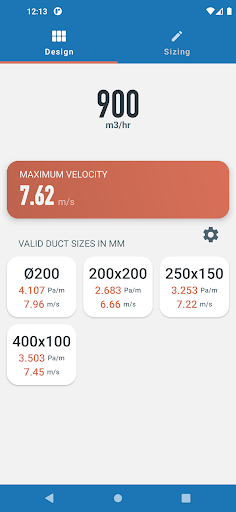
The app supports calculations for both rectangular and round ducts. This flexibility means you can handle a variety of project types—ranging from residential HVAC systems to large commercial ventilation setups. It allows you to switch seamlessly between metric and imperial units, which is especially beneficial for international projects or professionals working across different measurement systems.
Design Mode and Sizing Mode
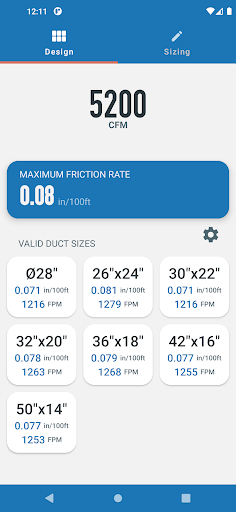
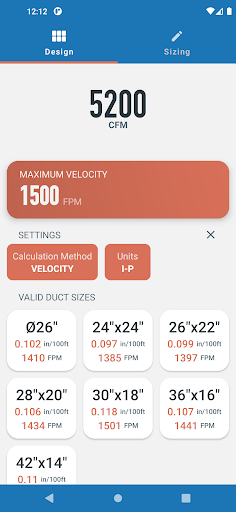
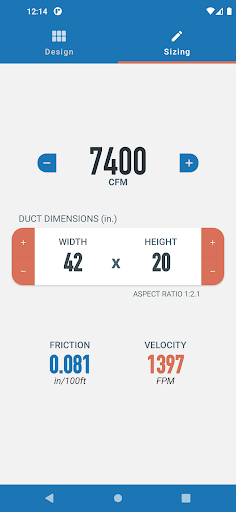
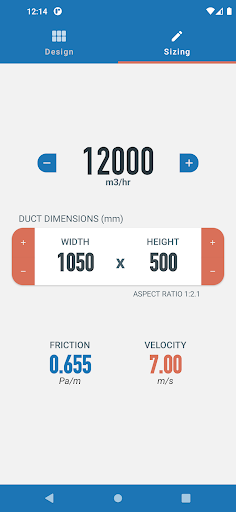
Design Mode lets you explore a range of suitable duct sizes by entering either the maximum friction rate or maximum velocity. The app then provides you with a list of appropriate rectangular and circular ducts along with the calculated friction rates and velocities. Meanwhile, Sizing Mode functions similarly to a traditional ductulator, allowing you to adjust duct dimensions and airflow rates while monitoring the automatically updating friction rates and velocities—ideal for analyzing existing systems or refining designs.
Project Saving and Data Management
Another convenient feature is the ability to save your calculations and projects. This means you can revisit and modify your duct sizing parameters anytime, enhancing workflow efficiency and reducing repetitive data entry.
Performance and Reliability
Ductulator Pro delivers precise calculations with smooth performance. It’s lightweight and optimized to run efficiently without draining your device’s resources. Whether you're working in a fast-paced environment or on detailed design, you can trust this app to provide quick and accurate results.
Why Choose Ductulator Pro?
If you're involved in HVAC design, ductwork installation, or simple home projects, Ductulator Pro is an essential tool that guarantees reliable and rapid duct sizing calculations. Its versatility, combined with an intuitive user interface and powerful features, positions it as a top choice for professionals and enthusiasts alike. The app's capability to handle a variety of units, duct shapes, and design scenarios makes it a must-have in your toolbox. Save time, improve accuracy, and make informed decisions with Ductulator Pro—your reliable partner for effective duct design.
Pros
- Intuitive user interface
- Accurate calculations
- Lightweight and fast
- Offline functionality
- Comprehensive duct sizes
Cons
- Limited free features
- No cloud sync
- Requires technical knowledge
- Occasional bugs
- No customer support chat











