
Overview of Inky - Run Inkscape on Android
If you've ever wished to carry the power of a desktop vector graphic editor in your pocket, Inky - Run Inkscape on Android might be the perfect solution. This innovative app brings the robust features of Inkscape, a well-known open-source vector graphics editor, directly to your Android device. Whether you're a professional designer or a hobbyist, this application enables you to create, edit, and manage vector images seamlessly on the go, transforming your mobile device into a portable design studio.
Key Features of Inky
Full-Featured Vector Graphics Editing
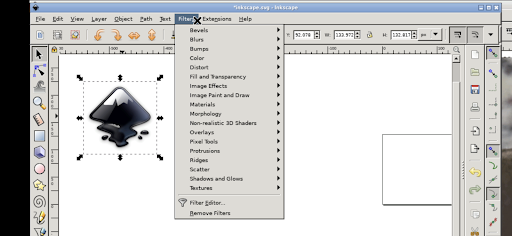
This app truly encapsulates Inkscape on your Android device, providing a comprehensive suite of tools. It supports creation of vector images primarily in Scalable Vector Graphics (SVG) format, but also allows for importing and exporting in various other formats. Users can craft primitive shapes such as rectangles, ellipses, polygons, arcs, spirals, stars, and 3D boxes. Text editing, filled with solid colors, patterns, and gradients—both radial and linear—adds further depth to your designs. Borders can be stroked and adjusted for transparency, making your graphics precisely customizable.
Raster Integration and Transformations
The app also supports embedding raster images and tracing them to generate vector graphics, allowing you to convert photos or other raster sources into editable vector art. Shapes can be manipulated through transformations such as moving, rotating, scaling, and skewing. This flexibility ensures creative control regardless of the project complexity.
Using Inky on Android
Intuitive Interface for Mobile Devices
Designed specifically for Android, Inky offers a user-friendly interface adapted from the desktop version. To begin, simply tap with one finger to perform a left click. Navigation is smooth—slide your finger to move the mouse cursor, pinch to zoom in and out, and press and hold then slide one finger to pan across your canvas. Double-finger sliding allows for scrolling, making navigation effortless even on smaller screens.
Keyboard and Contextual Controls
To access the keyboard, tap on the screen to reveal icon options and select the keyboard icon. For right-click functionalities, simply tap with two fingers. Adjusting the desktop scale involves clicking the notifications in the Android system and modifying settings—note that changes require restarting the app for effects to take hold. While these controls are optimized for tablets and stylus use, they are fully functional on phones using your finger.
File Management and Compatibility
Inky seamlessly integrates with Android's file system, linking to locations like Documents and Pictures without the need for manual import/export operations. For users unable to purchase the app, it is also possible to run Inkscape via the UserLAnd app, making it accessible across different user preferences.
Technical Details and Licensing
This Inkscape-based Android adaptation is released under the GPLv3 license. Its source code is publicly available, providing transparency and community contribution opportunities. The app’s icon features the original Inkscape logo, licensed under CC-By-SA 3.0, created by Andrew Michael Fitzsimon. It’s important to note that this version is not directly developed by the main Inkscape team but serves as an accessible port that allows Linux users to run Inkscape within an Android environment.
Why Choose Inky for Mobile Vector Design?
If your goal is to carry professional-grade vector editing capabilities in your pocket, Inky - Run Inkscape on Android is an exceptional choice. Its comprehensive features closely mirror those of the desktop Inkscape, making complex projects manageable on your mobile device. The intuitive interface, coupled with support for SVG files and layers, ensures your workflow remains flexible and efficient. Plus, the ability to reconcile desktop and mobile projects seamlessly makes it ideal for designers who need to switch between devices effortlessly. Incorporating Inkscape into your mobile toolkit empowers you to create stunning vector graphics anytime, anywhere—whether for branding, illustration, or technical diagrams.
Conclusion
In summary, Inky - Run Inkscape on Android extends the power of desktop vector graphic editing into the palm of your hand. Its rich set of features, responsive interface, and cross-platform compatibility make it a compelling option for designers on the move. While it might not replace a full desktop setup in all cases, it is certainly a valuable addition to any creative toolkit, bringing professional vector graphics editing capabilities directly to your Android device. Embrace the convenience of mobile vector design and let your creativity flow wherever you are.
Pros
- Intuitive interface suitable for beginners
- Compatible with SVG file format
- Provides layering and grouping features
- Offers a comprehensive suite of tools
- Available for free download and use
Cons
- Lacks some advanced features
- Performance can decline on older devices
- Reported to occasionally crash
- Requires a stylus for accurate input
- Community support is limited











