
What is OBD JScan?
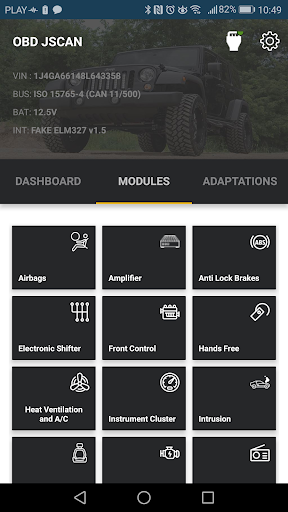
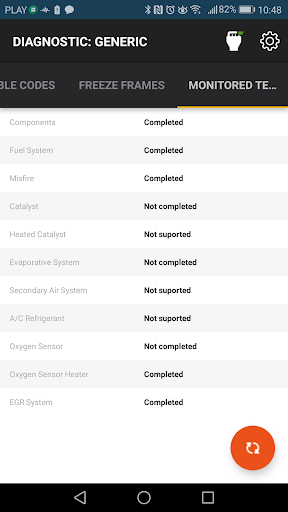
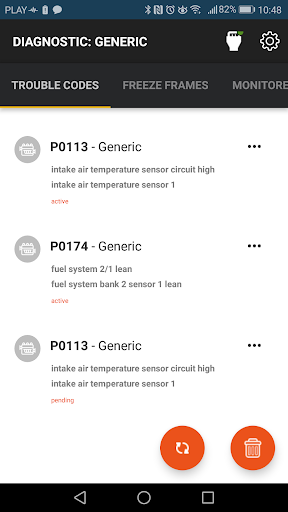
OBD JScan is a powerful Jeep diagnostic application designed to provide vehicle owners and enthusiasts with comprehensive control over various car modules. This innovative app enables users to read and interpret Diagnostic Trouble Codes (DTCs) related to emissions, access generic live data, and much more. Unlike basic diagnostic tools, JScan can connect to all available modules on your vehicle, including ABS, Steering Column, Automatic Transmission, Radio, Sway Bar, HVAC, and many additional systems. Its versatility makes it ideal for both casual users and professional mechanics who need detailed insight into their vehicle’s health.
What can I do with JScan?
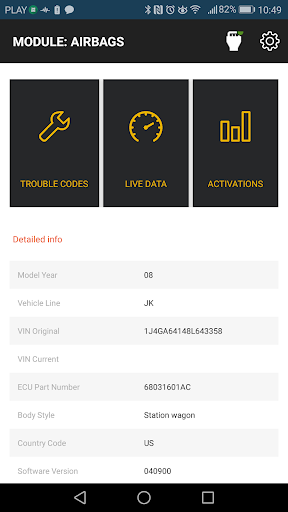
The app opens doors to a wide variety of diagnostic and customization features. With JScan, users can easily read and clear trouble codes across all vehicle modules, helping identify issues swiftly. It allows viewing live data from various sensors such as engine RPM, coolant temperature, and fuel system status, giving real-time insight into vehicle performance. Additionally, JScan supports vehicle customization by modifying settings like tire size, axle ratio, and DRL settings. Users can also identify vehicle modules, retrieve the VIN, and Part Number for detailed vehicle information. Support coverage includes several popular Jeep models like Jeep Wrangler JK, Jeep Grand Cherokee (WK, WK2, 11-20), Jeep Commander, Jeep Liberty/Cherokee, Jeep Compass, and Jeep Patriot. It also extends to Dodge and Chrysler models such as Dodge Avenger, Dodge Grand Caravan, Dodge Durango, Dodge Ram, Dodge Nitro, Dodge Challenger, and various Chrysler vehicles. Note that some models, especially WK2/Durango/Journey (2018+), JL (Jeep Wrangler), and JT (Jeep Gladiator), may require additional security bypass hardware, detailed information about which is available on the app’s website.
Supported and Recommended OBD Adapters
OBD JScan works seamlessly with a variety of OBD2 adapters for both Bluetooth and WiFi connections. Recommended Bluetooth adapters include OBD ELM327 iCar Vgate v2.0, v3.0, v4.0 Bluetooth LE, as well as OBD LinkMX and OBD LinkMX+. These adapters support stable data transmission and broad compatibility.For WiFi connectivity, options like OBD ELM327 iCar Vgate v2.0, v3.0, v4.0 WiFi are suitable choices. However, users should be wary of clones or cheap versions, particularly v2.1 clones, which have reported connection issues. For detailed information on compatible adapters, visit this link.
Getting Started with OBD JScan
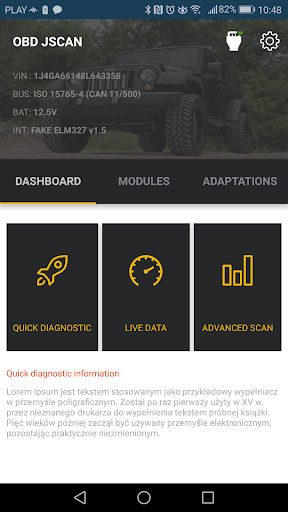
Starting with OBD JScan is straightforward. First, you’ll need an OBD2 adapter compatible with your device. The app is available on both Android and iOS, making it accessible for most users. After downloading, connect your adapter to your car’s OBD port, launch the app, and you’re ready to explore your vehicle’s diagnostics.The interface is designed to be intuitive and user-friendly, even for those who aren’t technically inclined. You can quickly access key features such as reading trouble codes, viewing live data, and customizing vehicle settings effortlessly. This ease of use ensures that both beginners and experienced mechanics can benefit from the app’s extensive capabilities.
Features That Make OBD JScan Stand Out
One of the most impressive aspects of JScan is its comprehensive feature set. It enables users to diagnose check engine lights actively, retrieve detailed fault codes, and even share data with others. Real-time sensor data provides valuable insights into engine performance, which can assist in diagnosing issues without requiring a trip to the mechanic.Moreover, JScan supports advanced functions like ABS bleeding and throttle relearns, features commonly found in professional scan tools but now accessible via a mobile app. The app's performance remains smooth, with a stable connection to adapters, ensuring reliable diagnostics even during prolonged use.The detailed explanations provided for each diagnostic trouble code help users understand the underlying problem, evaluate severity, and decide whether professional intervention is necessary. This information can save time and money by helping you troubleshoot effectively.
Final Thoughts
If you’re looking for a comprehensive, easy-to-use vehicle diagnostics app, OBD JScan is an excellent choice. It turns your smartphone into a powerful diagnostic tool capable of reading and clearing trouble codes, monitoring live data, and customizing several vehicle settings. Its support for a wide range of Jeep, Dodge, and Chrysler models, combined with compatibility with popular adapters, makes it highly versatile.Whether you’re a DIY car enthusiast eager to understand your vehicle better or a professional mechanic seeking a portable diagnostic solution, JScan offers the features you need. Its user-friendly interface coupled with advanced functions ensures you’ll get detailed insights into your vehicle’s health and performance. In summary, OBD JScan is more than just an app—it’s your car’s new best friend in maintaining optimal performance and diagnosing problems efficiently.
Pros
- User-friendly interface
- Real-time data monitoring
- Compatibility with many car models
- Affordable pricing
- Customizable dashboard
Cons
- In-app purchases required
- Limited advanced features
- Occasional connectivity issues
- Not available on iOS devices
- Requires Bluetooth adapter











