
Introducing ProShot: The Ultimate Photography and Videography App for Android
Are you looking for a powerful yet user-friendly photography app that transforms your smartphone into a professional-grade camera? ProShot is your complete solution for capturing stunning photos and videos. Designed to cater to both amateur enthusiasts and expert photographers, this app offers an impressive suite of features that emulate the capabilities of high-end DSLR cameras, right on your Android device.
Test Your Device Compatibility with ProShot Evaluator
Before diving into the full range of features, you can try the ProShot Evaluator app to see which functionalities your device supports. This quick assessment helps you optimize your workflow and ensures you get the best results from your smartphone camera, enhancing your overall photography experience.
Exceptional User Interface and Design
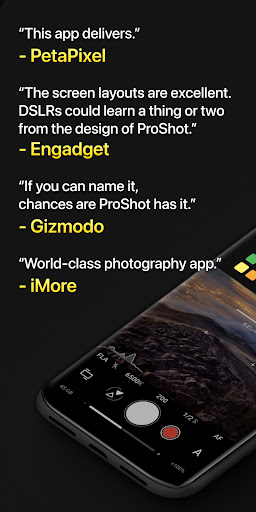
“The screen layouts are excellent. DSLRs could learn a thing or two from the design of ProShot,” praises Engadget. The intuitive and sleek design makes it easy for users to navigate even the most complex camera settings. Whether you’re adjusting exposure, white balance, or focus, the interface guides you seamlessly through each step. The app’s real-time histogram and built-in leveling tools are invaluable, helping you compose well-exposed shots in tricky lighting conditions. Despite its comprehensive features, ProShot remains lightweight, ensuring smooth operation without taxing your device's resources.
Full Manual Control Mimicking DSLR Photography
Manual, Semi-Manual, and Auto Modes
Take full command of your camera with ProShot’s advanced controls. The app leverages the camera2 API to provide Auto, Program, Manual, and Custom modes—mimicking a DSLR’s versatility. Adjust settings such as ISO, shutter speed, focus, white balance, and flash with precision. Whether you prefer full manual operation or just want to set a few parameters while leaving others on auto, ProShot adapts to your style.
Support for RAW and High-Quality Formats
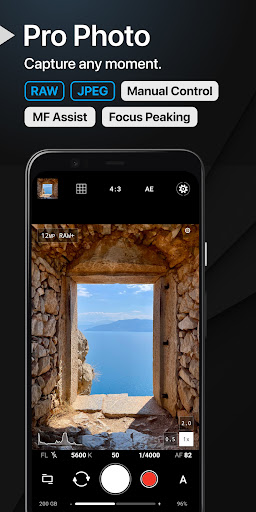
Photographers who enjoy editing their images will appreciate support for RAW (DNG), JPEG, and RAW+JPEG. The app also supports HEIC on compatible devices, providing high-quality output with minimal file size. Additionally, support for vendor extensions enable features like Bokeh and HDR, expanding creative possibilities.
Versatile Photography and Video Features
Photo Capabilities
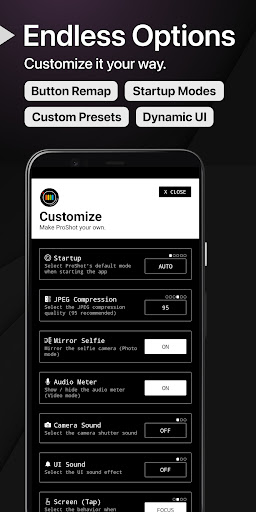
ProShot offers a range of options to meet every photographic need. Capture images in standard aspect ratios such as 4:3, 16:9, and 1:1, or customize aspect ratios like 21:9 or 5:4. Additional features include bracketed exposure for HDR photography, manual focus assist with focus peaking, and a zoom capability of up to 10X using just one finger. The app’s customizable interface allows setting accent colors and other preferences to match your style.
Advanced Video Recording
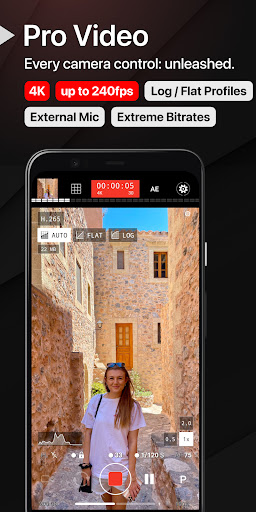
ProShot doesn’t stop at photos—its video features rival professional cameras. You can record in resolutions up to 8K with high bitrate options and support for beyond 4K on compatible devices. Adjustable frame rates from 24 FPS to 240 FPS enable slow-motion footage. The app supports LOG and FLAT color profiles for greater dynamic range and post-processing flexibility. Additional video features include external microphone support, real-time audio level monitoring, pause/resume recording, and simultaneous audio playback while recording.
Unique Lighting Modes and Creative Tools
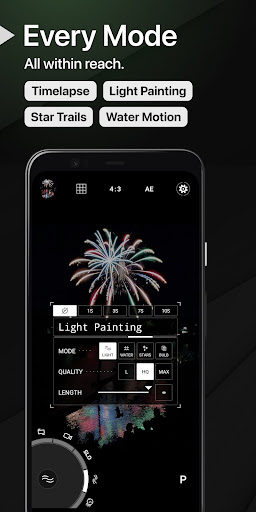
Express your creativity with innovative modes like Light Painting, capturing effects such as star trails and water reflections. ProShot’s dedicated light painting modes integrate bulb mode for long exposures, perfect for astrophotography or artistic light trails. The app also offers full camera control over timelapse videos, multiple aspect ratios, and custom settings to tailor every shot.
Privacy and Data Security
In an era where data privacy is paramount, ProShot prioritizes your security. The app does not store, collect, or transmit personal data, allowing you to shoot and record with confidence that your images and videos are safe from third-party access.
Why Choose ProShot?
If you’re serious about mobile photography or videography, ProShot offers the features of a dedicated camera in a lightweight, intuitive package. Its powerful manual controls, support for RAW formats, professional-grade video options, and creative lighting modes make it stand out among other camera apps. Whether capturing fleeting moments, astrophotography, or creating cinematic videos, ProShot equips you with the tools to elevate your craft. Constantly under development, the app continually adds new features, promising a future of exciting updates for its users.
Pros
- Intuitive user interface
- Extensive manual controls
- High-quality image output
- Supports RAW format
- Customizable presets
Cons
- Steep learning curve
- Limited free features
- Occasional app crashes
- Heavy on battery usage
- Lacks cloud sync











