

Introduction to YASNAC - SafetyNet Checker
Are you an Android user concerned about the security status of your device? YASNAC (short for Yet Another SafetyNet Attestation Checker) is an innovative Android application designed to demonstrate the capabilities of the SafetyNet Attestation API. This app provides users with a straightforward way to verify whether their device’s security features are intact and functioning properly.
Built with Jetpack Compose, YASNAC offers a modern and intuitive user interface that simplifies complex security checks. The app relies on an API key that permits up to 10,000 attestations per day. Once this quota is exhausted, users will encounter an error, and the service will be temporarily unavailable until the quota resets the following day.
If you're curious about the technical side, the source code for YASNAC is openly available on GitHub. This transparency allows developers and security enthusiasts to explore, customize, or contribute to its development.
What is SafetyNet and Why Does It Matter?
Understanding SafetyNet
SafetyNet is a comprehensive suite of security services and APIs provided by Google to safeguard Android devices from malicious threats. It continuously checks the integrity of your device, ensuring that apps, data, and the operating system itself are secure and unaltered.
By verifying device integrity, SafetyNet helps prevent tampering or rooting that could expose your device to vulnerabilities. However, sometimes devices may trigger false positives, or users might want to confirm their device’s security status proactively. That’s where YASNAC comes into play.
Getting Started with YASNAC
Installation and Usage
Installing YASNAC is simple—just search for it in the Google Play Store and tap install. The app’s clean and user-friendly interface makes it accessible even for those without advanced technical knowledge.
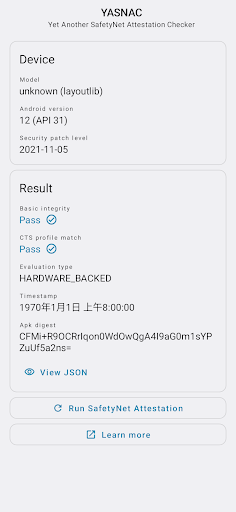
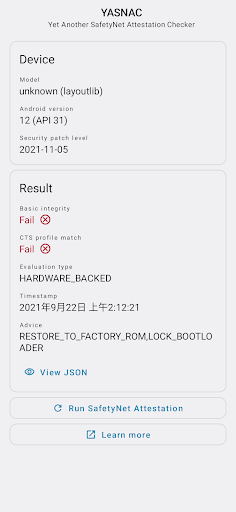
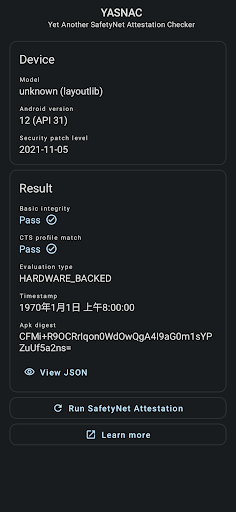
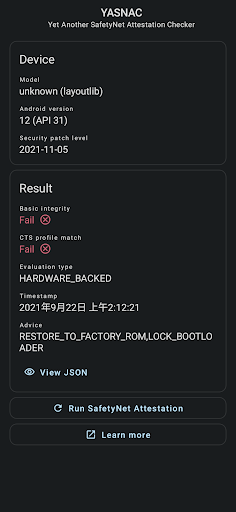
To perform a security check, open the app and press the "Run SafetyNet Attestation" button. Within seconds, YASNAC will conduct its assessment by utilizing the SafetyNet Attestation API to determine your device’s security status.
Once completed, it offers a detailed report, highlighting whether your device is safe or compromised. If issues are detected, the app provides explanations in a way that’s easy to understand—making it a helpful tool for both casual users and tech enthusiasts.
How Does YASNAC Work?
Security Verification Process
YASNAC leverages Google’s SafetyNet Attestation API to verify if your device has been tampered with or rooted. The process involves sending a request to the API, which then analyzes the device's environment to check for integrity issues.
In essence, it confirms whether your device has been modified in ways that could compromise security—such as rooting or installing custom firmware. The app then presents a comprehensive report based on this assessment, so you know at a glance whether your device maintains its security posture.
Because of its lightweight design, YASNAC runs smoothly without draining system resources, making it a practical addition to your security toolkit.
Why Choose YASNAC for Your Android Security?
Benefits and Security Best Practices
In today’s digital environment, securing your Android device against evolving cyber threats is more critical than ever. YASNAC provides an additional layer of security verification, giving you confidence in the integrity of your device.
This app is particularly useful for users who want to ensure that their device isn’t compromised, or for developers and security professionals testing device security statuses regularly.
Another advantage is its ability to explain test results in simple language, helping non-technical users understand their security status. Remember, however, that security isn’t solely about running a single app—keeping your device updated, practicing safe browsing, and applying security patches are essential components of a comprehensive security strategy.
Overall, YASNAC - SafetyNet Checker is a valuable, easy-to-use tool that empowers Android users to maintain their device’s security and integrity. It’s free, efficient, and perfect for anyone seeking peace of mind about their Android device's safety.
Pros
- Accurate SafetyNet results
- User-friendly interface
- No ads
- Open-source project
- Lightweight and fast
Cons
- Limited to SafetyNet check
- Lacks advanced features
- No regular updates
- Requires technical understanding
- No customer support











