


Introduction to the Greeting Card Design App
When it comes to creating personalized greeting cards or invitation letters, having a professional design can often feel daunting or time-consuming. The Greeting Card Design app is specifically developed to cater to users seeking an effortless way to craft beautiful, custom greeting cards without the need for advanced design skills. Whether you're preparing a birthday card, wedding invitation, or holiday greeting, this app offers a comprehensive set of features that make the process simple, fun, and highly customizable.
Key Features of Greeting Card Design
This versatile app is equipped with numerous features designed to enhance your creativity and streamline your workflow. Here are some of the most notable functionalities:
Extensive Templates for Every Occasion
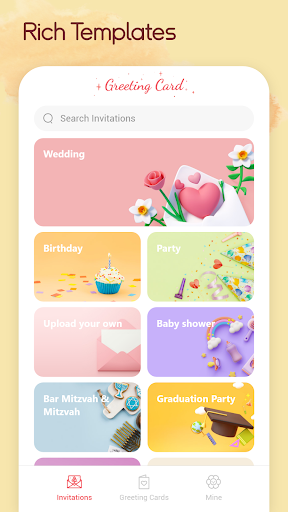
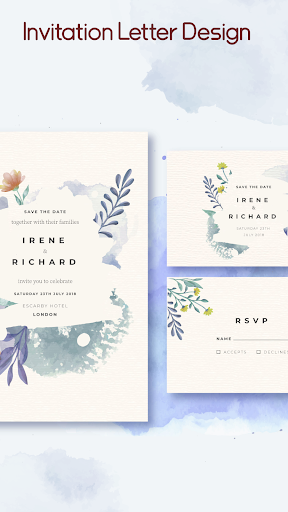
One of the standout aspects of Greeting Card Design is its wide array of pre-installed templates. These templates are suitable for various scenarios such as birthdays, anniversaries, holidays, or casual greetings. The stylish and modern designs ensure that users can find a template that matches their personal style or the tone of the event. This extensive collection helps users craft cards quickly without compromising on aesthetic appeal.
Customization Options for a Personal Touch
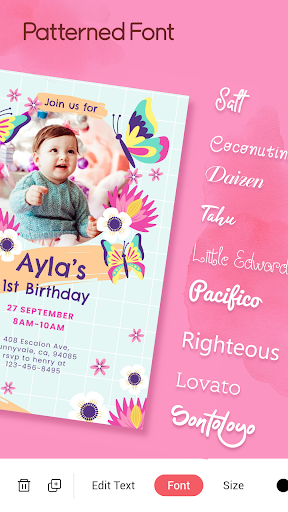
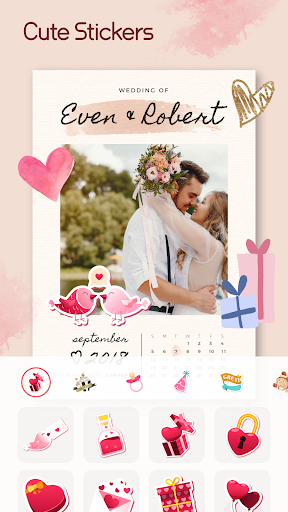
Personalizing your greeting cards is effortless with this app. It supports custom text input, allowing users to add heartfelt messages or event details easily. You can select from multiple fonts and colors to match your style preferences, creating unique and eye-catching designs. Besides text customization, the app includes a variety of preset stickers, enabling you to embellish your cards with cute icons or thematic images. Additionally, you can upload your own images, making each card truly one-of-a-kind.
Ease of Sharing and Printing
Once your masterpiece is complete, sharing options make distribution seamless. You can send your greeting cards via email, text message, or directly share on social media platforms. For those who prefer physical copies, the app supports exporting your designs as PDF files, making high-quality printing straightforward. This feature is perfect for creating tangible greeting cards or invitations to hand out in person.
Intuitive User Interface
Designed with user-friendliness in mind, Greeting Card Design boasts an intuitive interface that allows users of all skill levels to easily navigate and create stunning designs. Just a few taps are needed to customize templates, add elements, and finalize your cards. The straightforward workflow minimizes frustration and maximizes creativity.
Additional Benefits
Beyond its core features, this app also incorporates useful tools like calendar integration, which helps you keep track of upcoming special dates. This ensures you never forget to send a greeting card for loved ones’ birthdays or anniversaries. The combination of personalization, convenience, and variety makes Greeting Card Design the ideal tool for anyone looking to add a personal touch to their greetings effortlessly.
Conclusion
In summary, Greeting Card Design stands out as a comprehensive and user-friendly application for creating custom greeting cards and invitations. Its rich selection of templates, extensive customization options, and simple sharing capabilities make it perfect for last-minute planners, DIY enthusiasts, or anyone who wants to spread joy through thoughtfully designed cards. Whether you’re celebrating special moments or just want to brighten someone’s day, this app offers everything you need to craft beautiful, personalized greetings with ease. Explore Greeting Card Design today and start sending heartfelt messages that truly resonate.
Pros
- Intuitive interface for effortless design creation.
- Extensive selection of templates available.
- High-quality graphics and text features.
- Customizable options for personalized designs.
- Quick export and sharing capabilities.
Cons
- Limited free features without a subscription.
- Occasional reports of app crashes.
- Some advertisements can be disruptive.
- Requires internet connection to access all features.
- Restricted support for advanced editing tools.











