

Wansview Cloud App: The Ultimate Home Surveillance Companion
Are you concerned about the security of your home while you're away? The Wansview Cloud app offers an effective and user-friendly solution to keep an eye on your property anytime, anywhere. Designed to work seamlessly with Wansview Cloud Camera, this app empowers homeowners to monitor their homes in real-time, providing peace of mind regardless of their location. Whether you're keeping an eye on your children, elderly parents, pets, or potential intruders, Wansview Cloud makes home security accessible and straightforward.
Key Features of Wansview Cloud
The app provides a range of features tailored to enhance your home security experience:
Real-Time Video Streaming
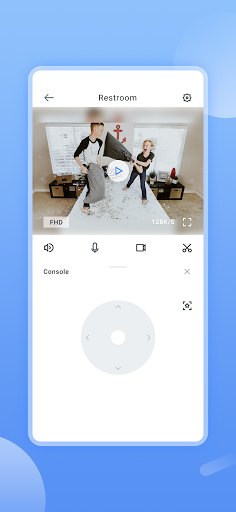
Connect with your Wansview Cloud Camera and view live video feeds directly on your smartphone 24/7. Whether you're at work or on vacation, you'll always have a window into your home environment.
Two-Way Audio Communication
Communicate instantly with family members or possibly deter intruders using the app's two-way conversation and audio feature. Just speak through your device and hear responses, creating a sense of connection no matter where you are.
Motion Detection Alerts
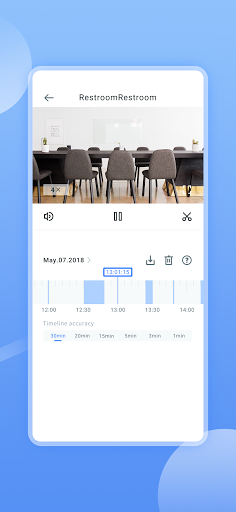
Wansview Cloud notifies you immediately if unusual motion activity is detected around your home. This proactive alert system ensures you're aware of any unexpected activity, allowing quick action if needed. Past footage of suspicious motion can also be reviewed conveniently within the app.
Review Recorded Footage
All your security footage is securely stored on the cloud. This makes it easy to access and review past recordings, helping you understand what occurred during any alert or suspicious event.
Remote Camera Control
Adjust your camera’s view remotely with features like pan, tilt, and zoom to get a closer look at specific spots, increasing the effectiveness of your surveillance.
High-Definition Night and Day Vision
Enjoy crystal-clear HD video, in both day and night conditions, ensuring your home is protected around the clock.
Easy Management
Manage all your camera content effortlessly with an intuitive interface that allows quick switching between views and setting adjustments without hassle.
Why Choose Wansview Cloud for Your Home Security?
In today’s fast-paced world, security should be simple and reliable. Wansview Cloud excels in offering seamless device integration, allowing you to connect with multiple security cameras effortlessly. The straightforward setup process means you can be up and running in no time—no complicated configurations required. The clean, intuitive interface makes it accessible for users of all technical levels, ensuring everyone can monitor their home with ease.
Convenience on the Go
Whether you're at work, running errands, or on vacation, the app’s mobile-friendly design ensures your home’s security is always at your fingertips. Instant notifications and real-time video access mean you’re never out of the loop.
Enhanced Security Through Cloud Storage
All captured footage is securely stored on the cloud, protecting your recordings from physical damage or theft. Access your videos securely whenever needed, providing an essential layer of security and peace of mind.
Comprehensive Home Surveillance
From monitoring children and elderly relatives to keeping an eye on pets or deterring intruders, Wansview Cloud offers a versatile and reliable security solution that can adapt to various home surveillance needs.
Conclusion
If you’re seeking a dependable home security app that combines ease of use with powerful features, Wansview Cloud should be at the top of your list. Its seamless integration with security cameras, real-time alerts, user-friendly interface, and cloud storage capabilities make it an excellent choice for protecting what matters most. Enhance your home security today and enjoy the peace of mind that comes with knowing your home is under your watchful eye, anytime and anywhere.
Pros
- Easy to set up and operate
- High-quality video streaming
- Dependable motion detection
- Affordable pricing
- Supports multiple camera setups
Cons
- Limited options for cloud storage
- App sometimes crashes
- Lacks support for desktop application
- Delays in notifications
- Limited integration with smart home devices











