


Overview of the WhenToWork Employee Scheduling App
If you're seeking an efficient solution to manage employee schedules, WhenToWork Employee Scheduling is an excellent choice. This innovative application simplifies the complex task of shift management, offering a user-friendly interface that caters to both managers and staff. Whether you're running a small team or overseeing a large workforce, this app adapts seamlessly to your needs, making scheduling a less stressful and more productive experience.
Main Features of WhenToWork Employee Scheduling
User-Friendly Interface for Easy Scheduling
One of the most compelling aspects of WhenToWork Employee Scheduling is its intuitive design. Creating schedules is as simple as dragging and dropping shifts to the appropriate timeslots. The visual layout reduces the learning curve, allowing even those with minimal technical experience to assign and modify shifts efficiently. This straightforward approach significantly cuts down the time spent on scheduling, freeing up resources for other critical tasks.
Handling Complex Scheduling Scenarios
The app excels at accommodating various scheduling complexities. It enables employees to input their availability directly into the system, which simplifies shift assignment and reduces email or messaging back-and-forth. This feature not only streamlines communication but also increases staff satisfaction by respecting their preferences and constraints.
Instant Notifications and Two-Way Communication
Keeping everyone informed is crucial in workforce management, and WhenToWork Employee Scheduling delivers with its real-time notification system. Employees receive immediate alerts about upcoming shifts, schedule changes, or important announcements, limiting misunderstandings. Furthermore, the app provides a two-way communication channel, allowing staff to request shift swaps or time off directly via the platform, fostering transparency and cooperation.
Integration and Analytics
Seamless integration with various payroll systems ensures that data flows smoothly, minimizing manual entry and reducing errors. Additionally, the built-in analytics offer valuable insights into work patterns and staffing trends. Managers can leverage these data points to make informed decisions, optimize schedules, and enhance overall operational efficiency.
Additional Benefits and Accessibility
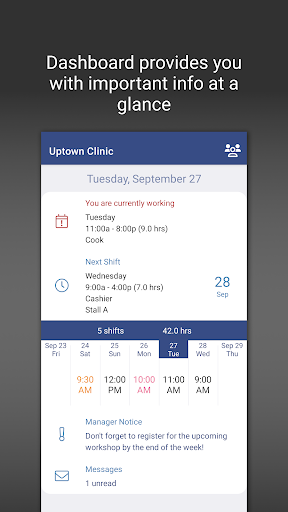
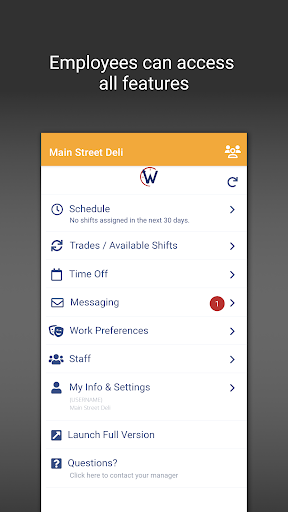
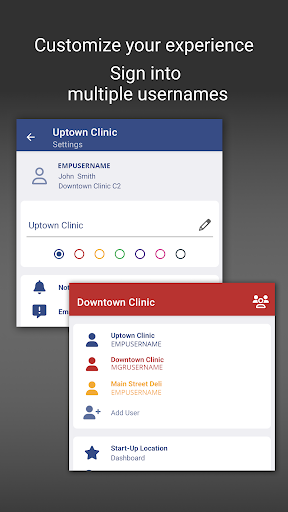
The WhenToWork.com OFFICIAL App extends these features to mobile devices, allowing users to view schedules, access Tradeboard, submit time-off requests, and send or receive messages—all from their Android smartphones or tablets. The new dashboard provides a quick overview for monitoring schedules at a glance, with easy toggle options between multiple usernames. For maximum flexibility, users can swiftly launch the full browser version to utilize the complete set of functions anytime they need it.
Final Thoughts
If you want to streamline employee scheduling and improve workplace communication, WhenToWork Employee Scheduling is a tool worth exploring. Its user-centric design, combined with powerful features like complex schedule handling, instant notifications, seamless integrations, and insightful analytics, makes it suitable for organizations of all sizes. Implementing this app can lead to happier employees, more efficient management, and ultimately a more productive workplace. Embrace this modern scheduling solution and see how it transforms your workforce management today.
Pros
- User-friendly interface
- Flexible scheduling options
- Automated reminders
- Mobile access available
- Customizable notifications
Cons
- Limited offline functionality
- Requires internet for updates
- Initial setup can be complex
- Limited free features
- Occasional syncing issues











