

Microsoft Family Safety: Your Digital Guardian for the Whole Family
Microsoft Family Safety is a comprehensive app designed to help families manage their digital lives effectively. In today’s connected world, ensuring children’s safety online while promoting healthy digital habits is more important than ever. This powerful tool offers a suite of features that empower parents to set boundaries, monitor activities, and foster responsible technology use, all while giving kids the independence they need to learn and explore safely.
Keeping Your Family Safe Online
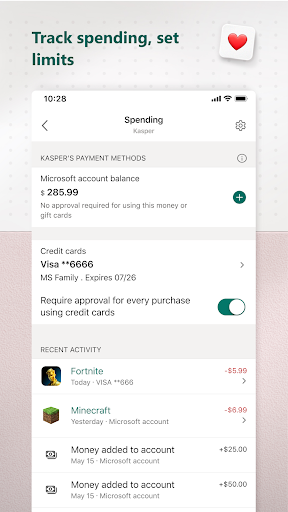
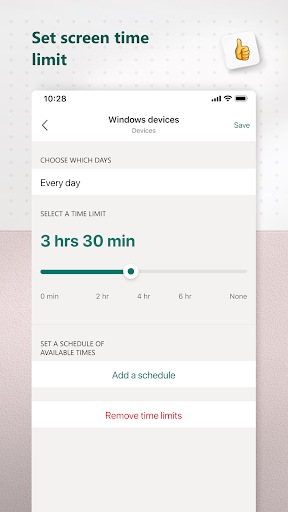
In the vast digital landscape, children can easily stumble upon inappropriate content or spend excessive time on devices. Microsoft Family Safety acts as a trusted digital sheriff, helping parents establish boundaries and protect their loved ones from online dangers. With customizable features, parents can set screen time limits for apps and games across various devices like Xbox, Windows, and Android, preventing the trap of endless scrolling or gaming marathons. It’s as simple as setting daily caps and receiving requests for extra time, putting parents back in control while teaching children about responsible usage.
Location Sharing & Safety Tracking
One of the app’s standout features is location sharing. It allows parents to view their children’s real-time locations, providing peace of mind and a practical way to check in during busy days. Whether to ensure teens arrive safely at school or to keep tabs during outdoor activities, this feature fosters safety and accountability. Furthermore, the app offers a driving safety component that shares insights into driving habits—such as top speed and phone usage while driving—helping promote responsible behavior behind the wheel.
Fostering Healthy Digital Habits
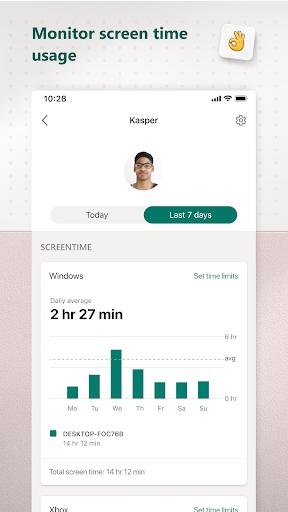
Microsoft Family Safety goes beyond simple monitoring by encouraging the development of healthy online behaviors. Parents can activate content filters to block inappropriate websites and applications, ensuring children access only age-appropriate content within browsers like Microsoft Edge. Activity reports offer a weekly summary of online activity, giving insight into what children are doing online—without invading privacy. These features promote responsible technology use and help parents guide their children toward balanced digital habits in an intuitive way.
Content Filters and Privacy Control
To ensure safe browsing, the app provides web filters, enabling kid-friendly browsing experiences on Microsoft Edge. Parents can also block unsuitable apps and games, creating a secure environment that promotes positive online interactions. Respecting user privacy, Microsoft Family Safety emphasizes data protection, ensuring that your information, including location data, is not sold or shared with third parties without consent. With transparent data collection policies, it offers meaningful choices about how your data is used, aligning with a family’s privacy needs.
Designed for Ease of Use and Data Security
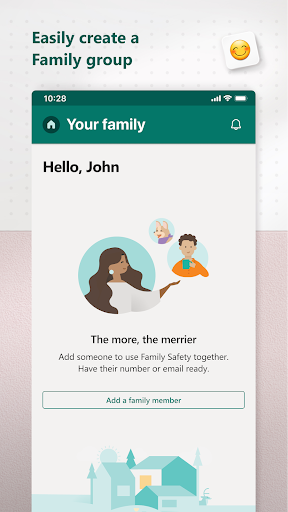
Managing family safety shouldn't be complicated. Microsoft Family Safety’s user-friendly interface makes setup and regular management straightforward across all devices, whether on a PC or smartphone. For parents concerned about data security, the app clearly states its practices, ensuring you understand how your information is stored and processed—primarily within the United States or other secure locations. With options to give children explicit consent for data collection, the app balances safety with respecting individual privacy rights.
Final Thoughts: An Essential Tool for Modern Families
In summary, Microsoft Family Safety offers a robust, intuitive, and customizable platform to help families navigate the digital age responsibly. Its combination of activity monitoring, screen time management, location sharing, and content filtering makes it an indispensable app for promoting safe and balanced online experiences. Whether you’re a tech-savvy parent seeking detailed control or a cautious caregiver wanting peace of mind, this app provides the tools needed to protect your loved ones without sacrificing their independence. Embrace Microsoft Family Safety today and keep your family safe, responsible, and connected in the ever-evolving digital world.
Pros
- Comprehensive parental control features.
- Ability to share location with family members.
- Set screen time restrictions on devices.
- Provides activity reports for monitoring purposes.
- Compatible across multiple platforms.
Cons
- Fewer features available on iOS compared to Android.
- Requires all users to have a Microsoft account.
- Setup process may be complicated for non-technical users.
- Some functionalities require additional payment.
- Occasional issues with syncing data.











