

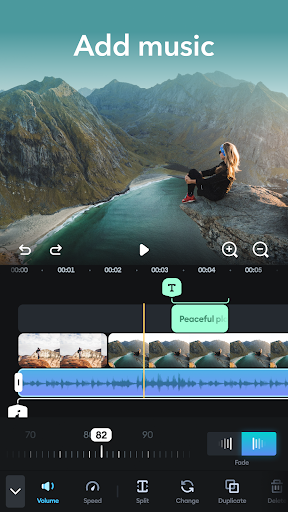

Introduction to Splice - Video Editor & Maker
Wonder how creators go viral with stunning videos? Splice is the answer to all your video editing needs, offering a powerful mobile editing experience that rivals desktop software. Whether you're a beginner or a seasoned content creator, Splice makes it easy to craft professional-quality videos with just your phone. The app combines performance comparable to pro-level desktop editors, optimized for mobile devices, ensuring a seamless editing experience anywhere you go.
Features of Splice - The Complete Mobile Movie Maker
Intuitive Editing Tools
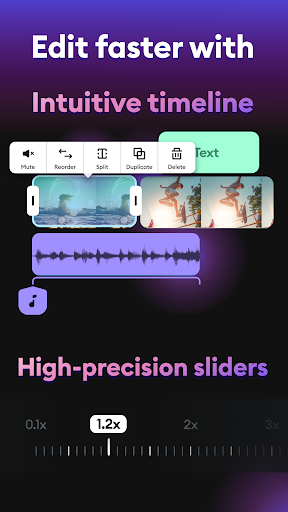
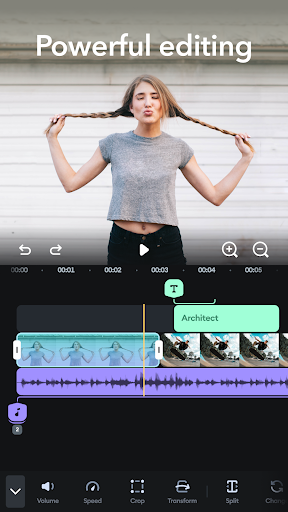
With Splice, editing on your mobile device is straightforward and fast. You can quickly trim, cut, and merge your video clips and photos within an intuitive timeline. The interface is designed for ease of use, making complex editing tasks feel like a breeze. Add smooth transitions, overlay text with custom fonts and colors, and adjust clip speed for dramatic slow-motion or energetic fast-paced effects.', Pro trimmer & cutter allows precise editing, while the merger & joiner helps assemble clips into compelling montages or slideshows effortlessly.
Editor for All Your Social Media Needs
Splice enables you to create perfectly sized videos optimized for platforms like Instagram (posts, stories, Reels), TikTok, and YouTube. Change aspect ratios, add stylish titles, and incorporate timing effects like hyperlapse or timelapse to make your content stand out. Plus, with speed adjustment features, you can craft videos with dramatic slow-motion or speedy sequences that captivate your audience.
Music and Audio Enhancement
Enhance your videos with a vast library of over 400 free songs. Easily trim and mix multiple audio tracks to find the perfect soundtrack for your creation. Adjust volume levels to ensure your audio complements the visuals without overpowering them. Splice also offers the ability to add personalized voiceovers or sound effects, making your videos more engaging.
Adding Text and Custom Effects
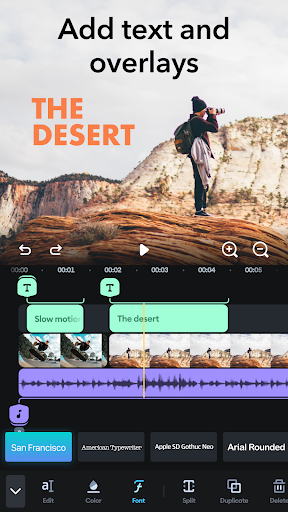
Communicate your message effectively by adding captions, titles, or overlays. Customize fonts, colors, and sizes to match your style. Incorporate fade-in and fade-out effects for smooth transitions that enhance the viewer's experience. This feature is perfect for building a connection with your followers and conveying your story more compellingly.
Easy Export and Sharing
Once your masterpiece is complete, export your videos in high quality, choosing the ideal aspect ratio for your intended platform. Share directly to social media channels such as YouTube, Instagram, TikTok, Facebook, or send via email. You can also save your videos directly to your device’s camera roll for later use. Additionally, Splice offers premium subscription plans for unlimited access to all features, including advanced editing tools and more song options.
Why Choose Splice - Video Editing on the Go
Splice stands out as one of the best mobile video editors available, thanks to its user-friendly interface combined with powerful features. It allows creators to produce stunning, professional-looking videos quickly—perfect for social media content, personal projects, or even marketing campaigns. Its versatility makes it suitable for all skill levels, from beginners eager to learn to experienced editors seeking a mobile solution to enhance their workflow.
Real User Experience and Feedback
Many users praise Splice for its intuitive design, quick editing capabilities, and feature-rich environment. From seamless trimming and montage creation to customized audio and text overlays, the app offers everything needed to produce engaging videos on a mobile device. Even those new to editing find it approachable, while advanced users appreciate the precise controls and extensive options.
Final Thoughts
Whether you're looking to make quick social media clips or full-length videos, Splice - Video Editor & Maker is an excellent choice. Its blend of simplicity and professional-grade features allows anyone to create eye-catching videos effortlessly. Try Splice for free today and elevate your content creation game, turning simple clips into captivating visual stories that can go viral across platforms.
Pros
- Intuitive interface that facilitates easy navigation.
- A broad selection of editing tools available.
- Supports exporting videos in high resolution.
- Includes a music library for background tracks.
- Provides advanced features suitable for professionals.
Cons
- Full feature access requires a subscription.
- Occasional crashes may occur during editing.
- Free version has limited functionalities.
- App size is large, possibly occupying significant device storage.
- Some features need an internet connection to function.











