


Secure Camera: The Ultimate Privacy-Focused Camera App
Have you ever felt the need for an extra layer of privacy when it comes to your photos and videos? Enter Secure Camera, a nifty little application designed to keep your captured moments under wraps. This modern camera app prioritizes privacy and security without compromising on performance or usability. Whether you want to take regular photos and videos or scan QR codes and barcodes, Secure Camera offers a comprehensive and secure solution.
Main Features of Secure Camera
Privacy-Centric Capture and Storage
The app functions similarly to your standard camera but with a critical difference: it encrypts all captured media immediately after capture. This means that even if someone gains access to your device, they won't be able to view your encrypted images or videos without the correct credentials. The app saves media via the Media Store API, so it doesn't require additional storage permissions, further enhancing your privacy.
Versatile Shooting Modes and Camera Operations
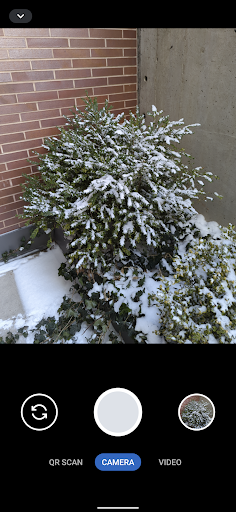
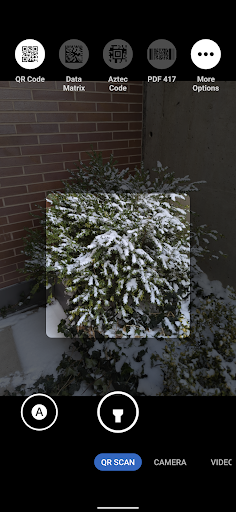
Secure Camera includes various shooting modes such as images, videos, and QR/barcode scanning, with additional modes like Portrait, HDR, Night, Face Retouch, and Auto available on devices supporting CameraX vendor extensions. The mode tabs are conveniently located at the bottom of the screen, allowing you to switch modes via tap or swipe gestures. The app also supports switching between front and rear cameras, capturing images, and starting/stopping video recordings through large, easy-to-access buttons or volume keys for quick control.
Intuitive User Interface
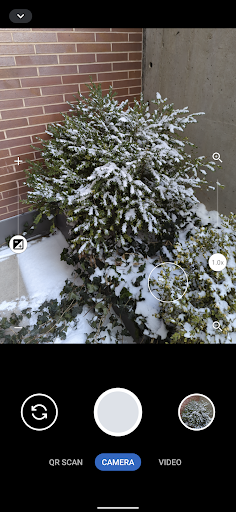
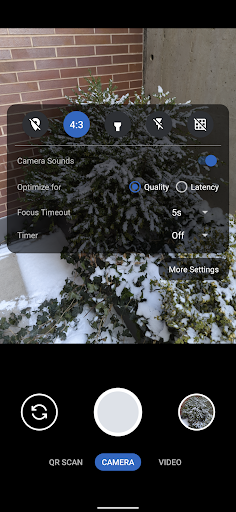
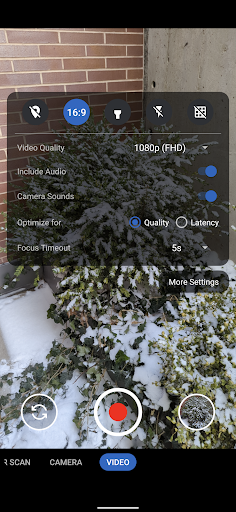
The minimalist design ensures an intuitive experience. You can access the settings panel by tapping the arrow button or swiping down from the top of the screen, and close it by tapping outside or swiping up. Within the interface, a row of large buttons facilitates camera switching, media capturing, and gallery access, while the camera view offers pinch-to-zoom and zoom slider controls. The app smartly utilizes the device's wide-angle and telephoto cameras where available, providing professional-level zoom capabilities.
Enhanced Security Features
The core security feature of Secure Camera is end-to-end encryption of your media files. Additional security measures include optional password protection and biometric authentication. For stealth operations, the app can camouflage itself, hiding its presence on your device, making it harder for prying eyes to detect or access its functionalities. These features are particularly appealing for users who value privacy and want to keep their media confidential.
Advanced QR & Barcode Scanning
One of the standout functionalities is its high-quality QR code and barcode scanner. The app takes a quick snapshot within a designated scanning square, supporting various barcode types. It can scan high-density, inverted, and rotated QR codes with ease. The scanner refreshes autofocus, auto exposure, and auto white balance every two seconds to ensure quick and accurate readings. The scan is highly reliable, and the torch can be toggled to improve visibility in low-light conditions.
Customizable and Future-Ready
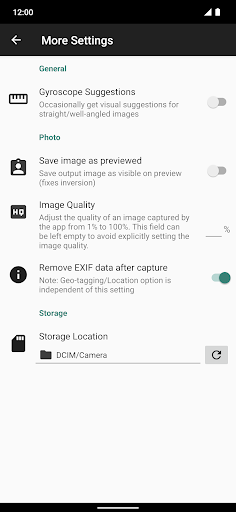
Users can fine-tune camera settings, including exposure, focus timeout, and whether to strip EXIF metadata. Location tagging can be enabled for photos or videos, although it's disabled by default. The app plans to add features like metadata stripping for videos in future updates. The toggle for metadata handling ensures you maintain control over what information is stored with your media, reinforcing security and privacy at every step.
Why Choose Secure Camera?
If you are seeking a camera app that combines powerful functionality with privacy and security, Secure Camera is an excellent choice. Its seamless integration of encryption, biometric security, stealth modes, and advanced features like high-quality QR/barcode scanning makes it stand out. Whether you want to keep your photos and videos private from nosy friends, protect sensitive information, or just enjoy a reliable, user-friendly camera app, Secure Camera delivers.
Experience peace of mind knowing that your personal media remains confidential, thanks to cutting-edge security features integrated directly into your camera app. Give Secure Camera a try and enhance your privacy without sacrificing the core functionalities you expect from a modern camera application.
Pros
- High-resolution photo capturing capability.
- Intuitive interface that allows easy browsing.
- Supports a variety of media formats.
- Provides cloud backup to ensure data safety.
- Includes diverse editing tools.
Cons
- Limited free storage capacity.
- Certain features are available only through in-app purchases.
- May experience occasional lag on older devices.
- Requires an internet connection for cloud backups.
- Limited manual control over app settings.











