Discover the Power of the Google Ads Mobile App
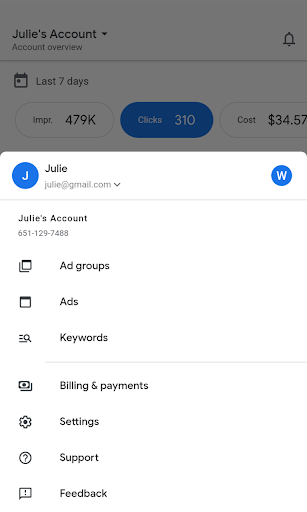
The Google Ads mobile application is a essential tool for digital marketers and business owners who want to stay connected with their advertising campaigns while on the move. Designed for ease of use and efficiency, this app allows you to monitor, manage, and optimize your online advertising efforts directly from your smartphone. Whether you’re tracking conversions, updating bids, or creating ads, the Google Ads app provides a seamless experience that puts campaign management at your fingertips.
Key Features of the Google Ads Mobile App
Real-Time Performance Monitoring
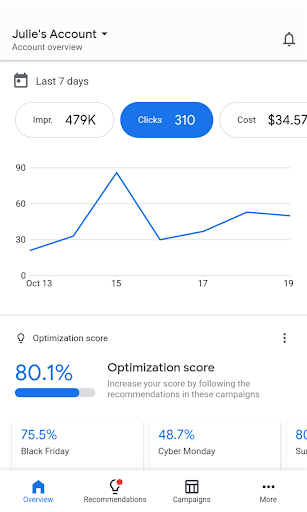
Stay updated with campaign stats such as conversions, impressions, and clicks. The app offers real-time analytics that help you understand how your ads are performing at any moment—empowering you to make quick, data-driven decisions.
Quick Campaign Management
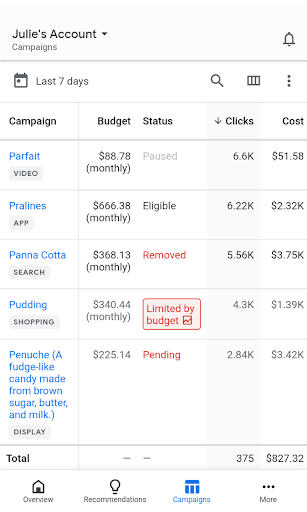
Edit and manage aspects like bids, budgets, and keywords with just a few taps. Whether you want to pause a campaign or adjust your budget, the app makes it straightforward to implement important updates on the go.
Ad Creation and Optimization
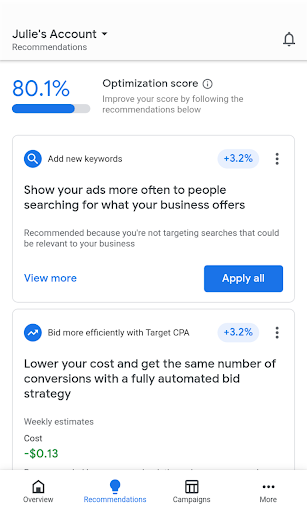
Create new ads, refine existing ones, and drive sales or attract new online users. You can see your optimization score and receive strategic recommendations to enhance your campaign performance, making your advertising more effective every time you use the app.
Notifications and Alerts
Get real-time notifications about important updates, performance summaries, or issues like ad disapprovals. These alerts keep you informed, so you can take swift action to prevent or resolve problems that might impact your advertising success.
Expert Support
Need help? The app offers easy access to support via call or chat with Google's advertising experts, ensuring you receive assistance whenever you need it—no matter where you are.
Getting Started with Google Ads
Setting up Google Ads on your mobile device is simple and straightforward. After downloading from the Play Store or App Store, you’re greeted with an intuitive interface designed for user-friendliness. The onboarding process guides you through linking your Google account and existing campaigns, making setup quick and hassle-free—like having a personal digital marketing assistant right in your pocket.
Explore the Features for Enhanced Campaign Management
The
Google Ads app is packed with features that cater to both beginners and seasoned marketers:
- Create and refine advertising campaigns with ease.
- Monitor in-depth analytics such as impressions, clicks, and conversions.
- Adjust your bidding strategies and budgets directly from your mobile device.
- Manage your ads to reach targeted audiences effectively and efficiently.
- Leverage personalized recommendations to improve your advertising results.
The seamless integration with other
Google products like
Analytics and
YouTube helps you get a comprehensive view of your online marketing efforts, boosting your overall digital strategy.
Why Choose the Google Ads App?
One of the standout qualities of the Google Ads app is its straightforward design, making digital advertising accessible even for newcomers. The app offers helpful tutorials and tips that serve as a virtual marketing mentor, guiding users toward better campaign performance. With quick access to support and a user-friendly interface, you can confidently manage your campaigns without needing complicated tools or desktop access. Plus, its ability to sync seamlessly with various Google tools means you always have a holistic view of your marketing landscape, enhancing your ability to optimize campaigns and increase ROI.
Final Thoughts
In today’s competitive digital landscape, having the Google Ads mobile app is a game-changer for businesses seeking to grow their online presence. It combines simplicity, power, and flexibility to help you achieve your marketing goals—whether that’s increasing website traffic, boosting sales, or growing your customer base. Download the Google Ads app today and unlock the full potential of your advertising campaigns, guiding your business to new heights of success.
Pros
- Comprehensive campaign management
- Integration with Google Analytics
- Advanced targeting options
- Real-time performance tracking
- Wide reach across platforms
Cons
- Complex interface for beginners
- High cost for competitive keywords
- Requires constant monitoring
- Limited support for small businesses
- Can be overwhelming with features