

Google Pixel Watch: The Ultimate Smartwatch Experience
Imagine a smartwatch that not only complements your lifestyle but actively enhances it. The Google Pixel Watch is designed to do just that — merging cutting-edge technology with sleek, modern aesthetics. Whether you're a tech enthusiast or someone seeking a stylish, functional device, this smartwatch offers an impressive array of features that make everyday tasks easier, healthier, and more connected.
Seamless Setup and Management with the Google Pixel Watch App
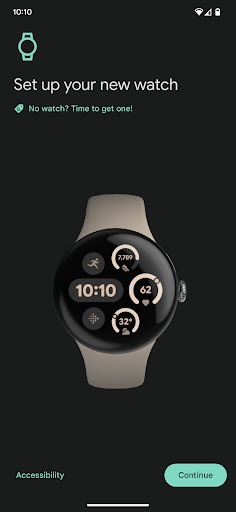
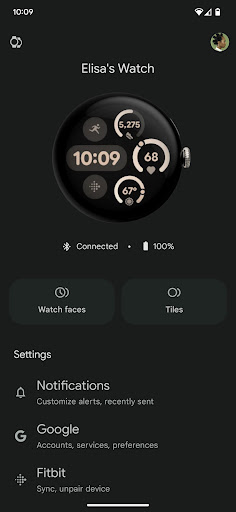
Getting started with your Google Pixel Watch is straightforward, especially when paired with the Google Pixel Watch app compatible with Android 8.0+ devices. This dedicated app allows users to easily set up and manage their watch directly from their smartphones. Customization options are abundant, making it simple to tailor your smartwatch to your preferences.
Key Features of the Google Pixel Watch App
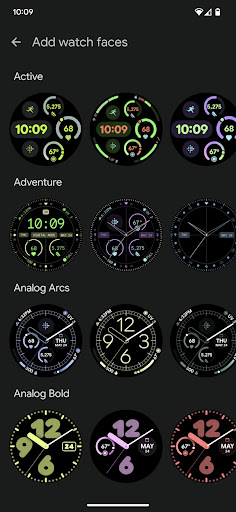
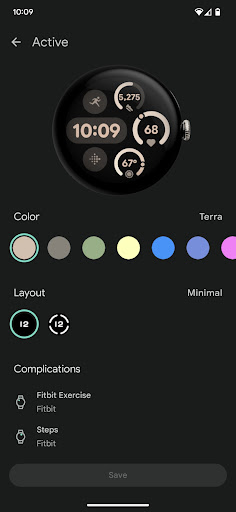
- Customize watchfaces: Personalize the look of your watch with various designs.
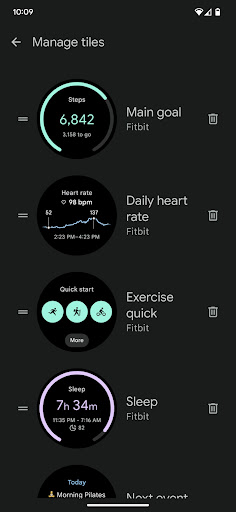
- Manage tiles: Organize quick access points for apps and information.
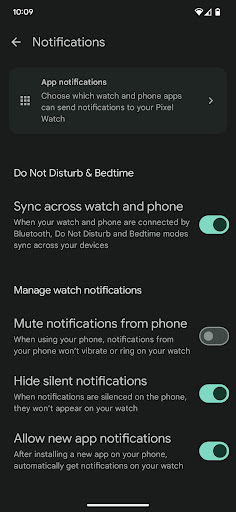
- Customize alerts and notifications: Control what notifications you receive and how they appear.
- Manage Google apps and accounts: Sync your Google services effortlessly.
- Install and manage apps: Expand your watch’s functionality with compatible apps.
- Set up mobile carrier: Available for select countries and carriers – check g.co/pixelwatch/networkinfo for details.
- Manage privacy settings: Keep control over your personal data and app permissions.
Whether you're adjusting your watch faces or managing notifications, the app provides full control at your fingertips, making the Pixel Watch a highly customizable device catered to your unique needs.
Design and Performance: The Perfect Balance
Elegant Design that Speaks Sophistication
The Google Pixel Watch features a round dial with a minimalist aesthetic that exudes sophistication. Its vibrant display ensures readability in various lighting conditions, while the smooth interface makes navigation intuitive. It’s not just a smartwatch — it’s a piece of art you can wear on your wrist, elevating your style effortlessly.
Powerful Performance Driven by Wear OS
Under the hood, the Pixel Watch runs on Wear OS, Google’s operating system optimized for smartwatches. This means seamless integration with both Android and iOS devices, offering access to a broad ecosystem of apps like Google Assistant, Maps, and Spotify. Fitness enthusiasts will love the built-in GPS, heart rate monitor, and multiple workout modes — transforming your watch into a personal trainer that’s available 24/7. Plus, its water-resistant design allows you to wear it confidently during swim sessions.
Battery Life and Charging
A key consideration for any wearable is battery life, and the Google Pixel Watch rises to the challenge. You can expect a full day of usage even with heavy activity, and if you're more conservative, it can stretch to two days. Charging is quick and convenient, thanks to fast-charging capabilities. The ability to use wireless charging enhances ease of use, especially if you are already invested in the Google ecosystem with compatible devices like Pixel phones.
Is the Google Pixel Watch Worth It?
Overall, the Google Pixel Watch stands out as a versatile and stylish device that effectively combines style, functionality, and innovative features. Whether you’re seeking a device to keep you connected, help manage notifications, or support your fitness goals, this smartwatch covers all these aspects seamlessly. It acts as a personal assistant on your wrist, streamlining your daily routines and elevating your overall experience.
If you’re in search of a premium smartwatch that enriches your lifestyle while maintaining a sleek appearance, the Google Pixel Watch should definitely be on your radar. Trust me, once you experience its capabilities, you’ll wonder how you ever managed without it.
Pros
- Elegant and minimalist design
- Seamless integration with Google services
- Accurate fitness tracking
- Customizable watch faces
- Supports Google Assistant
Cons
- Limited app selection
- Battery life could be improved
- No LTE option available
- Higher price compared to competitors
- Lacks advanced health sensors











