
Discover the Power of PS Remote Play
Key Features of PS Remote Play
Stream Your PlayStation Games Remotely
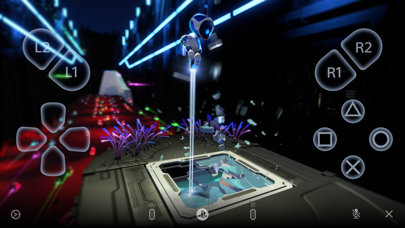
Imagine being able to display the PlayStation®5 or PlayStation®4 screen on your mobile device. With PS Remote Play, this becomes a reality. You can enjoy your favorite PlayStation games from anywhere, as long as you have a stable internet connection. Whether you're next door or across the globe, your gaming adventure is just a tap away.
Flexible Controller Support
The app supports various controllers to ensure an authentic gaming experience. You can use the on-screen controller on your mobile device or connect a physical controller such as the DUALSHOCK®4 wireless controller on Android devices with Android 10 or later. For newer devices, the DualSense™ wireless controller on Android 12 or later provides enhanced feedback and responsiveness. Additionally, the DualSense Edge™ wireless controller is compatible with Android 14 or later, offering premium features for serious gamers. For Android smartphones with USB Type-C ports, the Backbone One PlayStation® Edition provides an ergonomic, console-like experience.
Voice Chat and Text Input
Stay connected with friends via voice chat using your mobile device’s microphone. You can also efficiently enter game commands or messages using your device's keyboard, making multiplayer gaming more seamless.
Compatibility and Requirements
To get started, you'll need a mobile device running Android 9 or later, a PS5 or PS4 with the latest system software, a PlayStation Network account, and a fast internet connection. Keep in mind that Remote Play consumes significantly more data than typical video streaming services, so mobile data usage may be high depending on your network. For optimal performance, use a reliable Wi-Fi connection.
Verified Devices and Controller Compatibility
For the best experience, verified devices include the Google Pixel 9 series, Google Pixel 8 series, and Google Pixel 7 series. Depending on your device and Android version, you can enjoy seamless controller support—using the DUALSHOCK 4 on Android 10 and 11, the DualSense on Android 12 and above, or the DualSense Edge on Android 14 or later.
Transform Your Gaming Experience with PS Remote Play
Easy Setup and Seamless Experience
Play with Authentic Controls
Why Choose PS Remote Play?
Final Thoughts
Pros
- Seamless streaming from PS4/PS5
- Compatible with iOS and Android devices
- Supports the use of wireless controllers
- Delivers high-quality game resolution
- Simple and straightforward setup process
Cons
- Requires a stable high-speed internet connection
- Limited to PlayStation consoles
- Uses a significant amount of mobile data
- Potential controller lag on older devices
- Not all games are supported










