
Introduction to Mini Piano Lite
Have you ever wished you could carry a piano in your pocket? With Mini Piano Lite, now you can! This innovative mobile application transforms your smartphone or tablet into a fully functional portable piano, making it an ideal tool for music enthusiasts of all skill levels. Whether you're a complete beginner eager to learn or an experienced musician looking for a convenient practice solution, Mini Piano Lite offers a range of features designed to enhance your musical experience. It combines realistic sound quality, intuitive controls, and a sleek interface, delivering a seamless, enjoyable way to compose, learn, and entertain with music whenever and wherever you like.
Design and User Interface
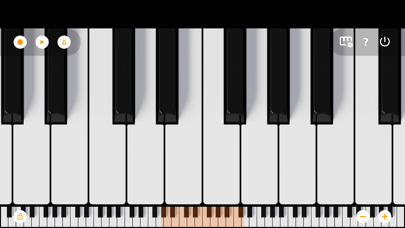
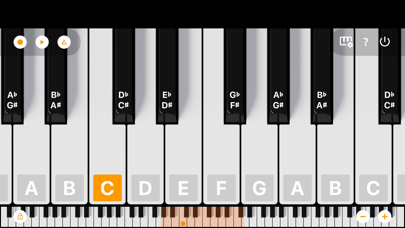
Upon launching Mini Piano Lite, users are greeted with a sleek, minimalist interface that emphasizes ease of use. The app's design ensures that even newcomers can start playing immediately, thanks to its intuitive layout and responsive control scheme. The full 88-key keyboard can be zoomed and scrolled to fit your screen, whether you’re on a phone, tablet, or Chromebook. The support for Dark Mode enhances visual comfort during extended play sessions and complements the modern aesthetic. The application’s straightforward interface allows you to swiftly navigate between features, making your musical journey efficient and enjoyable.
Core Features of Mini Piano Lite
Realistic Sound & Full Keyboard
At the heart of Mini Piano Lite is its high-quality sampled piano sound. The app produces a remarkably realistic tone, rivaling that of standalone digital pianos. The 88-keys provide a full keyboard experience, with options to zoom in or out seamlessly to suit your preference. Multiple display modes, including note labels with octave indicators, aid both beginners and advanced players.
Versatile Instrument Selection
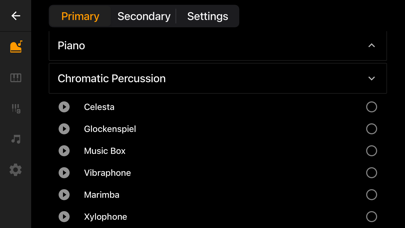
Beyond the default piano, the app includes 128 other instrument sounds, spanning a variety of instrument types like violins, flutes, and more. This extensive palette allows you to experiment with different sounds, adding depth and diversity to your musical explorations.
Recording and Exporting
With recording functionalities, you can capture your sessions directly within the app. Save your melodies as MIDI files, which you can later export or refine in your preferred music editor. Support for exporting to MP3, AAC, or WAV formats makes sharing your creations or setting ringtones straightforward and versatile.
Learning & Practice Tools
A special song mode with falling blocks feature makes learning new songs engaging and interactive. The app lights up keys to guide your fingers, facilitating easier practice sessions. A built-in metronome helps you maintain consistent tempo, making it a great educational resource for beginners and students.
Additional Functionalities
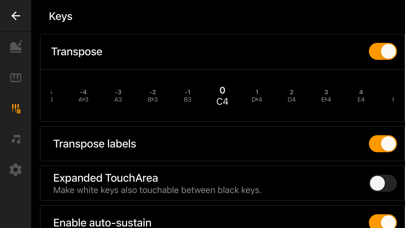
Other notable features include multitouch support to allow using all your fingers simultaneously, a transposing feature for changing pitch by note or Hz, and an option to disable the white key touch area between black keys for more precise play. You can also set recordings as ringtones or use MIDI in support for external keyboards, adding flexibility to your musical workflow.
Ad-Free Experience & Additional Options
Mini Piano Lite maintains a minimal ad disruption model, featuring only a single banner to support ongoing development—no popups or videos interfere with your playing. For an ad-free experience, you can upgrade to Mini Piano Pro or KeyChord. Educational institutions can also benefit from bulk licensing discounts by contacting the developers directly.
Why Choose Mini Piano Lite?
This compact yet powerful piano app is beloved by numerous users due to its realistic audio, intuitive design, and versatile features. It offers a responsive virtual piano experience, making it perfect for casual entertainment, musical practice, or learning new songs. The app’s compatibility across devices, from smartphones to Chromebooks, makes it an accessible choice for all users. Whether you’re in class, commuting, or relaxing at home, Mini Piano Lite adapts to your musical needs—making it an essential digital piano for your pocket.
Getting Started with Mini Piano Lite
Ready to embark on your musical journey? Download Mini Piano Lite today and discover the joy of playing a realistic digital piano right from your device. Explore its features, experiment with sounds, learn new songs, record your performances, and share your music with friends. Whether for fun or education, this app is a perfect companion for all aspiring musicians. Give it a try and unlock your inner pianist!
Pros
- Lightweight and easy to install
- Intuitive interface for quick learning
- Good sound quality for a free application
- Supports multi-touch functionality
- Does not require an internet connection
Cons
- Fewer features compared to paid versions
- Presence of ads can be distracting
- Some keys may not respond reliably
- Lacks advanced customization options
- Basic graphics and design











