

Introduction to Fine Lock
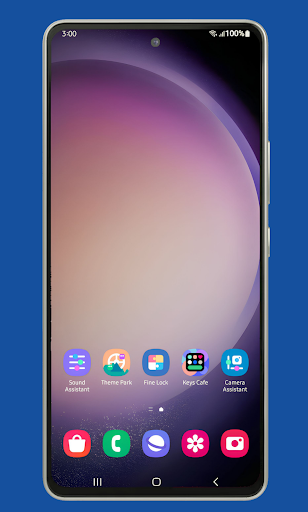
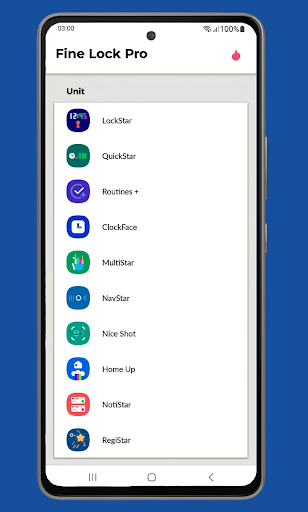
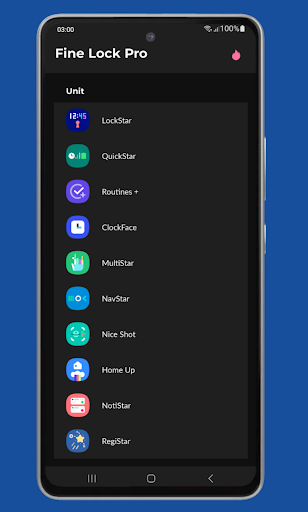
Fine Lock is a community-driven solution designed specifically for Samsung devices. It is important to note that Fine Lock has no affiliation with Samsung Electronics or Samsung Mobile. Instead, it provides a convenient way for users to access and utilize Good Lock and Galaxy Labs modules—official tools that customize and optimize the Android experience on Samsung smartphones running Android Oreo and One UI. These modules allow for extensive personalization options, from customizing your lock screen to modifying notification panels. However, their availability is limited, as they are only downloadable via the Galaxy Store in select markets, and even when installed, they may not function on all devices.Would-be users should be aware that Fine Lock does not support Samsung devices with AOSP OS, such as those running LineageOS. Moreover, due to policies set by Google Play, Fine Lock cannot download modules on your behalf. For modules, users should obtain the latest APK files through trusted sources like APKMirror or Sammobile.
Core Features & PRO Version Enhancements
The PRO version of Fine Lock unlocks additional capabilities to enhance your device customization experience. Key features include:
Module App Shortcuts in Home Screen
Quick access to your favorite modules directly from your home screen for seamless customization.
Background Check for Updates
Stay informed with automated update notifications for your modules, ensuring your device benefits from the latest features and improvements.
Hide Modules Not Installed
Streamline your interface by hiding modules that you do not currently have installed, minimizing clutter.
Dynamic Wallpaper
This feature intelligently changes your wallpaper based on your device's Dark Mode or Night Mode, adding a personalized touch that adapts to your current theme.
Note that Fine Lock requires Android 9 or later along with scheduled Dark/Night modes to utilize some PRO features.
Getting Started with Fine Lock
Starting with Fine Lock is straightforward. Simply download the app from the Google Play Store, and you’re on your way. Given that it is a third-party application, users need to manually install Good Lock modules via links offered within the app. These modules are not bundled but must be sourced from legitimate APK repositories like APKMirror or Sammobile to ensure safety and compatibility.After installation, you can select and activate modules that suit your preferences, enabling you to tailor your device's look and functionality to your liking. The user interface is designed to be approachable, making it accessible even for those new to Android customization.
Why Choose Fine Lock
For Samsung enthusiasts eager to personalize their devices beyond stock settings, Fine Lock offers an invaluable toolkit. It effectively acts as a launcher for Good Lock modules, opening up a universe of customization options. Whether you wish to overhaul your task manager, revamp your lock screen, or dynamically change wallpapers, this app provides the flexibility to experiment freely.The app's straightforward interface and proactive update system make it a reliable companion for fine-tuning your smartphone. The ability to hide unused modules and access app shortcuts from your home screen further enhances the user experience.
Limitations & Compatibility
It's essential to recognize that Fine Lock is specifically designed for Samsung devices running official One UI with Android 8 or Android 9+. It will not work on devices from other brands, especially those running custom OS builds like LineageOS. Attempting to use it on unsupported devices may lead to app crashes or malfunctioning.Ensure you have the latest version of Fine Lock before making any purchase, and if you encounter issues with unlocking PRO features, contact support with your Order ID (usually starting with GPA from Google Play emails).
Final Thoughts
In sum, Fine Lock is a must-have app for Samsung users who love to personalize their smartphones. It provides a bridge to unlock the full potential of Good Lock modules, allowing for detailed customization that can elevate your device from ordinary to extraordinary. Whether you're customizing your lock screen, changing task management, or setting dynamic wallpapers, Fine Lock brings a universe of possibilities directly to your fingertips. If you're passionate about fine-tuning your Samsung device’s look and feel, give Fine Lock a try—your device will thank you for it.
Pros
- Seamless integration with Samsung devices
- User-friendly interface
- Customizable lock screen features
- Supports various widgets
- Fast performance
Cons
- Limited to Samsung devices only
- Paid features can be expensive
- Occasional bugs with updates
- Requires frequent app permissions
- No support for non-Samsung devices











