
PrinterShare Mobile Print: Your Ultimate Mobile Printing Solution
Are you often in need of printing documents, photos, or other digital content while away from your home or office? PrinterShare Mobile Print is the app that transforms your mobile device into a powerful printing tool, enabling you to print seamlessly from Android phones, tablets, and even iOS devices. With its extensive compatibility and user-friendly design, PrinterShare makes printing incredibly convenient, whether you’re working from your living room or traveling abroad.
Getting Started with PrinterShare Mobile Print
Installing PrinterShare Mobile Print is straightforward and quick. The app is available on both the Google Play Store and the Apple App Store. Once downloaded and installed, it automatically detects nearby printers, making it easy to start printing right away. The compatibility range is impressive, supporting popular brands like HP, Canon, Brother, Samsung, and many more, including legacy network printers. This extensive support ensures that most users won’t encounter issues when trying to connect their mobile device to their printer.
Key Features That Enhance Your Printing Experience
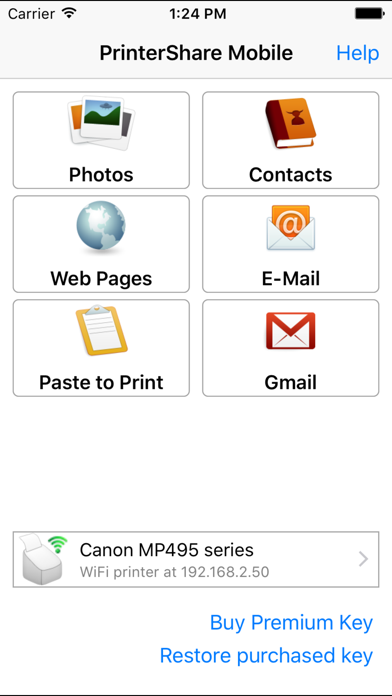
One of the standout features of PrinterShare Mobile Print is its ability to print directly from your device without the need for a computer. You can print a wide variety of content—photos, PDFs, emails, web pages, and even clipboard data—straight from your smartphone or tablet. The app supports multiple file formats including JPG, PNG, GIF, PDF, DOC, XLS, PPT, and TXT. Additionally, it integrates with cloud storage services such as Google Drive, OneDrive, Box, and Dropbox, enabling you to access and print documents stored online with just a few taps.
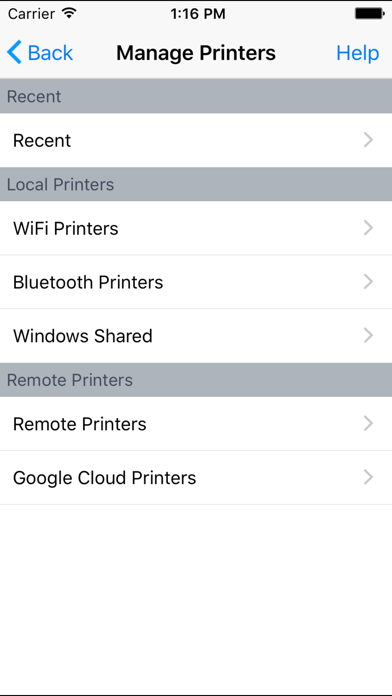
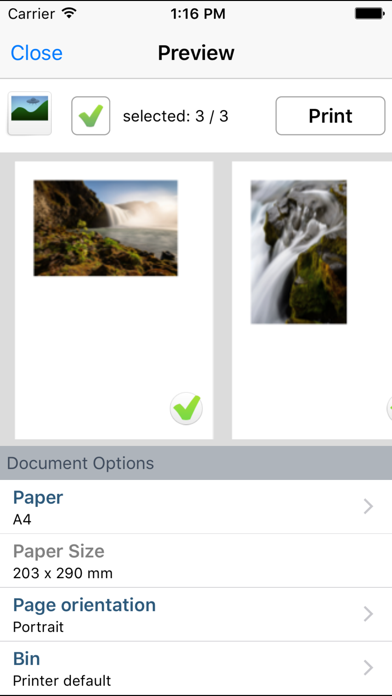
The app offers versatile printing options, too. Whether you prefer printing via Wi-Fi, Bluetooth, or USB (OTG), PrinterShare has got you covered. This flexibility makes it ideal for different environments, from modern wireless setups to more traditional USB connections. You can customize print settings such as paper size, orientation, copies, duplex mode, quality, and color preferences, ensuring your prints meet your specific needs.
For those who require legal or formal documentation, PrinterShare allows printing of text messages, call logs, contacts, and web pages. This feature is particularly useful for keeping physical copies of important conversations or data.
If you need to print shipping labels or receipts, the app supports direct printing from browsers to compatible thermal printers via supported websites like UPS. This makes it a valuable tool for small business owners or logistic professionals.
Premium Features and Compatibility
While the free version of PrinterShare provides basic printing capabilities, unlocking Premium Features enhances your experience significantly. With Premium, you gain **unlimited nearby direct printing**—including PDFs, images, and documents—without needing a computer, via Wi-Fi or Bluetooth. Additionally, the app offers a **complimentary 100 pages** of remote printing per month under the same account, making it suitable for occasional or frequent use.
PrinterShare supports a broad spectrum of printers from HP, Canon, Brother, Samsung, Dell, Lexmark, Ricoh, and other manufacturers. To verify your printer’s compatibility, a full list is available on the official website. For unsupported or legacy printers, PrinterShare also provides free Windows and Mac software that can facilitate printing from your computer.
Ease of Use and Performance
Designed with user experience in mind, PrinterShare’s interface is intuitive and straightforward. Simply select the document you wish to print, choose your printer from the detected devices, and tap the print button. The clean layout and well-labeled options make navigation easy for users of all tech levels. Plus, the app performs efficiently, ensuring high-quality output whether you’re printing a high-resolution image or a simple text document.
The app also emphasizes privacy and security, requesting only necessary permissions to facilitate printing and not to access personal data. In case you encounter any issues, support is readily available via email, ensuring smooth operation.
Final Verdict
PrinterShare Mobile Print is an excellent solution for anyone who needs reliable, versatile, and easy-to-use mobile printing capabilities. Whether you’re a student, professional, or business owner, this app simplifies the process of printing from your mobile device—no matter where you are. Its support for a wide range of printers, cloud integrations, and flexible connectivity options makes it a must-have tool for modern digital workflows.
Pros
- Wide compatibility with various printers.
- Supports direct printing via Wi-Fi.
- Includes Bluetooth connectivity.
- Compatible with multiple file formats.
- Intuitive and user-friendly interface.
- Allows integration with cloud services.
Cons
- Free version has limited features.
- Connectivity can be occasionally unreliable.
- Contains advertisements in the free edition.
- Some printers need additional configuration.
- Premium features require a subscription.











