






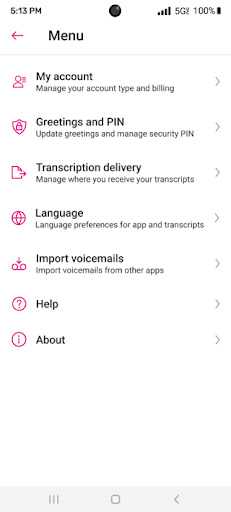

Introduction to Visual Voicemail
Are you tired of the traditional voicemail system that forces you to dial into your mailbox and listen to messages in order? The Visual Voicemail app transforms the way you handle voicemails, offering a more efficient, user-friendly experience. Designed to integrate seamlessly with your MetroPCS service, Visual Voicemail enables you to access, listen, read, and manage your voicemails effortlessly — all from a sleek, organized interface.
Key Features of MetroPCS Visual Voicemail
Enhanced Message Management
MetroPCS Visual Voicemail allows you to listen to your voicemails in any order, respond with a single tap, update your contacts, and manage your inbox without the hassle of dialing into your voicemail box. This modern feature eliminates the need to remember your traditional voicemail number or reconfigure forwarding settings.
Best of all, Visual Voicemail activates for free during the initial launch, making it easy and cost-free to upgrade your messaging experience. For users seeking even more convenience, an optional Voicemail to Text upgrade is available for a small monthly fee. This feature transcribes voicemails into text, which can be accessed directly within the app inbox or via SMS, allowing quick reading during meetings or when on the go.
Additionally, MetroPCS Visual Voicemail may utilize infrequent free SMS messages to communicate with the voicemail server, ensuring minimal costs and interference with your regular messaging plan.
For better user interaction, an Unread Messages widget is included, which can be added to most Android home screens by long pressing on free space, selecting Add Widgets, and choosing the Visual Voicemail widget from the list.
Why Visual Voicemail is a Must-Have
Revolutionizing Voicemail Handling
Have you ever missed an important voicemail simply because you didn’t want to dial in and listen to all your messages? Visual Voicemail is here to change that. With this innovative app, your voicemails are displayed as a neatly organized list on your screen, making it easier to prioritize and manage messages.
What Exactly is Visual Voicemail?
Imagine this: instead of dialing a number, entering a password, and listening through a series of messages, you see all your voicemails listed with caller details and message snippets. This is precisely what Visual Voicemail offers. Not only can you see who called and when, but many messages are transcribed into readable text, saving you time and effort. This way, you no longer have to guess the message content or waste time listening to every voicemail.
Easy Navigation and User-Friendly Interface
The interface of Visual Voicemail is designed for simplicity and ease of use. When you open the app, you'll be greeted with a clean layout displaying a list of voicemails, each showing the caller's name and a preview of the message. This resembles a hybrid of your email and messaging apps combined into one seamless platform.
You can tap any voicemail to listen, read the transcription, or call the sender back directly from the interface. The app also supports organizing your voicemails through sorting and categorization features, helping you keep your inbox tidy and manageable.
Features That Make Your Life Easier
Transcription and Multilingual Support
A standout feature of Visual Voicemail is its voicemail transcription service. This function is especially helpful when multitasking or in environments where listening isn’t feasible. You can read voicemails as text to catch up quickly without headphones or disturbing others. The app also supports multiple languages, making it accessible to a diverse user base.
Seamless Cross-Device Syncing
Another advantage is its ability to sync across devices. Whether you’re on your smartphone or tablet, your voicemails and their transcripts are accessible, providing flexibility and convenience wherever you are.
Personal Experience and Conclusion
After using Visual Voicemail for several weeks, I can confidently say it’s a game-changer for anyone seeking to streamline their communication. Its intuitive design and powerful features convert a once tedious task into a simple, quick activity. While the transcription accuracy might vary depending on how clearly the caller speaks, the overall experience remains highly positive.
For users tired of the outdated voicemail system, Visual Voicemail offers a modern solution that improves productivity and keeps your messages organized. Give it a try—you’ll wonder how you managed without it!
Pros
- Easy to access voicemail messages.
- No need to dial voicemail number.
- Save and archive voicemails.
- User-friendly visual interface.
- Quickly identify important messages.
Cons
- Requires internet connection.
- Limited support for older phones.
- Can be buggy at times.
- Not available with all carriers.
- Privacy concerns with message storage.










