


Background Eraser: Your Ultimate Photo Background Removal Tool
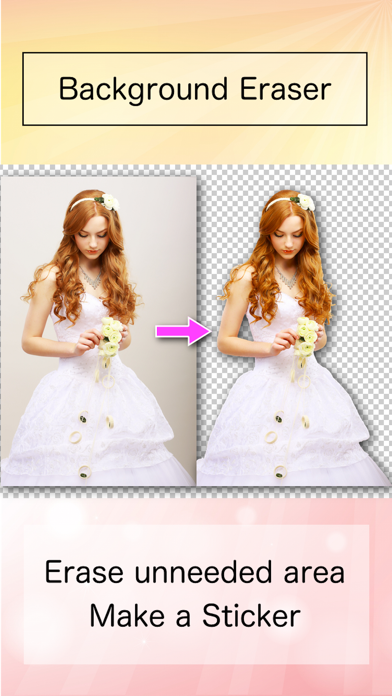
Are you tired of taking the perfect shot only to be disappointed by distracting or unappealing backgrounds? Background Eraser is an innovative application designed to help you effortlessly cut out images and make their backgrounds transparent. Whether you want to turn your photos into stickers, create stunning collages, or enhance your social media content, this app provides a powerful and user-friendly solution. With its advanced features, Background Eraser ensures precise background removal so you can focus on showcasing your subject at its best.
Key Features of Background Eraser
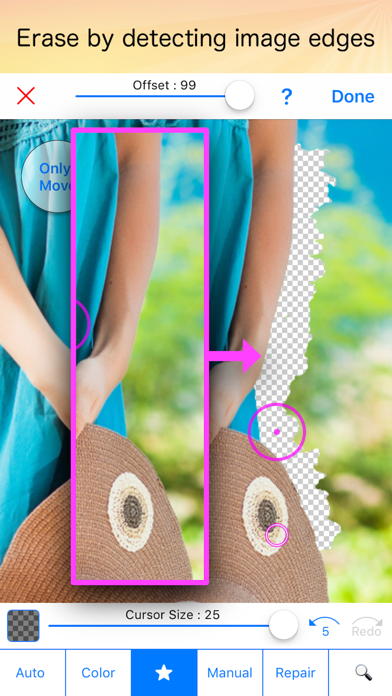
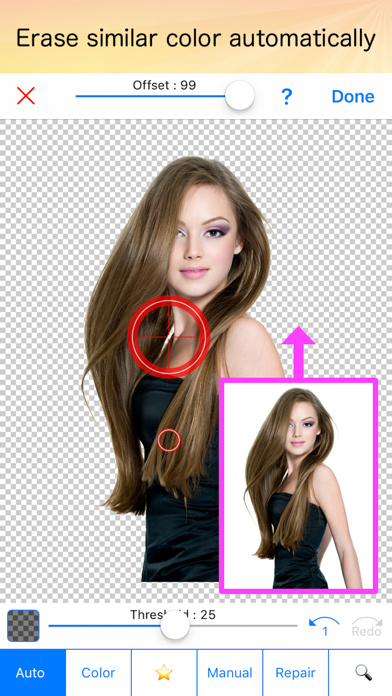
The app boasts several modes tailored to different editing needs. One of its standout capabilities is the "Magic" mode, which detects edges within an image to facilitate easy and accurate erasing. This feature is perfect for quick edits where precision matters without much manual effort. Additionally, the "Auto" or "Color" mode allows users to remove backgrounds automatically by selecting similar pixels. This is particularly useful for images with uniform backgrounds or simple color schemes. The ability to make backgrounds transparent with high accuracy is essential when superimposing photos or creating composite images for professional presentations or creative projects. Overall, these features work together to help you achieve clean, professional-looking results quickly and efficiently.
Getting Started with Background Eraser
Downloading and installing Background Eraser is straightforward, whether you're using an Android device or an iPhone. The app’s sleek and intuitive interface makes navigation a breeze. As someone with minimal technical skills, I found it incredibly accessible — it’s like entering a neatly organized workspace where everything is logically placed, so you always know where to find the tools you need.
Simplicity Meets Powerful Functionality
Upon opening the app, you're greeted by a clean dashboard that immediately tells you what to do next. Upload your photo, then choose the preferred background removal mode. The "Auto" mode leverages advanced AI algorithms to detect and eliminate backgrounds with impressive precision, making the process quick even for complex images. For users who prefer finer control, manual adjustments are available, allowing you to fine-tune the edges and restore parts of the image if needed. This flexibility ensures that even challenging photos can be processed with confidence. The real-time feedback during editing makes the experience seamless, almost like painting with a digital brush.
Performance and Usability
In terms of performance, Background Eraser handles high-resolution images with ease, delivering fast processing times that save you time. Its straightforward design and minimal learning curve mean both beginners and experienced editors can use it effectively. While occasional ads might pop up, they are not overly intrusive, and opting for the premium version can provide an ad-free experience. This app truly feels like having a personal photo editor at your fingertips, ready to help create stunning visuals for social media posts, marketing materials, or personal projects.
Why You Should Use Background Eraser
If you’re looking to elevate your photo editing skills or simplify the process of creating professional-quality images, Background Eraser is an invaluable tool. Its ability to automatically or manually remove backgrounds allows you to craft eye-catching content that stands out. Whether you're a social media influencer, a small business owner, or just someone who loves experimenting with photos, this app makes it easy to produce polished images that capture attention. Imagine transforming an ordinary indoor shot into a striking visual by removing distracting backgrounds effortlessly. With its user-friendly interface and powerful features, Background Eraser helps you unlock your creative potential and achieve high-quality results every time.
Conclusion
Overall, Background Eraser is a versatile and reliable photo editing app that caters to all skill levels. Its suite of features, including intelligent automatic modes and manual precision tools, ensures you can create transparent backgrounds quickly and accurately. Whether for personal use, social media content, or professional projects, this app empowers you to produce stunning images with ease. Next time you take a photo, don’t let an imperfect background spoil it — let Background Eraser work its magic and elevate your visual content to new heights.
Pros
- User-friendly with an intuitive interface
- Allows high-resolution image export
- Enables quick background removal
- Offers a wide range of editing tools
- Supports multiple image formats
Cons
- Limited features in the free version
- Advertisements can be disruptive
- Occasional bugs during editing
- Some features require an internet connection
- Premium version has a relatively high cost











