


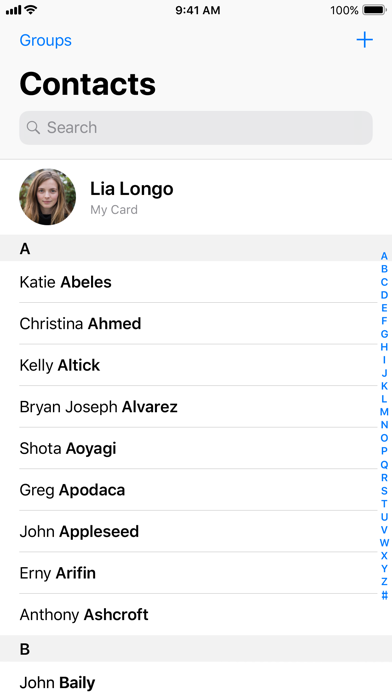
Overview of the Contacts App
The Contacts app is an essential tool designed to help you efficiently manage, organize, and synchronize your contacts across all your devices. Whether you're using Android, iOS, or Wear OS, this app offers a seamless experience that keeps your connections at your fingertips. Its main purpose is to simplify contact management while providing robust features for backup, organization, and quick access to your most important contacts.
Main Features
Back Up and Sync Your Contacts
One of the core strengths of the Contacts app is its effortless backup and sync capability. By linking your contacts to your •Google Account, you ensure that your contact information is safely stored and easily recoverable if needed. This cloud synchronization allows you to access your contacts from any device where you're signed in, including your next phone or tablet. In addition, the app provides a •Recovery feature that lets you restore contacts deleted within the last 30 days from the Trash. This guarantees peace of mind, knowing your data remains protected and recoverable.
Keeping Contacts Organized and Up to Date
Staying organized is simple with the Contacts app. You can view your contacts segmented by •accounts, such as work or personal, making it easier to manage different groups. The interface allows you to add new contacts and edit existing details—like phone numbers, emails, and photos—with just a few taps. The app also helps users •merge duplicate contacts to prevent clutter and adds useful details to enhance each contact's profile. These features contribute to a cleaner, more organized contact list that makes communication smooth and hassle-free.
Connect with Important People
The Contacts app goes beyond simple storage by helping you •connect with the people who matter most. You can easily view •highlights such as upcoming birthdays and anniversaries, ensuring you never miss a special occasion. To stay proactive, you can add notifications for important dates, keeping loved ones and colleagues engaged. Additionally, the app allows quick access to recently added or viewed contacts, making it easier to pick up where you left off and maintain your relationships effortlessly.
User Experience and Additional Functionality
Intuitive User Interface
The Contacts app features a sleek and minimalistic user interface that emphasizes ease of use. Designed for both tech-savvy users and newcomers, navigating through contacts feels natural and straightforward. The clean layout minimizes clutter, focusing on providing all necessary functionality in a streamlined manner—allowing you to find, add, or edit contacts quickly and efficiently.
Synchronization Across Devices
Synchronization is one of the app's standout features. Whether you're switching to a new device or using multiple gadgets, Contacts ensures your contact data is always up to date. By integrating seamlessly with your •Google Account, any change made on one device immediately reflects across all. This synchronization eliminates the need for manual transfer, reducing errors and saving time, making your contact management effortless.
Smart Organization and Search
Staying organized is easy with features such as labels and groups. You can categorize contacts—for example, separating work from personal contacts—allowing for better management. The built-in search functionality quickly locates contacts with minimal effort. Plus, the favorites section enables you to pin your most important contacts for instant access, saving time and enhancing productivity.
Privacy and Security
Your privacy is a top priority with the Contacts app. All your data is encrypted, ensuring that your information remains secure. You also have customizable privacy settings to control who can see your contacts, and the app allows you to manage sharing preferences effectively. These security measures give you confidence that your contact information is protected against unauthorized access.
Conclusion
The Contacts app is a powerful, comprehensive solution for anyone looking to enhance their communication management. Its features go well beyond basic storage, offering smart organization, seamless synchronization, and strong privacy controls. Whether you're managing personal connections or professional contacts, this app simplifies the process, making it more organized, secure, and accessible. Embrace the Contacts app to take your contact management to the next level and stay connected with ease.
Pros
- User-friendly interface
- Efficient contact management
- Smooth integration with other applications
- Fast search capability
- Customizable contact information fields
Cons
- Lacks advanced features
- Periodic synchronization problems
- Advertisements can be disruptive
- Needs internet connection for full features
- Limited backup solutions










