




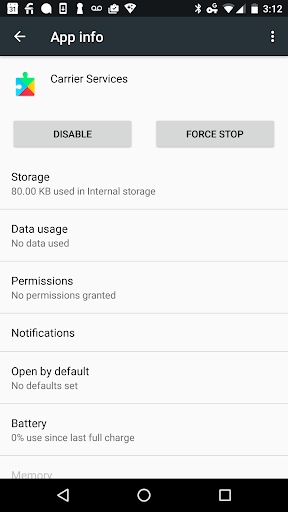
Carrier Services: The Invisible Backbone of Your Messaging Experience
Carrier Services is a crucial system app on your Android device that underpins the seamless functioning of messaging features, especially when using Google’s Messages app. Though it often goes unnoticed, this app plays a vital role in supporting innovative communication protocols like RCS (Rich Communication Services) which enrich your texting experience with features such as high-resolution image sharing, read receipts, and real-time typing indicators. Understanding what Carrier Services does can help you appreciate how it contributes to a smoother, more reliable mobile messaging environment.
What Is Carrier Services?
Imagine this: you’re sending a lively, emoji-filled message to a loved one, and it finally reaches them swiftly and perfectly. Behind this effortless interaction lies Carrier Services, acting as the invisible facilitator that ensures your messages, especially those enhanced by RCS technology, are delivered without glitches. This app is designed to support Android users by bridging communication between your device and your carrier’s network, ensuring that the advanced messaging features you enjoy function as intended. Its role is paramount in enabling rich content sharing, such as high-quality photos, videos, and read receipts, making your messaging experience more dynamic and expressive.
Key Features of Carrier Services
Enhanced Messaging Capabilities
Primarily, Carrier Services works hand-in-hand with Google’s Messages app to support *RCS (Rich Communication Services)* — a modern upgrade over traditional SMS. RCS delivers upgraded features like real-time typing indicators, delivery and read receipts, and the ability to send high-resolution images without compression. These enhancements transform basic texting into an engaging communication platform that rivals messaging apps, all powered silently by Carrier Services.
Network Connectivity Support
In addition to enriching your messaging experience, Carrier Services assists in establishing and maintaining stable connectivity with your carrier’s network. This ensures that updates and data exchanges happen smoothly behind the scenes, helping with the overall reliability and performance of your device’s network interactions. Whether you're sending a photo, making a call, or browsing the web, Carrier Services helps keep your connection robust.
Why Is Carrier Services Important?
Many users might overlook Carrier Services until they encounter issues like delayed message delivery or failed texts. From personal experience, ensuring this app is updated has often resolved frustrating messaging problems, highlighting its importance. By functioning quietly in the background, Carrier Services enhances your device's communication capabilities, supporting features that make texting more expressive and instantaneous. Regular updates ensure it adapts to the latest network standards and introduces improvements, making it a silent yet essential partner in your mobile life.
Benefits of Recognizing Carrier Services
Why You Should Care
While it may seem like just another app, Carrier Services is actually a silent hero that ensures your device communicates efficiently with your carrier’s network. Whether you are sending texts, making calls, or sharing multimedia content, this app helps keep everything running smoothly. Think of it as the plumbing in your house—hidden but indispensable. Keeping Carrier Services updated and functioning properly guarantees that your messaging and network features operate without hiccups, providing you with a reliable and enriched communication experience.
Conclusion
In summary, Carrier Services might not be the most noticeable app on your device, but it plays a critical role in maintaining the seamless flow of your communications. From supporting advanced messaging features like RCS to ensuring stable network connections, it acts behind the scenes to keep your digital conversations lively, immediate, and hassle-free. Next time you send a message without a problem, remember the quiet work of Carrier Services helping make it happen. Appreciating this essential component can deepen your understanding of your device’s full capabilities and help you appreciate the seamless communication experience it provides.
Pros
- Significantly improves call quality.
- Enhances messaging capabilities.
- Optimizes network connectivity.
- Enables faster data transfer speeds.
- Supports advanced network features.
Cons
- Limited to certain Android devices.
- May sometimes cause app conflicts.
- Potentially increases battery usage.
- Effects may vary across regions.
- Requires frequent updates.










