


Introducing Hush: Android Auto Audio Fix
Android Auto has revolutionized the way we connect our smartphones to our vehicles, offering seamless access to navigation, messaging, and music. However, users have encountered a common frustration: when switching between Android Auto supported apps and other media players, unexpected audio issues can occur, disrupting the driving experience. That’s where Hush: Android Auto Audio Fix comes into play—a smart solution designed to enhance your in-car audio experience by addressing these pesky problems.
Understanding the Need for Hush
While Android Auto is great for safety and convenience, it’s not without its quirks. One notable issue involves Android Auto resuming the last music app you played—such as YouTube or Spotify—when you adjust the volume, even if you've been listening to a different app. This can be dangerous, especially when switching from a quiet podcast to loud music suddenly. This distraction can compromise driving safety, causing unwanted volume spikes that startle passengers and divert attention from the road.
How Hush Enhances Your Driving Experience
To combat this, Hush employs a clever technique: it plays a silent audio track on repeat in the background. This approach tricks Android Auto into thinking that an active audio app is playing, preventing it from resuming other media sources unexpectedly. As a result, your preferred non-Android Auto app—like YouTube, podcasts, or other media players—can run without interference, allowing you to smoothly control volume levels without any sudden changes or distractions.
Seamless Setup and User Experience
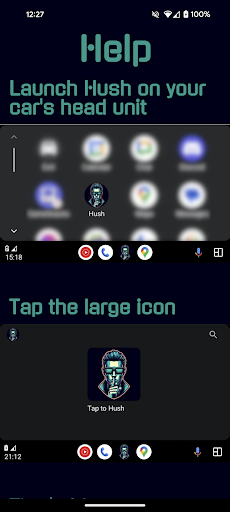
Getting started with Hush is straightforward. Simply download it from the Play Store, and follow the intuitive setup instructions provided within the app. The process is designed to be quick and hassle-free, ensuring you can enjoy the benefits immediately. Once installed, Hush runs silently in the background, requiring minimal maintenance or interaction.
The interface is minimalist and user-friendly, ideal for drivers who prefer a “set it and forget it” app. Its stability and performance are notable—many users report that Hush operates without glitches or crashes, making it a reliable companion during daily drives. Regular updates keep the app compatible with the latest Android Auto versions, reflecting ongoing developer support.
Why Choose Hush?
While several similar apps are available, few match Hush's combination of reliability, simplicity, and effectiveness. It doesn’t consume excessive resources or complicate your smartphone’s operation. Instead, it quietly does its job, ensuring that audio issues like volume spikes and unintended app resuming are eliminated. This makes your drives less stressful and more enjoyable.
The Bottom Line
In today’s connected world, minimizing distractions while driving is crucial. Hush: Android Auto Audio Fix addresses a specific but significant problem—unsolicited audio interruptions—that can impact your focus on the road. With its easy setup, unobtrusive operation, and proven reliability, Hush is a valuable tool for anyone looking to improve their Android Auto experience. If you've been frustrated by sudden volume surges or app resuming issues, consider giving Hush a try; it’s a small app that can make a big difference in your driving safety and comfort.
Pros
- Improves audio quality when using Android Auto.
- Simple to install and set up.
- Works with most Android devices.
- Receives regular updates to enhance performance.
- Uses minimal battery power.
Cons
- Limited support for users not using Android Auto.
- Requires Android version 8.0 or higher.
- May occasionally interrupt other audio applications.
- Lacks an integrated customer support chat feature.
- Setup process at the beginning may be confusing.











