
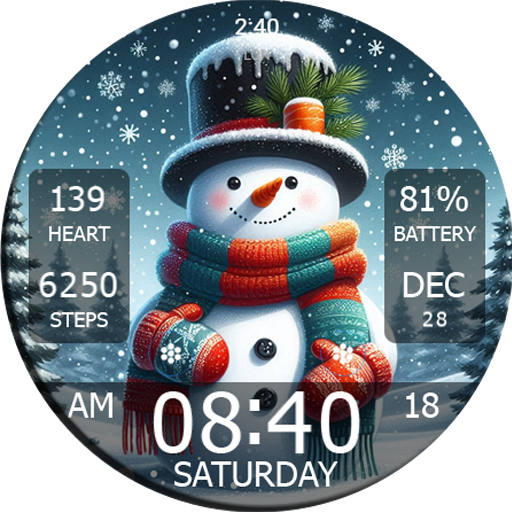
Frequently Asked Questions
What features does the Key WF55 Snowman Watch Face offer?
The Key WF55 Snowman Watch Face provides a charming and festive design ideal for winter, featuring customizable display options such as time, date, and weather updates against a snowman-themed background. Users can personalize color schemes and choose various snowman animations to add a playful touch to their smartwatch experience.
Is the Key WF55 Snowman Watch Face compatible with all smartwatches?
The Key WF55 Snowman Watch Face is specifically designed for smartwatches operating on the Wear OS platform. Compatibility requires the device to support Wear OS; devices running other operating systems may not be able to use this watch face.
How can I customize my Key WF55 Snowman Watch Face?
Customizing the Key WF55 Snowman Watch Face is simple and user-friendly. Access the customization options through the watch face settings on your smartwatch to change the color theme, select displayed information (such as steps, battery life, or weather), and choose different snowman animations to match your style or mood.
Does the Key WF55 Snowman Watch Face affect battery life?
While it does consume some battery, the Key WF55 Snowman Watch Face is optimized for efficiency. The battery impact depends on the frequency and complexity of animations and updates, and users can reduce battery drain by limiting animations and update frequency in settings.
How do I install the Key WF55 Snowman Watch Face on my smartwatch?
To install the watch face, ensure your smartwatch is connected to the Google Play Store, then search for and download it. After installation, select the watch face from your device's menu to activate and enjoy its festive features immediately.
You May Like

Zedge™ Wallpapers & Ringtones
Personalization
4.6
ThemeKit - Themes & Widgets
Personalization
4.7
Fonts Keyboard Themes & Emoji
Personalization
4.7
Pixel 4D™ Live Wallpapers
Personalization
4.7
Edge Lighting - Borderlight
Personalization
4.8
Themes
Personalization
4.2
Launcher OS™
Personalization
4.4
Microsoft Launcher
Personalization
4.7
Themepack - App Icons, Widgets
Personalization
4.7
LED Keyboard: Colorful RGB
Personalization
4.5
Wallpapers HD - Backgrounds 4K
Personalization
4.7
Make Money: Play & Earn Cash
Personalization
4.5