

850 OBD-II App Overview
If you're a car enthusiast or a vehicle owner curious about what’s happening under the hood, the 850 OBD-II app is your new best friend. This innovative tool transforms your smartphone into a powerful diagnostics device, providing insights into your car’s performance that were once only accessible to professional mechanics. Designed specifically for Volvo models and compatible with other makes to some extent, this app offers an extensive suite of features that make vehicle troubleshooting more straightforward and accessible. Whether you’re interested in reading fault codes, monitoring real-time sensor data, or even performing some basic programming functions, the 850 OBD-II app has you covered.
Getting Started with 850 OBD-II
Getting started is simple and hassle-free. You will need an ELM327 adapter, which connects to your car's OBD-II port—typically located under the dashboard—and pairs with your smartphone via Bluetooth, Wi-Fi, or USB. The app supports ELM327 V1.4b or greater; however, ensuring your adapter has the latest firmware is crucial for optimal performance, as missing commands or incompatible firmware can limit functionality. After connecting your adapter, download the 850 OBD-II app from the Google Play Store and follow the straightforward on-screen instructions to set up the connection. The user interface is designed to be intuitive, making it easy for both beginners and seasoned car enthusiasts to navigate and utilize the full range of features.
Feature-Rich Diagnostics and Modules Support
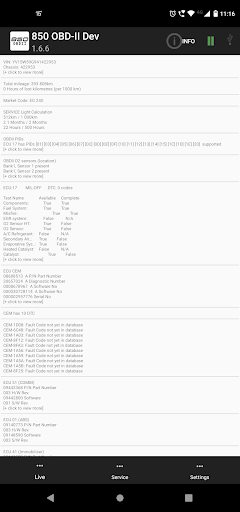
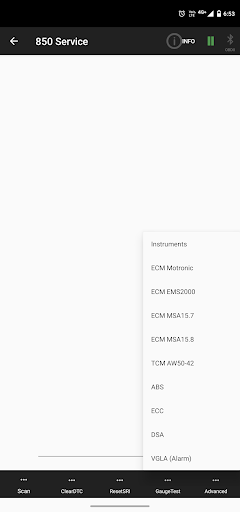
One of the standout aspects of the 850 OBD-II app is its extensive support for various modules and systems in Volvo cars, especially models from the 1996-2000 P80 series and later P2 platform. The app goes beyond standard OBD-II capabilities by allowing users to read specific modules directly, aiding in precise diagnostics. For example, it supports modules such as CDM, ABS, TCM, ECM, ECC (A/C), VGLA (Remote Programming), and many more, covering models including S70, V70, XC70, S40, V40, C70, S60, S80. Notably, the app can also program and read faults for systems like ABS and Dashboard on certain models and even supports remote programming of VGLA modules—bringing dealership-level capabilities to your fingertips.
Supported Systems and Limitations
While the app supports a wide range of modules, some systems like Yazaki dash, M4.3, MFI systems (LH-jetronic 3.2 & EZ129K), Fenix 5.2, Motronic M4.3, ECC (A/C), Cruise Control are outside its reach with the ELM327 interface. Additionally, compatibility may vary depending on the model year and the specific configuration of your vehicle. For instance, models featuring SRS, Power Seats, or Heat systems are supported, with functionality expanding as newer P2 series vehicles come into support. To get the best results, you might need to adjust the CAN Bus version setting within the app depending on your vehicle's year.
Main Features and Functions
The 850 OBD-II app is packed with a variety of powerful features, including:
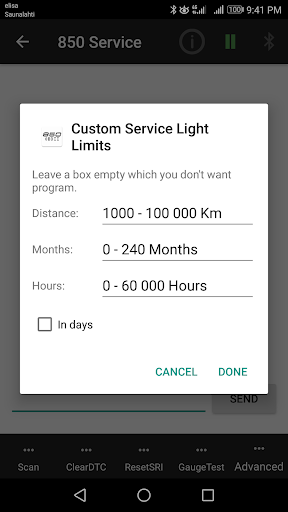
- Service Light (SRI) Reset & Programming
- Reading and clearing Fault Codes (DTCs)
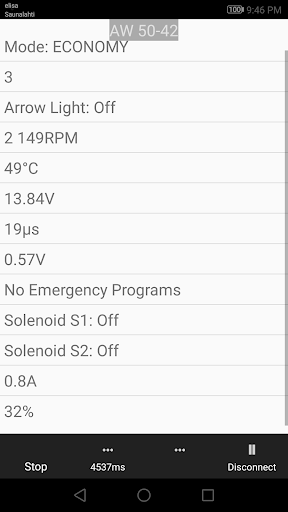
- Real-time sensor data monitoring, such as engine RPM, vehicle speed, and fuel consumption
- Accessing detailed system information like part numbers and configurations of ECUs
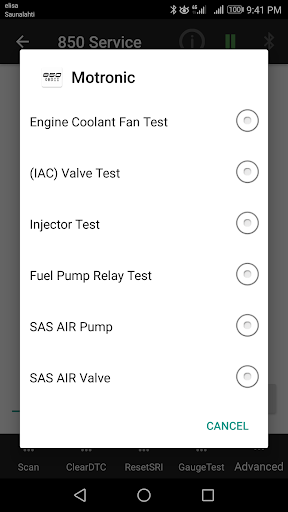
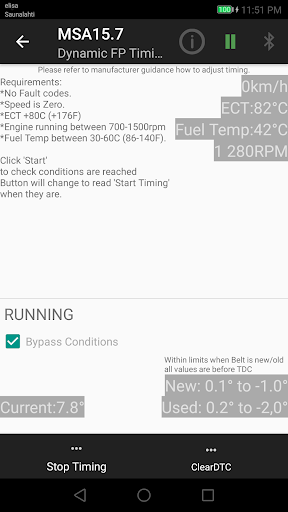
- Executing advanced commands like Injector testing and Fuel pump timing
- Remote programming and module parameter adjustments
- Live scrolling sensor values for ABS, SRS, Instrument Panel, and more
Special Diagnostic Capabilities
The app enables diagnostics for specific systems such as SRS, immobilizer, power seats, heat controls, and various ECUs, translating Volvo-specific DTCs into understandable descriptions. It also supports component testing, activation of relays, and the ability to send custom commands to your vehicle's modules via an integrated terminal feature. This level of control makes it invaluable not only for troubleshooting but also for performing modifications or adjustments—saving trips to the dealership.
User Experience and Additional Notes
The 850 OBD-II app boasts a sleek, easy-to-navigate design, making complex vehicle diagnostics accessible to everyone. The app also offers helpful explanations for each fault code, reducing the typical confusion associated with OBD-II diagnostics. While the app is mostly free to use, some advanced features may require a paid subscription, offering even more control and insight into your vehicle's systems. Because the app relies on user feedback for improvements, occasional bugs or limitations may occur—users are encouraged to report issues through the provided channels to facilitate updates.
Conclusion
In summary, the 850 OBD-II app is a versatile, feature-rich tool for Volvo owners and auto hobbyists who wish to gain a deeper understanding of their vehicles' health. It brings dealership-level diagnostics into your hands, allowing for fault code management, live sensor data, and even module programming without leaving home. Perfect for DIY repairs, regular maintenance, or just trying to learn more about your car, this app enhances your vehicle ownership experience. With ongoing updates and a growing feature set, it’s poised to become an essential part of your automotive toolkit. If you’re looking to eliminate guesswork and perform your own diagnostics, give the 850 OBD-II app a try—you won’t be disappointed.
Pros
- Real-time engine diagnostics
- User-friendly interface
- Comprehensive error code database
- Affordable price point
- Supports most car models
Cons
- Limited advanced features
- Requires additional hardware
- Occasional connection issues
- No offline mode available
- Basic user manual











