









Introduction to the Meeting - Video Conference App
In today’s digital age, staying connected with your team, friends, or family has become more important than ever. The Meeting - Video Conference app offers a seamless and efficient way to conduct video meetings regardless of your location. Whether you're working remotely, hosting large-scale webinars, or simply catching up with loved ones, this versatile app strives to make online meetings straightforward and accessible. Designed with user convenience in mind, it combines high-quality video calling with robust features to ensure every virtual session is smooth, secure, and reliable. Its ability to scale from small private chats to large gatherings makes it a go-to solution for both personal and professional use.
Key Features of the Meeting - Video Conference App
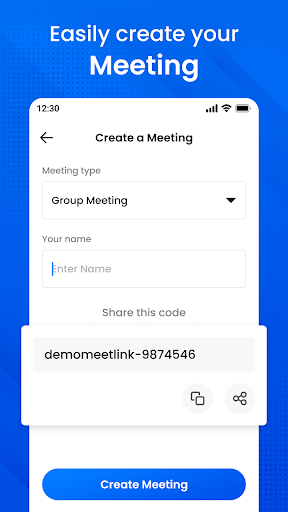
The app stands out with an impressive array of features tailored to enhance your video conferencing experience. One of its core strengths is its capacity to support large-scale meetings with up to 100 participants, making it perfect for business conferences, online seminars, or virtual events. The high definition (HD) video and audio ensure crystal-clear clarity, eliminating common issues such as lag or poor sound quality that can disrupt your meetings. Plus, the intuitive interface allows users to create meetings and invite others effortlessly by sharing a simple meeting code. Participants can easily rejoin previous meetings by browsing through meeting history, saving time and hassle.
Secure & Private Communication
Security is a top priority for users, and this app takes it seriously with end-to-end encryption that safeguards your conversations. You can confidently discuss sensitive topics knowing your video calls are protected from unauthorized access. Additionally, you can lock your meetings to restrict access solely to invited participants. The app also offers the convenience of joining meetings without login for quick access, ensuring that even casual users can participate without barriers.
Additional Functionalities
Beyond basic video conferencing, the app provides features like screen sharing ideal for presentations or collaborative projects, and a real-time chat function that allows participants to send messages, share links, or notes during the meeting. These features are designed to facilitate communication and collaboration, making remote teamwork and virtual social gatherings more productive and engaging.
Benefits of Using the Meeting - Video Conference App
This app is built for convenience, flexibility, and reliability. Its global coverage means you can connect with anyone, anywhere, at any time—whether across the city or across the world. The mobile app provides the accessibility and portability necessary to carry your business meetings or social chats wherever you go. From casual catch-ups to essential business-critical meetings, the application ensures that every session runs smoothly and securely.
Why Choose Meeting - Video Conference?
If you're searching for a dependable and feature-rich video conferencing tool, the Meeting - Video Conference app is an excellent choice. Its easy setup, high-quality streaming, and advanced security measures make it suitable for all types of users—from small teams to large enterprises. Plus, its user-friendly design guarantees that even beginners can get started quickly, making virtual meetings less complicated and more productive. Whether you need a free option for casual chats or a robust platform for professional presentations, this app adapts to your needs.
Conclusion
In conclusion, the Meeting - Video Conference app combines powerful features such as HD video and audio quality, large participant capacity, and strict security measures to deliver an exceptional virtual meeting experience. Easy to download and simple to use, it is perfectly suited for anyone looking to stay connected—be it for work, education, or social purposes. Embrace the future of remote communication with this reliable and versatile video conferencing tool — your ultimate solution for online meetings.
Pros
- High-quality video and audio
- Supports large group meetings
- User-friendly interface
- Cross-platform compatibility
- Reliable connection
Cons
- Can be resource-intensive
- Limited free version features
- Occasional connectivity issues
- Requires account registration
- No end-to-end encryption











