

Introduction to the FreeStyle LibreLink - US App
If you're managing diabetes and seeking an efficient way to monitor your glucose levels, the FreeStyle LibreLink - US app offers a comprehensive solution right at your fingertips. Designed to work seamlessly with compatible sensors, this app transforms your smartphone into a powerful health assistant, making blood glucose tracking more convenient and less invasive.
Key Features of FreeStyle LibreLink - US
Monitor Glucose with a Painless Scan
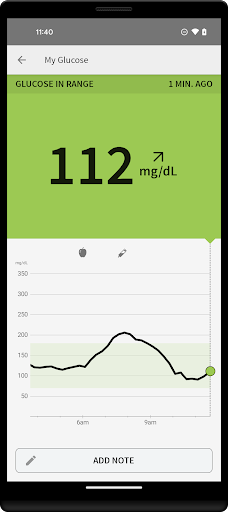
The core of the app's functionality is its ability to allow users to check glucose levels by simply holding their phone near the FreeStyle Libre Sensor. This painless scanning method eliminates the need for routine fingersticks, providing a quick and comfortable way to stay informed about your glucose status. The app is compatible with both 10-day and 14-day Sensors, offering flexibility depending on your device and preferences.
Real-Time Data and Historical Trends
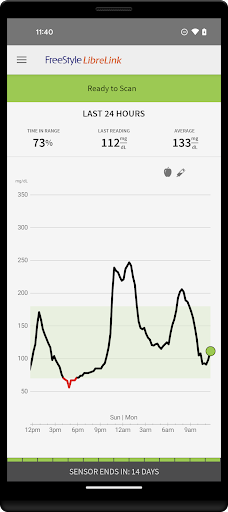
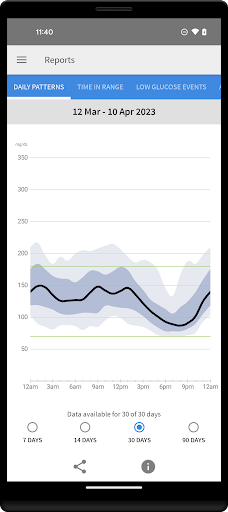
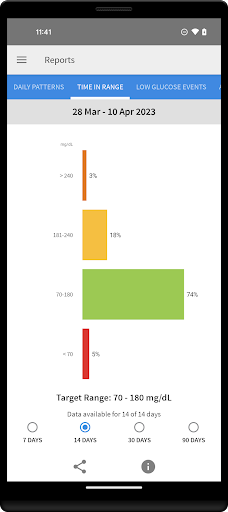
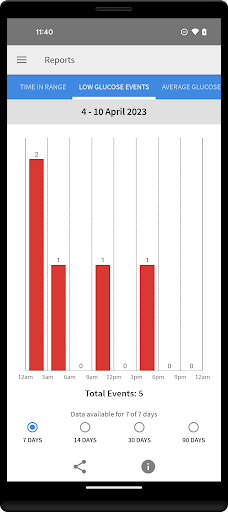
In addition to real-time glucose readings, the app provides access to trend arrows and comprehensive glucose history, helping you understand your glucose patterns over time. Visual reports, including the Ambulatory Glucose Profile, enable you to monitor fluctuations and identify potential issues proactively.
Notes and Activity Tracking
You can add notes related to your food intake, insulin usage, and physical activity. This feature allows you to correlate your glucose data with various lifestyle factors, supporting better management of your diabetes.
Data Sharing and Professional Connectivity
The app integrates with LibreView, enabling you to connect with healthcare professionals and share your glucose reports effortlessly. This connectivity facilitates more informed consultations and personalized care plans.
Alerts and Reminders
Personalized alarms and reminders help you stay on schedule with glucose checks, especially during busy days. This proactive approach ensures you never miss a critical measurement, promoting better health outcomes.
Compatibility and Usage Tips
Smartphone Compatibility
Compatibility with smartphones and operating systems may vary. To find out if your device works with FreeStyle LibreLink, visit http://FreeStyleLibre.us. For optimal performance, ensure your device meets the specified requirements.
Using the App and Reader with the Same Sensor
If you prefer to use both the FreeStyle Libre Reader and LibreLink app with the same sensor, start with the Reader first and then scan with your phone. Note that data from each device is stored separately, and scanning with both devices is necessary to capture complete information.
Important Information and Legal Notes
The FreeStyle LibreLink app is intended for measuring glucose levels in individuals with diabetes, and it’s recommended to use it in conjunction with traditional blood glucose monitoring systems when necessary. Remember, fingersticks are required for treatment decisions or when symptoms don't align with sensor readings.
Registration with LibreView is necessary for data sharing features. The sensors, brand marks, and related trademarks are property of Abbott. For detailed terms of use and legal notices, visit http://FreeStyleLibre.us.
Before starting, review the product user manual accessible via the app or contact support for printed copies.
Experience the Benefits of the FreeStyle LibreLink - US App
Managing diabetes has never been easier with the FreeStyle LibreLink app. Its straightforward setup, painless glucose scans, and comprehensive data tracking make it an invaluable tool for anyone seeking to stay on top of their health with minimal hassle.
The app's ability to provide instant readings, detailed trend analysis, and convenient sharing options empowers users to make better-informed decisions throughout their day. Whether you're at home or on the go, this app serves as your personal health partner, promoting improved glucose control and overall well-being.
So, if you're looking to streamline your diabetes management routine, explore the FreeStyle LibreLink - US app. It combines technology and usability to give you peace of mind and greater control over your health journey. Happy monitoring!
Pros
- User-friendly interface for easy navigation.
- Quick access to glucose monitoring data.
- Seamless integration with Libre sensors.
- Customizable alerts for glucose levels.
- Easy data sharing with healthcare providers.
Cons
- Requires a compatible smartphone to use.
- Limited compatibility with sensors.
- May quickly drain the phone's battery.
- Data accuracy depends on sensor placement.
- A subscription is needed for all features.











