

Introduction to Square Team App
Square Team is an all-in-one communication and management platform designed to streamline team collaboration and scheduling. Perfectly integrated with Square's ecosystem, this app empowers businesses to enhance operational efficiency from anywhere — whether you're in the office or on the go. With features that facilitate seamless communication, real-time scheduling, and easy access to pay and time tracking information, Square Team ensures your team stays connected and productive. It’s tailored to support both employers and team members, providing tools such as shift management, messaging, and payroll processing—all within a user-friendly mobile interface.
Main Features of Square Team
Home Screen & Core Functionalities
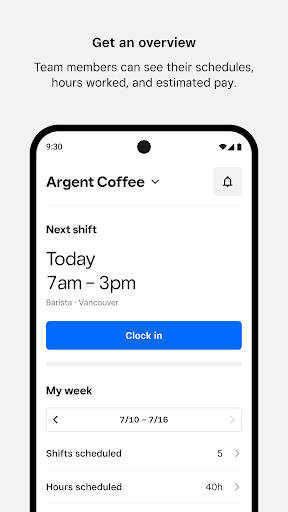
The app’s home screen offers a quick overview of essential functions. Team members can **clock in** directly through the app for upcoming shifts, streamlining the process and saving time compared to traditional methods at the POS. The **Weekly Snapshot** feature provides a concise overview of scheduled hours and locations, helping employees plan their week effectively. Additionally, team members can view their **estimated pay**, including hours worked, breaks, overtime, tips, and overall earnings, ensuring transparency and financial awareness.
Messaging and Announcements
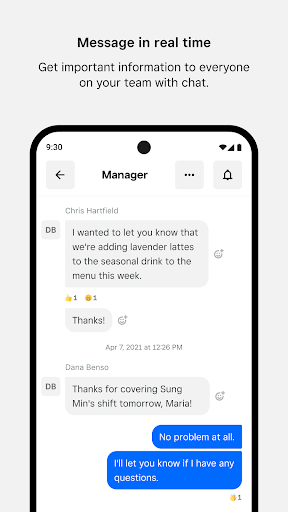
Real-time **messaging** within the app eliminates the need for sharing personal contact information and keeps communication streamlined. Employers can easily broadcast **announcements** and updates to the entire team, ensuring everyone stays informed about schedule changes, events, or other important news. This instant communication fosters better collaboration and reduces miscommunication.
Shifts and Scheduling
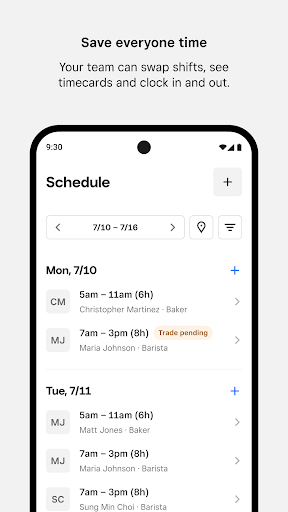
Square Team allows for flexible **team-initiated scheduling**, enabling staff to request time off, swap shifts, or claim open shifts directly within the app. Employees can view their **timecards**, scheduled hours, and **estimated pay**, making it simple to stay updated on their work commitments. The **clock in and out** feature keeps track of hours, while notifications help remind staff about upcoming shifts or breaks, fostering punctuality and accountability.
Payroll and Compensation
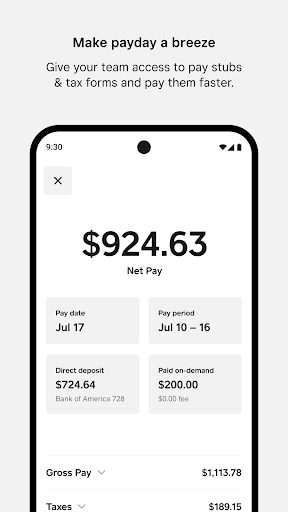
For businesses using **Square Payroll**, the app simplifies the payment process by automatically importing **timecards**, tips, and commissions. Employers can easily pay **W2 employees** and **1099 contractors**, with Square handling payroll taxes and filings. Employees can **view their estimated earnings** beforehand, access **pay stubs**, and **download tax forms** directly from their mobile devices. For staff paid via Square Payroll, the app facilitates faster payments through integrations like Cash App, providing convenience and transparency.
Team Management and Personal Settings
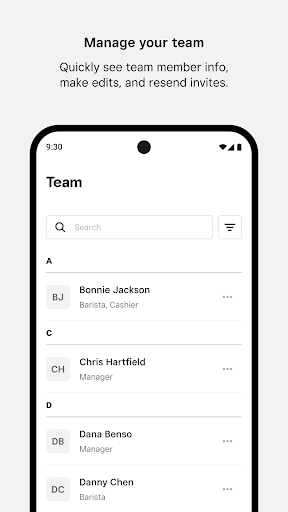
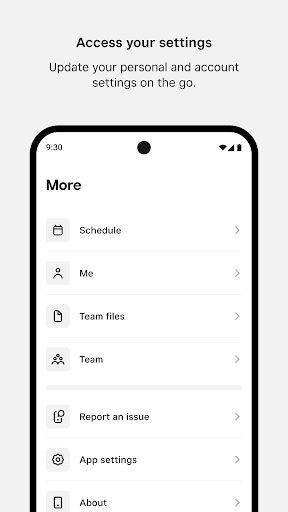
Managers can quickly view and edit **team member information**, resend invitations, or add new members—all from within the app. Team members can also update their **personal and account settings**, ensuring their profiles are current. This ease of management helps maintain an organized team structure and improves overall communication flow.
Why Choose Square Team?
Square Team stands out for its intuitive design and comprehensive feature set that caters to various team sizes and industries. Its **cross-platform compatibility** — available on both Android and iOS — makes it accessible on multiple devices, whether you're on the move or at a desk. The app’s focus on **collaboration** reduces the typical back-and-forth of project coordination by consolidating task management and team communication into a single platform. The minimalist, clean interface minimizes cognitive load, allowing teams to focus on their core tasks and accomplish more efficiently. Overall, Square Team is an excellent choice for businesses aiming to improve teamwork, scheduling accuracy, and payroll management in a simple, effective way.
Pros
- User-friendly interface for easy navigation.
- Seamless integration with other Square applications.
- Strong security features to protect data.
- Customizable options to meet business needs.
- Reliable customer support available.
Cons
- Limited offline capabilities.
- Requires a stable internet connection.
- Some features can be expensive.
- Initial setup may be time-consuming.
- Occasional synchronization problems reported.











