


Discover the Power of TeamSpeak 3 - Voice Chat
This spam-free platform offers the flexibility to operate on your own private server—ensuring secure communication with your guild, clan, or colleagues. Alternatively, you can join one of the numerous public servers and channels to connect with a broader community. TeamSpeak 3 for Android is optimized for mobile devices, ensuring you stay connected wherever you go.
To communicate with other TeamSpeak 3 users, you need to connect to a TeamSpeak 3 server. Direct user-to-user connections are not available; instead, your device connects to these servers, which host various channels for different groups or communities. For public server access, simply download the TeamSpeak desktop client, go to Connections > Server List, and select a server. For private servers, contact your admin for connection details.
Key Features That Enhance Your Voice Communication Experience
- Synchronized bookmarks for quick server and channel access
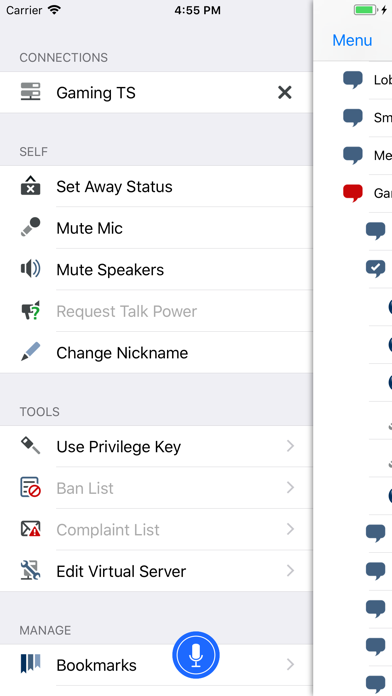
- Multi-server connectivity allows you to switch between multiple servers effortlessly
- Push-To-Talk (PTT) and voice activation provide flexible communication options
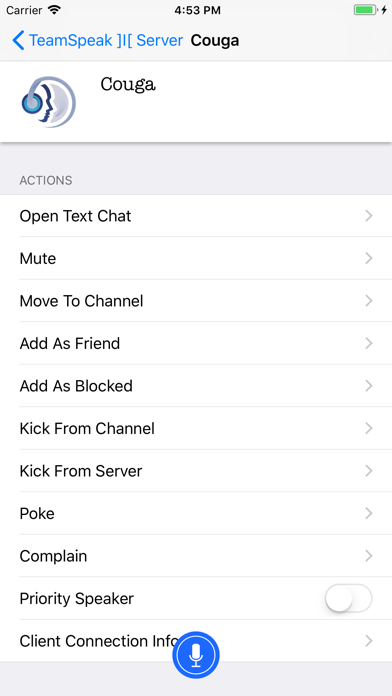
- Support for most admin functions like user management and moderation
- Send and receive text messages within channels
- Identity and contacts management simplifies user organization
- Detailed channel and player information
- Notifications for player status changes
- Regular, free app updates improve functionality and security
Developers continuously work on enhancing TeamSpeak 3, adding new features and fixing issues. If you encounter bugs, the developers appreciate feedback and often provide quick fixes—sometimes with rewarding users who assist in identifying the problems. By choosing to rate the app based on its overall features and performance, you contribute toward ongoing improvements.
Experience the Difference: User Insights on TeamSpeak 3
Fresh users might notice the nostalgic and user-friendly interface, reminiscent of classic PC versions. Setting up a server is straightforward, and you can start chatting almost immediately. The app allows extensive customization—from audio quality to interface layout—giving you a tailored communication experience. Whether you’re coordinating a raid in your favorite MMORPG or hosting a virtual family reunion, TeamSpeak 3 handles large groups with ease, supporting multiple channels simultaneously without confusion.
When it comes to security and privacy, TeamSpeak 3 excels. It uses military-grade encryption to keep your conversations safe and private. The app also shies away from requiring registration with personal details, enhancing your anonymity and peace of mind. These qualities make it a top choice for sensitive discussions and privacy-conscious users.
Overall, TeamSpeak 3 is a reliable and versatile voice communication solution, perfect for gaming, professional collaboration, or social interaction. Its rich feature set, performance, and commitment to privacy make it a standout in the crowded voice chat app market. Whether you're on the move or at your desktop, TeamSpeak 3 keeps you connected and ready for the action. Give it a try today and experience high-quality voice chat like never before!
Pros
- High-quality audio clarity
- Low latency communication
- Support across multiple platforms
- Customizable channels
- Strong security features
Cons
- Complicated setup process for beginners
- Limited features available for free
- Occasional disconnections
- Outdated user interface design
- In-app purchases are necessary
You May Like

Google Messages
Communication
4.6
Contacts
Communication
3.5
Messenger
Communication
4.7
Carrier Services
Communication
4.2
Opera Mini: Fast Web Browser
Communication
4.7
Discord - Talk, Play, Hang Out
Communication
4.7
Messenger Kids – The Messaging
Communication
4.3
Zangi Private Messenger
Communication
4
Plus Messenger
Communication
3.9
Whoscall: Safer Together
Communication
4.7
Messenger SMS - Text Messages
Communication
4.7
WAMR: Reveal deleted messages!
Communication
4.4