

Introduction to Game Booster Power GFX Lag Fix
Are you tired of experiencing lag spikes and performance drops during intense gaming sessions on your mobile device? If so, Game Booster Power GFX Lag Fix is designed to be your ultimate gaming companion. This innovative app focuses on optimizing your device's resources to ensure smooth, lag-free gameplay. Whether you're a casual gamer or a dedicated enthusiast, this application can significantly improve your gaming experience by reducing delays, enhancing graphics, and monitoring device health—all in real-time.
Key Features of Game Booster Power GFX Lag Fix
All-In-One Gaming Optimization Toolbox
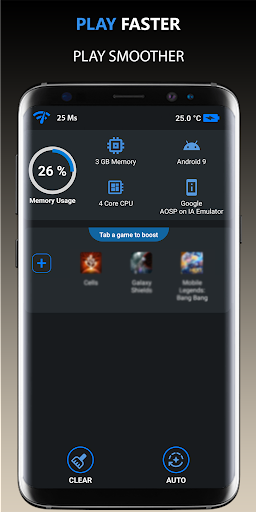
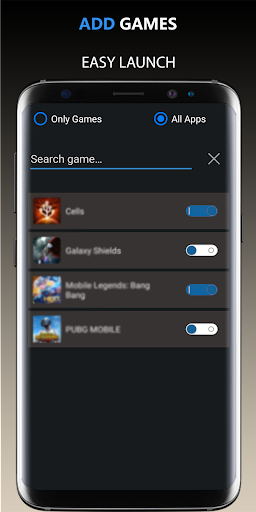
The app acts as an All-In-One Toolbox for gamers, combining several essential tools into a single interface. You can launch your games efficiently with a dedicated Game Launcher and activate Game Booster functions with just one tap, saving you time and effort. The Lag analysis feature helps you identify network and performance issues, allowing for targeted improvements.
Performance Enhancement Tools
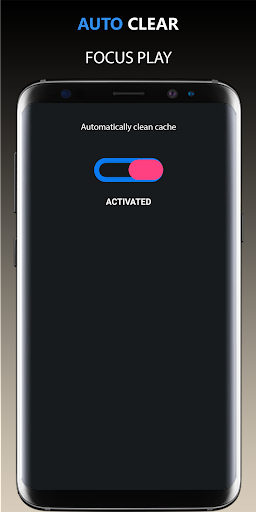
One of the most appreciated aspects of Game Booster Power GFX Lag Fix is its ability to automatically boost your device's performance by closing unnecessary background apps. It optimizes your CPU and GPU settings, effectively giving your device a performance boost tailored specifically for gaming. The app also incorporates a Hardware Monitor which displays real-time data such as memory load, battery temperature, and network latency to help you keep tabs on your device’s health during gameplay.
Graphic Optimization & Benchmarking
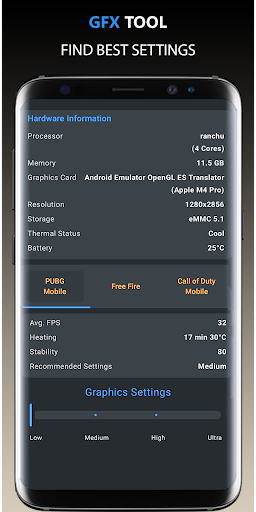
The embedded GFX Benchmark Tool assists gamers in achieving the best visual performance by detecting the high FPS settings suitable for your device. This ensures you can enjoy crisp graphics without sacrificing smoothness, enhancing your overall gaming experience. As new games are added continuously, the app stays updated to support the latest titles and graphic optimization features.
Permissions & Usage
The app requires Internet access for network listening and pinger functionalities, and permission to kill background apps to free up system resources. These features work together seamlessly to ensure your device is always primed for gaming excellence.
Why Gamers Love Game Booster Power GFX Lag Fix
Many users have reported noticeable improvements in gaming performance after using Game Booster Power GFX Lag Fix. The app’s auto-boost feature simplifies performance tuning, so you don’t need to manually change settings or worry about lag ruining your gaming fun. The intuitive interface makes it accessible even for those with limited technical knowledge, while the real-time monitoring tools allow you to keep an eye on device temperatures and network latency, preventing overheating and lag spikes.
Performance i.e., Does It Truly Deliver?
In practical application, the effectiveness of Game Booster Power GFX Lag Fix is well recognized. Many users have experienced smoother gameplay, reduced lag instances, and better frame rates, especially in resource-intensive games. While it may not turn an aging device into a high-end gaming machine, the app offers meaningful performance enhancements that can help you optimize your device’s capabilities and extend its gaming lifespan.
Conclusion
If you're seeking an all-in-one solution to improve gaming performance on your mobile device, Game Booster Power GFX Lag Fix is definitely worth trying. Its combination of performance boosting, graphic optimization, and device monitoring makes it a powerful tool for gamers aiming for the best possible experience. Download the app today and elevate your mobile gaming to new heights with fewer lag spikes and more immersive gameplay!
Pros
- Enhances game performance effectively
- User-friendly interface for straightforward navigation
- Extends device battery life
- Minimizes game lag and stuttering
- Compatible with most Android games
Cons
- May not function on all devices
- Includes in-app advertisements
- Features are limited in the free version
- Requires internet connection for full features
- May occasionally crash on older devices











