
Frequently Asked Questions
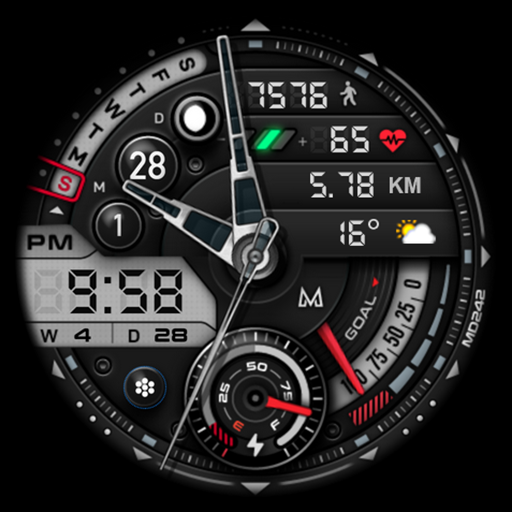
What features does the MD242 Hybrid watch face offer?
The MD242 Hybrid watch face combines both digital and analog display features to provide a comprehensive timekeeping experience. It includes customizable display options, support for multiple time zones, weather updates, a step counter, heart rate monitoring, and battery status indicators. Users can personalize the watch face with various color themes and complications to match their style and preferences.
Is the MD242 Hybrid watch face compatible with all smartwatch brands?
The MD242 Hybrid watch face is primarily designed for Wear OS and Tizen operating systems, making it compatible with a wide range of smartwatches such as Samsung Galaxy Watch, Fossil, and other Android-based devices. It is not compatible with Apple Watch due to its different operating system. Users should verify their watch’s compatibility before downloading.
How can I customize the MD242 Hybrid watch face to suit my preferences?
Customization is a core feature of the MD242 Hybrid watch face. Users can easily modify color themes, select different complications, and adjust the layout to match their style. The app offers an intuitive interface allowing drag-and-drop arrangement of elements, selection of various widgets, and configuration of displayed information like weather or fitness data either from their smartwatch or connected smartphone app.
Does the MD242 Hybrid watch face drain the smartwatch battery quickly?
The MD242 Hybrid watch face is optimized to reduce battery consumption. Its impact on battery life varies depending on the smartwatch model and usage patterns. It employs efficient algorithms to ensure smooth operation of all features without significantly draining the battery. Users can further extend battery life by adjusting settings such as brightness and update frequency.
What is the installation process for the MD242 Hybrid watch face?
Installing the MD242 Hybrid watch face is simple. Users should download the app from the Google Play Store or Samsung Galaxy Store based on their smartwatch brand. After installation, they can open the app on their smartwatch and select the MD242 Hybrid watch face as their preferred display. The app will guide them through initial setup, customization options, and syncing with their smartphone.
You May Like

Zedge™ Wallpapers & Ringtones
Personalization
4.6
ThemeKit - Themes & Widgets
Personalization
4.7
Fonts Keyboard Themes & Emoji
Personalization
4.7
Pixel 4D™ Live Wallpapers
Personalization
4.7
Edge Lighting - Borderlight
Personalization
4.8
Themes
Personalization
4.2
Launcher OS™
Personalization
4.4
Make Money: Play & Earn Cash
Personalization
4.5
Microsoft Launcher
Personalization
4.7
Themepack - App Icons, Widgets
Personalization
4.7
Wallpapers HD - Backgrounds 4K
Personalization
4.7
LED Keyboard: Colorful RGB
Personalization
4.5