


Discover eDrawings: The Ultimate CAD Viewer for Mobile Devices
In the realm of computer-aided design (CAD), having a reliable and versatile viewing tool can greatly enhance your workflow and collaboration efforts. eDrawings emerges as a standout application designed specifically for Android phones and tablets, providing users with an intuitive platform to view, analyze, and share complex 3D and 2D design files on the go. This innovative app simplifies the process of interpreting detailed CAD data without the need for heavy desktop software, making it an essential tool for engineers, designers, and product developers alike.
Key Features of eDrawings for Mobile CAD Visualization
Native Support for CAD and Drawing Files
The strength of eDrawings lies in its ability to open and view a broad spectrum of CAD formats. Whether working with native SolidWorks® parts, assemblies, and drawings, or common 3D formats like STEP, IGES, JT, and IFC, or 2D files such as DWG, DXF, the app ensures seamless access to your design data. Files can be loaded directly from email attachments, cloud storage services like Dropbox™, Google Drive, and SkyDrive®, or via web and FTP servers, offering unparalleled flexibility in file management.
Interactive 3D and 2D Viewing
Using multi-touch gestures, users can effortlessly **pan, zoom, and rotate** models to examine details from every angle. The app also supports the viewing of drawing sheets, exploded views from SolidWorks, and full-screen mode for an immersive experience. Features like animating standard views and browsing multiple sheets allow for comprehensive analysis on mobile devices.
Enhanced Collaboration and Communication
One of the most valuable aspects of eDrawings is its ability to facilitate communication among team members and stakeholders. Files can be quickly shared via email, with annotations, text notes, and freehand markups preserved within the file. This capability streamlines feedback, review processes, and collaborative design reviews, even when team members are geographically dispersed.
Upgrade to eDrawings Pro: Unlock Advanced Capabilities
In-App Purchase for Extended Functionality
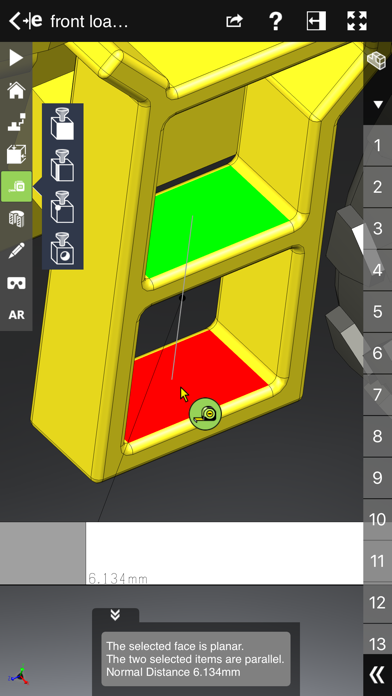
By opting for the eDrawings Pro upgrade through in-app purchase, users gain access to a suite of powerful tools that enhance productivity and precision. These include the ability to measure
- Distance, angles, and lengths
- Point-to-point measurements
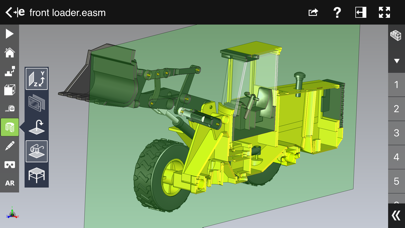
- Cross-sectional views in XY, YZ, ZX directions
Furthermore, dynamic cross-section viewing allows users to drag cross-section planes across models for in-depth analysis. Creating markups with notes and freehand drawings, along with the ability to share marked-up files with full history, makes collaborative review sessions more effective and efficient.
Intuitive User Experience and Performance Optimization
Designed with user convenience in mind, eDrawings boasts an intuitive and easy-to-navigate interface that doesn't require technical expertise. The graphics are crisp and responsive, supporting smooth operation even with large or complex files. The app's optimization ensures that performance remains fluid on various mobile devices, enabling users to examine every detail without lag.
Although the free version provides extensive features, the eDrawings Pro upgrade is highly recommended for professionals who need advanced measurement, cross-section, and markup tools. It’s a small investment that can significantly elevate your CAD review and collaboration workflows.
Augmented Reality and Additional Functionalities
Excitingly, eDrawings incorporates augmented reality (AR) features, allowing you to visualize your CAD models in real-world environments. Although some devices might encounter clipped buttons in AR mode, adjustments via the settings menu provide access to all functionalities. This AR capability adds a new dimension to design visualization and client presentations.
For further information or support, users are encouraged to visit official websites like SolidWorks or eDrawings Viewer.
Final Thoughts: Why eDrawings is an Indispensable CAD Companion
If you’re involved in product design, engineering, or manufacturing, eDrawings offers an unmatched combination of versatility, ease of use, and collaborative features for mobile CAD viewing. Its support for native SolidWorks files, multi-touch navigation, annotation capabilities, and augmented reality visualization make it a powerful tool for on-the-spot design review, client demonstrations, or simple file sharing. Whether you’re an experienced engineer or just beginning your CAD journey, this app can significantly enhance your productivity and project communication. Download eDrawings today and transform how you view, share, and collaborate on your 3D models!
Pros
- User-friendly interface
- Supports various file formats
- Collaborative features
- Cross-platform compatibility
- Interactive 3D models
Cons
- Limited free version
- Occasional lag with large files
- Requires internet for full features
- Not ideal for complex designs
- Lacks advanced editing tools











