
Discover the Ultimate Navigation Companion with Compass
Are you someone who loves exploring the outdoors, traveling to new places, or simply needs a reliable tool to help you find your way? Look no further than Compass, the sleek and minimalistic app designed to combine elegance with powerful navigation features. Whether you're on Android smartphones or wearing a compatible Wear OS smartwatch, this app is your digital North Star, guiding you effortlessly through every journey.
Intuitive and Modern Interface for Effortless Navigation
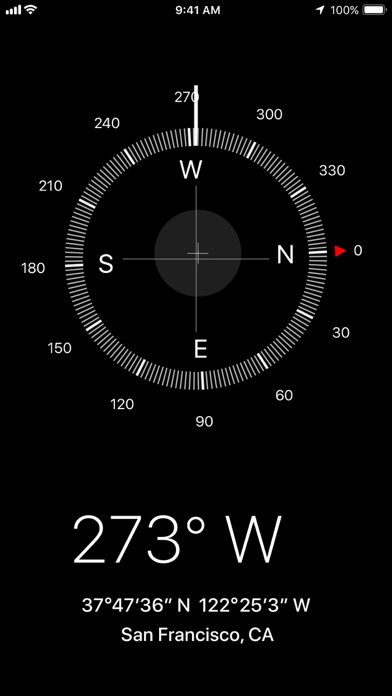
From the moment you open Compass, you'll notice its clean, modern design that prioritizes ease of use. The dark-themed interface not only looks stylish but also reduces eye strain and adapts well to various lighting conditions. The compass needle smoothly swings into alignment with the Earth's magnetic field, giving you a real-time, precise indication of orientation. With a straightforward layout, even users with minimal technical experience can navigate through its features seamlessly.
Powerful Features Enhancing Your Navigational Experience
Accurate Location Coordinates and Multiple Formats
One of the standout features of Compass is its ability to display your exact location's coordinates along with altitude information. Supporting various formats including DMS (Degrees, Minutes, Seconds), DDM (Degrees and Decimal Minutes), DD, UTM, MGRS, and OLC (Plus Codes), it caters to a wide range of navigation needs.
Save and Find Places Easily
Planning a trip? You can save important places within Compass to quickly see their direction and distance from your current position. This makes it easy to revisit spots or navigate back to a specific location without hassle.
Enhanced Accuracy with Magnetic Declination
The app intelligently adjusts for geomagnetic declination, ensuring your compass points to true north instead of magnetic north. This feature enhances the reliability of your navigation, especially when navigating over large distances or in areas with magnetic anomalies.
Useful Tools for Everyday Navigation and DIY Projects
Compass includes a variety of handy tools such as an integrated bubble level for checking surface levels, an angle measurement feature to compare two orientations, and the ability to customize units for angles, distances, and coordinates according to your preferences. Whether you're a hiker, carpenter, or DIY enthusiast, these features support your projects and outdoor activities.
Customizable Themes and Night Mode Features
Switch between dark and light themes to match your lighting conditions or personal style. The dynamic colors feature adapts the app's appearance based on your wallpaper, providing a personalized experience. For night owls and night explorers, the red screen filter dramatically reduces screen brightness and light pollution, aiding better night vision.
Haptic Feedback and Visibility Enhancements
Feel each turn with immersive haptic feedback, giving tactile confirmation as you navigate. For environments with challenging lighting, switch to a high contrast display mode to improve visibility. Additionally, the app can display the current magnetic field strength in micro-Tesla units and detects anomalies, alerting you when nearby objects interfere with the compass sensor.
Offline Functionality and Privacy Assurance
Designed to work offline, Compass allows you to navigate without an internet connection—perfect for remote adventures. Plus, prioritizing your privacy, it operates without trackers or analytics, ensuring your location and usage data remain secure.
Why Choose Compass?
Whether you're an avid hiker, traveler, outdoor explorer, or someone who just needs a dependable navigation tool, Compass offers a balanced mix of aesthetics, functionality, and privacy. Its reliable performance, intuitive design, and feature-rich options make it a must-have app for all, from seasoned adventurers to casual users. Feel confident in your direction and enjoy a seamless navigation experience—download Compass today and elevate your explorations to the next level.
Pros
- Provides accurate direction tracking
- Features a user-friendly interface
- Works offline without requiring internet connection
- Uses minimal battery power
- Offers customizable settings
Cons
- Contains intrusive advertisements
- Lacks advanced or premium features
- Has limited support for iOS devices
- Occasionally experiences bugs after updates
- Requires access to location permissions











