Introducing the NDI HX Camera: Your Ultimate Live Streaming Tool
The NDI HX Camera app is designed to transform your iOS device into a professional-grade live streaming camera, making it one of the most convenient solutions for content creators, broadcasters, and professionals alike. Whether you’re vlogging, hosting webinars, or streaming live events, this app offers an easy-to-use platform to produce high-quality, low-latency video and audio streams directly from your smartphone.
Seamless Setup and User-Friendly Interface
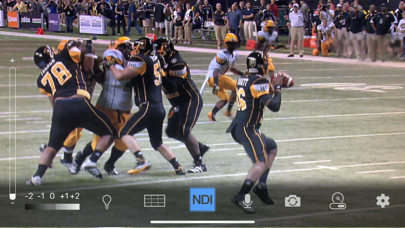
One of the standout features of the NDI HX Camera is its incredibly smooth setup process. You simply download the app, follow a few straightforward prompts, and your device is ready to stream. Designed with user experience in mind, the app’s modernized UI provides an intuitive interface that simplifies live broadcasting—even for users with minimal technical expertise. The latest update, V1.7, enhances this experience further with a streamlined interface, a fixed viewfinder that displays the full video height, and a tally light with multiple modes to keep you informed during your stream.
Professional Features at Your Fingertips
The app offers a suite of professional settings that you can access right from your mobile device, including options to choose between high, medium, and low bandwidth modes to adapt to your network environment. Additional features like grid overlay, autofocus, and pinch-to-zoom allow for flexible and creative control over your shots. Users can also switch between the front and rear cameras, monitor connection strength via an on-screen meter, and see preview and on-air status through the integrated tally display.
Enhanced Flexibility for Content Creation
With the NDI HX Camera app, you gain the ability to add new camera angles and vantage points to your broadcasts, significantly enhancing the dynamic quality of your content. It supports multiple resolutions and frame rates, enabling you to deliver tailored streams suitable for different audiences. The app’s compatibility with NDI 4 or newer systems ensures seamless integration with professional live production setups, transforming your smartphone into a key source in your production workflow.
Optimized for Reliable Live Streaming
Connectivity is crucial during live broadcasts, and the NDI HX Camera excels in this area. It allows users to connect effortlessly to popular streaming platforms like MS Teams, Skype, Zoom, and others, making remote and online broadcasts smoother than ever. The app also manages multiple device and camera switching without noticeable delay, ensuring a professional and polished streaming experience. Additionally, features like battery optimization help prolong your streaming sessions, preventing unexpected shutdowns during critical moments.
Ideal for Content Creators and Broadcasters
This app is especially beneficial for content creators, live streamers, and professional broadcasters. Its portability combined with professional features makes it perfect for vlogging, live events, webcasts, or online meetings. The ability to adjust exposure, focus, and white balance offers creative freedom, while its low-latency streaming ensures your audience experiences real-time broadcasting without lag. Whether you're a casual user or a seasoned professional, the NDI HX Camera empowers you to deliver high-quality streams easily and reliably.
Final Thoughts
In summary, NDI HX Camera is a must-have application for anyone looking to elevate their live streaming setup. Its combination of ease of use, professional features, and robust connectivity makes it an ideal tool for both novices and experts. Bring your mobile device into your live production environment effortlessly, and take your content to the next level with this powerful streaming app.
Pros
- Simple to set up and use, ideal for beginners.
- Delivers high-quality video streaming.
- Supports a variety of streaming platforms.
- Offers low latency for real-time interactions.
- Compatible with both Android and iOS devices.
Cons
- Can drain battery life significantly.
- Needs a stable internet connection for optimal performance.
- Limited free features; requires a premium subscription for full access.
- Occasional connectivity problems have been reported.
- User interface may be less intuitive for newcomers.