

Introducing Hyundai Digital Key
Discover the future of vehicle access with Hyundai Digital Key. This innovative app transforms your smartphone into a smart, convenient key that allows you to control your Hyundai vehicle effortlessly. Whether you're in a hurry or managing multiple drivers, Hyundai Digital Key streamlines your driving experience by providing quick and secure access to your car directly from your mobile device.
Key Features of Hyundai Digital Key
With Hyundai Digital Key, you can perform essential vehicle functions such as lock, unlock, and start your Hyundai without ever reaching for physical keys. When you approach your vehicle, simply tap your smartphone on the door handle equipped with NFC technology to unlock or lock your vehicle. For ignition, just place your compatible smartphone onto the wireless charging pad to start your engine—no keys required! This seamless process ensures that accessing your vehicle is both quick and hassle-free.
Remote Control and Management
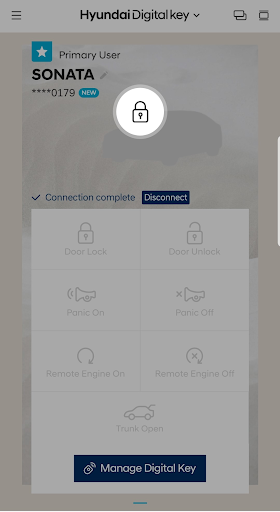
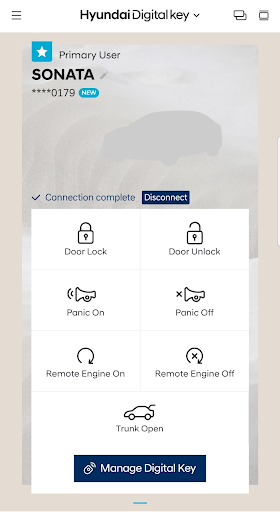
The Hyundai Digital Key app also offers remote control capabilities via Bluetooth. Using the app, you can start or stop your engine, lock or unlock doors, activate panic mode, or even open the trunk from a distance. This feature is particularly useful when you need to prepare your vehicle before your arrival or manage it remotely when you're away. Managing digital keys is simple—you can create, share, and revoke access for trusted friends or family members through the app or on MyHyundai.com. This control ensures you always have the right level of access and security for your vehicle.
Sharing and Managing Digital Keys
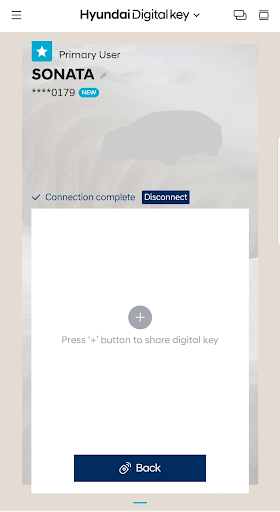
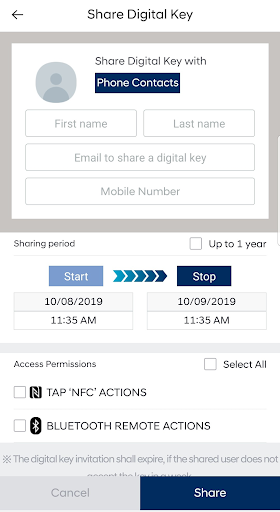
One standout aspect of Hyundai Digital Key is its digital key sharing functionality. Need to lend your car? Easily generate a digital key and send an invitation to someone via the app. Once accepted, they can access and control your vehicle based on the permissions you assign and the time frame you specify. You can also pause or delete shared keys at any time, giving you full control over who has access to your vehicle. This feature makes vehicle sharing safe, flexible, and convenient.
Why Hyundai Digital Key Is a Game-Changer
Many drivers dread the hassle of fumbling for keys, especially during busy mornings or bad weather. The Hyundai Digital Key app eliminates those frustrations by turning your smartphone into a fully functional car key. Designed primarily for Android smartphones, setting up the app is straightforward—just pair it with your vehicle by hovering your phone near the NFC reader on the driver’s door handle. Once connected, you’re ready to unlock, start, and control your vehicle remotely, all from your phone.
Enhanced Security and Personalization
Security is a top priority with Hyundai Digital Key. It uses NFC technology combined with robust authentication features to safeguard your vehicle against unauthorized access. Plus, the app allows you to create personalized user profiles, ensuring that different drivers can have their own preferred settings. Whether it’s seat adjustments, mirror positions, or climate controls, your vehicle will automatically adjust according to your profile when you unlock it. This personalized approach enhances comfort and convenience for every driver.
Final Thoughts
Overall, Hyundai Digital Key is a significant step forward in automotive technology, merging convenience, security, and innovative control into one easy-to-use app. Although currently available only for Android devices, this technology demonstrates Hyundai’s commitment to enhancing the driver experience through smart solutions. If you own a compatible Hyundai vehicle and are looking to upgrade your everyday driving routine, the Hyundai Digital Key app is definitely worth exploring. Say goodbye to keys and hello to a more connected, effortless way to access and control your vehicle—making every journey more seamless and enjoyable.
Pros
- Convenient keyless entry and starting
- Easy sharing of keys with family members
- Improved security through encryption
- Smooth integration with Hyundai vehicles
- User customizable settings
Cons
- Limited to Hyundai models that support compatibility
- Requires a smartphone to operate the system
- May deplete phone battery rapidly
- Possible connectivity problems
- Initial setup process can be complicated











