

Preference Manager: Addon – The Ultimate Tool for Managing App Shared Preferences
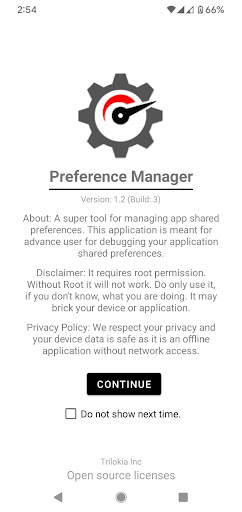
Preference Manager: Addon is a powerful and intuitive application designed for advanced users who want to gain deeper control over their device's shared preferences. This tool is essential for those who enjoy customizing their Android experience, offering a streamlined way to debug and modify app settings at a granular level. Designed as an addon for Gamers GLTool Pro, it elevates your customization capabilities, making it an indispensable part of your device management toolkit.
Key Features of Preference Manager: Addon
User-Friendly Interface and Ease of Navigation
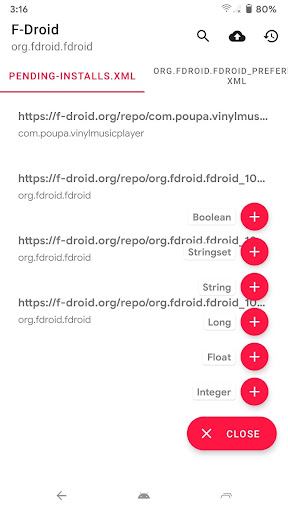
Upon launching Preference Manager: Addon, users are welcomed with a clean and organized interface that emphasizes simplicity without sacrificing functionality. The design is intuitive, ensuring that even novice users can navigate through various options effortlessly. Everything is conveniently placed, enabling you to access and modify shared preferences with just a few taps.
Deep Customization and Profile Management
This app shines in its ability to offer deep customization of your device's settings. Whether you're adjusting permissions, managing notifications, or tweaking system parameters, Preference Manager: Addon provides comprehensive tools to do so. One particularly useful feature is the ability to create and save profiles for different scenarios, such as work, travel, or gaming. This allows you to quickly switch between preferred settings without hassle, enhancing your overall user experience.
Enhanced Performance Optimization
Performance improvement is a key highlight of this addon. After using Preference Manager: Addon for a couple of weeks, many users report noticeable enhancements in speed and battery life. The app intelligently manages background processes and resource allocation, ensuring your device runs smoothly and efficiently. This feature makes it an excellent choice for users seeking to maximize their device’s capabilities without installing additional bloatware.
Robust Security and Privacy
Security is a top priority in today’s digital landscape, and Preference Manager: Addon addresses this concern by offering tools to meticulously manage app permissions. As an offline application with no network access, the app ensures that your personal data remains protected. The developers emphasize privacy, making it suitable for users who value data security and want peace of mind while customizing their device.
Important Usage Considerations
Disclaimer: Preference Manager: Addon requires root permissions to function properly. Without root access, the app will not operate. This tool is intended for users who are familiar with rooted devices and understand the potential risks involved. Improper use can result in bricking your device or disrupting application functionality. Therefore, use this app only if you are confident in your technical skills and aware of the implications.
Furthermore, as an addon application for Gamers GLTool Pro, it enhances the core functionalities of the main app but is not responsible for any damage that may occur during operation. Always back up your data beforehand and proceed cautiously.
Conclusion: Why Choose Preference Manager: Addon?
If you are a power user seeking maximum control over your Android device, Preference Manager: Addon is an essential tool. Its combination of a user-friendly interface, customizable profiles, security features, and performance optimization makes it stand out among similar apps. Whether you want to tweak app preferences, enhance device performance, or secure your data, this addon provides all the necessary tools in one package.
By integrating Preference Manager: Addon into your device management routine, you can achieve a more personalized, efficient, and secure mobile experience. Remember to use root permissions responsibly, and unlock the full potential of your device with this comprehensive preference management solution.
Pros
- User-friendly interface
- Highly customizable options
- Supports multiple devices
- Regular updates
- Offline mode available
Cons
- Limited features in the free version
- Requires in-app purchases
- Occasional synchronization issues
- Ads displayed in the free version
- Can consume significant system resources











