






Remini - AI Photo Enhancer: Transform Your Old Photos into Stunning HD Images
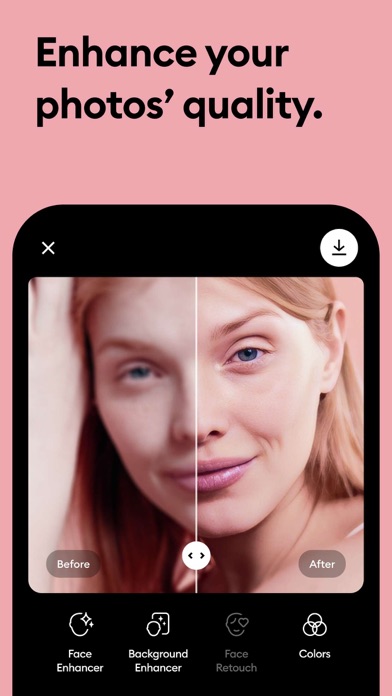
If you’ve ever stumbled upon old, pixelated, or damaged photos and wished they looked clearer, Remini is the perfect solution to breathe new life into your cherished memories. Leveraging cutting-edge Artificial Intelligence (AI) technology, this app specializes in transforming blurry, grainy, or low-quality images into professional-looking, high-definition photos with just a single tap. Whether you want to enhance family portraits, vintage travel snaps, or spontaneous selfies, Remini makes the process effortless and highly effective.
With over 100 million photos revitalized worldwide, Remini has established itself as one of the most popular and beloved photo enhancer apps. It’s not just about improving image clarity — it’s about unlocking details you might not have noticed before and rediscovering stories hidden within your old pictures. The app’s intuitive interface ensures a seamless experience, making it accessible to both casual users and photo enthusiasts alike.
How Does Remini Work?
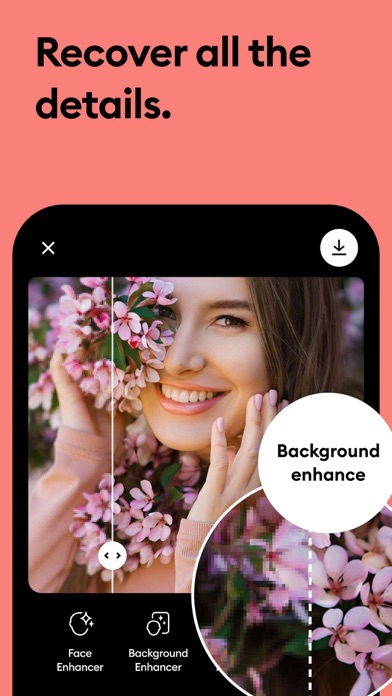
Getting started with Remini is simple. After installing the app, you just upload the photo you want to enhance. The AI-powered engine then processes the image, unblurring, sharpening, and increasing its pixel count to produce a stunning, crystal-clear result. The entire transformation process is quick, and you can instantly compare the original and enhanced versions to appreciate the difference.
The app’s chip into advanced AI algorithms ensures that the core essence and details of your images are preserved, while imperfections like scratches, blurriness, or pixelation are corrected. This makes Remini especially ideal for restoring vintage photos, old family albums, or any image that holds sentimental value but has suffered from age or damage.
When to Use Remini
Remini shines in various scenarios — whether you want to enhance portraits, selfies, or group photos. It’s perfect for reviving vintage family pictures and making travel memories look like they were shot yesterday. Even blurry night out photos can be sharpened for clearer, more vibrant results. Simply upload your photos, select the enhancement option, and watch as the app works its magic, revealing new details and restoring quality.
Furthermore, the app is a valuable tool for photographers, social media aficionados, and anyone looking to preserve and share high-quality images of their most treasured moments.
What Makes Remini Stand Out?
Unlike many other photo editing apps, Remini utilizes highly sophisticated AI capabilities that generate realistic and natural-looking results. Its ability to boost image resolution while maintaining the original essence of the photo distinguishes it from standard filters. Plus, batch processing allows users to enhance multiple images simultaneously, saving valuable time.
Many users are surprised to discover hidden details in their photos after enhancement — making Remini not just a restoration tool but a discovery platform that reveals stories and nuances in your images previously unseen.
Additional Features and Accessibility
The app supports multiple languages including English, Hindi, Japanese, Korean, Portuguese, Russian, Chinese, Spanish, and Thai. For those seeking unlimited access to all features, Remini offers subscription plans on a weekly or yearly basis.
Subscriptions are managed through your Google Account settings, and auto-renewal can be turned off if needed. Users also benefit from a free trial period, after which the subscription fee applies. The developers continually update the app, adding new features and improvements via consistent AI model enhancements.
Conclusion
Remini - AI Photo Enhancer is more than just a photo editing app — it’s a gateway to rediscover your past memories with clarity and vibrancy. Whether you have damaged vintage photographs or want to enhance your digital images for social sharing, Remini provides powerful, easy-to-use tools powered by advanced AI technology. It bridges the gap between nostalgia and modern imagery, allowing you to relive your favorite moments in stunning high definition.
Pros
- Enhances photo clarity effectively
- User-friendly interface
- Fast processing time
- Supports batch processing
- Restores old photos well
Cons
- Limited free version features
- Occasional over-sharpening
- Requires internet connection
- Ads in free version
- Subscription can be pricey










