

Android Auto - Your Smart Driving Companion
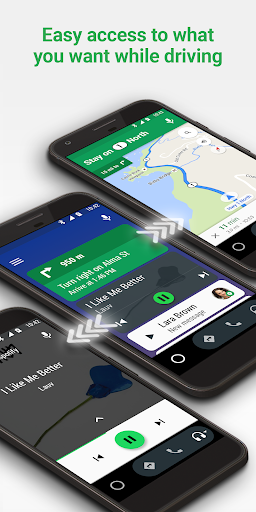
Android Auto is your smart driving companion that helps you stay focused, connected, and entertained with the powerful Google Assistant. Designed with a simplified interface, large buttons, and intuitive voice actions, Android Auto makes it easy to access your favorite apps from your phone while on the road. Whether you're navigating through city streets or cruising on highways, Android Auto enhances your driving experience by keeping essential functions within easy reach and minimizing distractions.
Seamless Integration for a Smoother Drive
One of the standout features of Android Auto is its ability to seamlessly integrate with your car's infotainment system. Once you connect your compatible device with a high-quality USB cable, Android Auto takes control and transforms your car's display into a clean, user-friendly interface. It feels like your phone and car have become one, delivering all the key controls on a simplified screen that’s easy to navigate. This integration allows you to access maps, music, messages, and more — all without taking your eyes off the road.
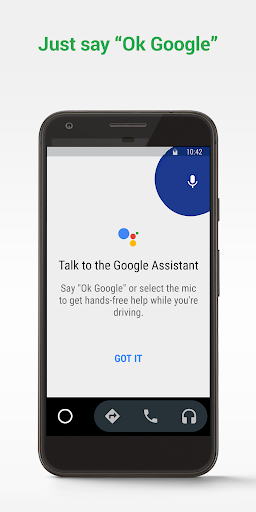
The voice command feature truly shines here. By simply saying "Ok Google", you can ask for directions, play music, send messages, check your calendar, and even set reminders. This hands-free approach helps you stay focused on driving while still managing your digital life effectively.
Navigation Made Easy
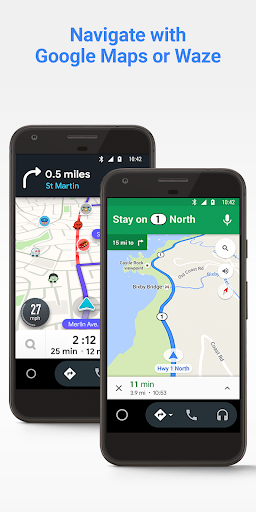
Navigation is a vital part of any driving app, and Android Auto excels with Google Maps and Waze. These apps offer real-time GPS navigation with traffic alerts, alternative routes, and updates on road hazards. Whether you're heading to an unfamiliar destination or just heading home, the visual display features large, easy-to-press buttons that make following directions straightforward. You can also easily find nearby fuel stations, restaurants, or coffee shops, making your journey more convenient and stress-free.
Entertainment at Your Fingertips
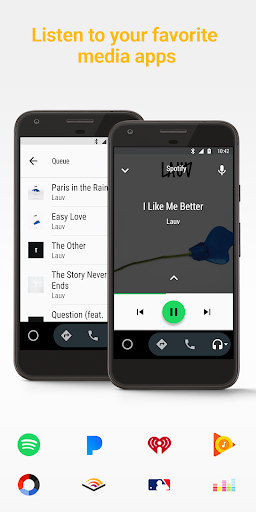
No road trip is complete without entertainment, and Android Auto ensures you stay entertained with your favorite media apps. Whether you prefer streaming services like Spotify, Pandora, or Google Play Music, or listening to radio, podcasts, or audiobooks, Android Auto provides direct control. You can switch playlists, change stations, or skip episodes effortlessly using voice commands or the car's touchscreen, all while keeping your focus on the road. This feature transforms long drives into enjoyable experiences, giving you access to a vast array of content at your command.
Keeping You Connected Safely
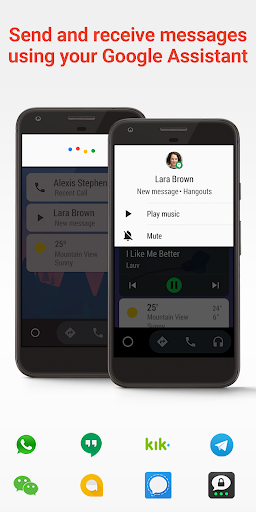
Staying connected without risking safety is a core benefit of Android Auto. Incoming messages and notifications appear on the display, and you can listen to them read aloud. Responding is just as simple with voice-to-text, allowing you to reply to texts or messages via multiple messaging platforms like SMS, Hangouts, WhatsApp, Skype, Telegram, WeChat, Kik, Google Allo, and others. This hands-free communication ensures you can stay in touch without compromising your attention on the road.
Getting Started with Android Auto
To enjoy Android Auto, you'll need a device running Android 6.0 or higher with an active data connection. Over 400 car models now support Android Auto; to see if your vehicle is compatible, check your owner’s manual or contact your manufacturer. Once compatible, connect your phone to your car using a quality USB cable, and launch the Android Auto app. For more information, visit android.com/auto.
Support and community resources are also available to help you make the most of Android Auto. Visit support.google.com/androidauto or the Android Auto community forums for assistance.
Why Drivers Love Android Auto
If you've ever struggled to navigate or manage your phone while driving, Android Auto acts as your reliable co-pilot. It streamlines your digital tasks into a safe, driver-friendly experience. From real-time navigation with Google Maps and Waze to voice-controlled music and messaging, Android Auto transforms your vehicle into a smart, connected space. Its intuitive design reduces distractions, helping you focus on the road and arrive safely at your destination.
Many users find that once they've experienced the convenience and safety features of Android Auto, they can't imagine driving without it. Whether you're a daily commuter or a road trip enthusiast, Android Auto is a game-changer that puts innovation and safety at the forefront of your driving experience.
Pros
- Seamless integration with car systems.
- Supports a wide range of apps.
- Voice command enhances safety.
- Regular updates improve features.
- Customizable interface.
Cons
- Limited app compatibility.
- Requires Android device.
- Can be distracting while driving.
- Connectivity issues reported.
- Not all vehicles are supported.











