







Introduction to MagicCall – Voice Changer App
Discover the fun and excitement brought by MagicCall, the innovative voice changer app designed to transform your calling experience. Whether you're looking to prank your friends, entertain loved ones, or add a humorous twist to your conversations, MagicCall offers an array of features that make every call memorable and entertaining.
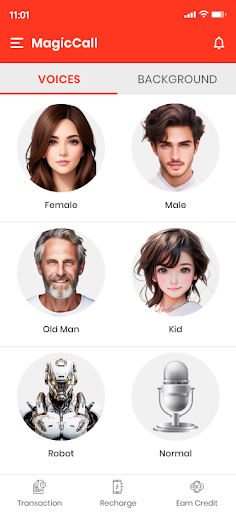
This app allows users to modify their voice in real-time during phone calls, opening up endless possibilities for creative and amusing interactions. From switching to a female voice, a kid’s voice, a cartoon character, or a AI robot voice, MagicCall ensures your voice transformation is smooth, natural, and fun. The app also includes a variety of background sounds such as traffic noise, birthday tunes, or concert atmospheres, allowing you to create convincing environmental effects that will leave your call recipient surprised or amused.
Imagine calling a friend and pretending you're stuck in a traffic jam, or wishing someone a happy birthday with a lively background song—MagicCall makes these scenarios possible with ease. Its cutting-edge technology generates human-like voices for various characters, enabling you to switch voices during the call and keep your friends guessing.
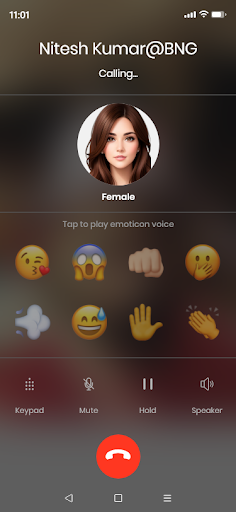
The sound emoticons feature adds an extra layer of fun by playing quick sound effects like kisses, slaps, claps, or even fart noises during your call. With MagicCall, making jokes or funny calls becomes effortless, affordable, and highly entertaining. Users have shared stories about how the app helps them make excuses with traffic noise backgrounds or prank classmates by sounding like their professor.
In summary, MagicCall isn't just a voice changer—it’s a pocket-sized amusement park. It’s perfect for lighthearted pranks, social gatherings, or simply brightening your day with silly voices and playful sound effects. Whether you're seeking a female to male voice changer, a kid voice, or immersive backgrounds like a concert or mountain scene, this app covers it all, providing a seamless, enjoyable, and humorous calling experience.
Features of the MagicCall App
Voice changer during call
- Enjoy a real-time voice changer during calls with options like female voice, kid voice, or cartoon voice.
- Seamlessly switch between voices during a conversation for maximum fun.
- Test your voice before making the call to ensure perfect effect.
- This is one of the cheapest ways to make funny and prank calls.
- Use sound emoticons like kisses, claps, or fart sounds to enhance your calls in real-time.
- Make funny international calls at nominal rates.
Voices and Backgrounds available on MagicCall
- Male to female voice changer
- Female to male voice changer
- Kid voice
- Grandpa voice
- Robot voice changer
- Rain background
- Concert background
- Birthday Song
- Traffic Background
- RaceCar Background
- Mountain Background
How to Make a Call Using MagicCall Voice Changer
- Select a voice type: Male, Female, Cartoon, or other options. Or pick a background theme such as Birthday Song, Traffic, Rain, or Music Concert.
- Choose the contact or dial a specific number you want to prank or surprise.
- Initiate the call with the MagicCall Voice Changer.
- Once connected, your voice will change into the selected voice or background theme.
- Use any sound emojis to add extra humor or effect.
- Wait for your friends or family to react with surprise or laughter!
Conclusion
With MagicCall, you can turn ordinary phone calls into extraordinary moments of laughter and fun. Its wide range of voice effects, background sounds, and sound emoticons makes it a top choice for pranksters, entertainers, or anyone looking to add humor to their conversations. Whether you want to impersonate a cartoon character, create a convincing traffic jam excuse, or surprise friends with a birthday wish accompanied by lively music, MagicCall provides all these features in a simple, user-friendly package. Make your calls memorable and bring a smile to everyone on the other end—give MagicCall a try today!
Pros
- User-friendly interface that simplifies navigation
- Offers a wide range of features to enhance user experience
- Regular updates improve functionality and security
- Excellent customer support available for troubleshooting
Cons
- Some advanced features may require a steep learning curve
- Occasional bugs reported in the latest version
- Limited customization options for certain settings
- Free version has restrictions that may affect usability










