


Analyze WiFi Launcher: Your Professional WiFi Detective on Your Smartphone
Are you looking for a reliable tool to monitor and analyze WiFi networks directly from your mobile device? Analyze WiFi Launcher is the ultimate WiFi detective app that empowers users with comprehensive network insights at their fingertips. Designed for both casual users and network professionals, this app offers a range of features to help you understand and optimize your WiFi experience seamlessly.
Key Features of Analyze WiFi Launcher
• Signal strength and data analysis
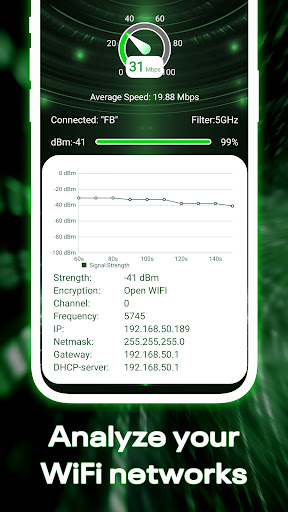
One of the primary capabilities of Analyze WiFi Launcher is its ability to rapidly query and display the current WiFi signal strength. This feature allows users to assess the quality of their network connection instantly. The app not only measures the signal but also provides detailed data analysis, giving you insights into fluctuations and connection stability over time.
• Device information and network details
Get comprehensive information about the connected device and network. This includes MAC address and network address, essential data for troubleshooting or network management. With these details, users can identify connected devices and ensure their network security or analyze network distribution within multiple devices.
• Network speed test and Ping latency monitoring
Optimize your internet experience with built-in network speed testing tools. Measure your download and upload speeds easily to understand your network's performance. Additionally, the app monitors Ping latency, helping you identify delays or lag issues that could impact your online activities, such as gaming or video streaming.
• User-Friendly Interface
The app boasts a simple UI interface that requires minimal learning effort. Whether you're a tech novice or an expert, navigating through the features is straightforward, ensuring quick access to important network data without unnecessary complexity.
Privacy Commitment and Data Security
Analyze WiFi Launcher is committed to user privacy and data security. It operates entirely locally on your device, ensuring that all network analysis occurs off-line. The app does not upload any data to external servers, making it a safe choice for users concerned about privacy. This focus on local operation guarantees that your network information remains confidential and under your control, aligning with legitimate network troubleshooting and analysis needs.
Conclusion
If you're seeking a powerful yet easy-to-use tool for analyzing your WiFi networks, Analyze WiFi Launcher is an excellent option. From checking signal strength to performing speed tests and viewing device details, this app provides all essential features to enhance your network management skills. Its commitment to privacy and a straightforward interface makes it suitable for all users. Install Analyze WiFi Launcher today and take control of your WiFi connectivity with confidence!
Pros
- User-friendly interface that simplifies navigation
- Provides a wide range of features to enhance user experience
- Regular updates introduce new functionalities and improvements
- Reliable performance with minimal downtime
- Excellent customer support available to assist users
Cons
- Some features may have a learning curve for new users
- Occasional bugs that require fixes in updates
- Premium features are locked behind a subscription paywall
- Limited customization options compared to competitors
- Requires a stable internet connection for full functionality











