

- Category Music
- Developer Roni Music
- Available on PC
- OS Windows 10 version 17763.0 or higher
- languages English (United States)
A Closer Look at Amazing Slow Downer for Windows: Your Musical Speed Control Companion
Imagine being able to slow down a tricky guitar solo, speed up a drum pattern, or loop a specific section of a song seamlessly — all with precision and ease. That's exactly what Amazing Slow Downer for Windows promises to deliver, making it an essential tool for musicians, music educators, and enthusiasts eager to dissect and master their favorite tunes without losing any tonal quality.
Developer and Core Strengths
Developed by Roni Music, a seasoned player in music software solutions, Amazing Slow Downer for Windows stands out through its focus on audio fidelity and user-centric features. The app's centerpiece lies in its ability to modify playback tempo and pitch independently, offering an intuitive yet powerful experience for users aiming to analyze music deeply, practice better, or create unique remixes.
- High-Precision Speed Adjustment: Change tempo from 0.1x to 4x without pitch distortion.
- Key-Independent Playback: Alter tempo without affecting pitch, maintaining original sound quality.
- Looping and Section Repeats: Easy-to-set loops for focused practice sessions or detailed analysis.
- Support for Multiple Audio Formats: Compatible with common formats, ensuring broad usability.
Targeted toward musicians, music teachers, students, and even casual listeners who wish to explore music at their own pace, the app caters to anyone invested in a deeper musical understanding.
Engaging the Musical Ears: A User-Friendly Experience
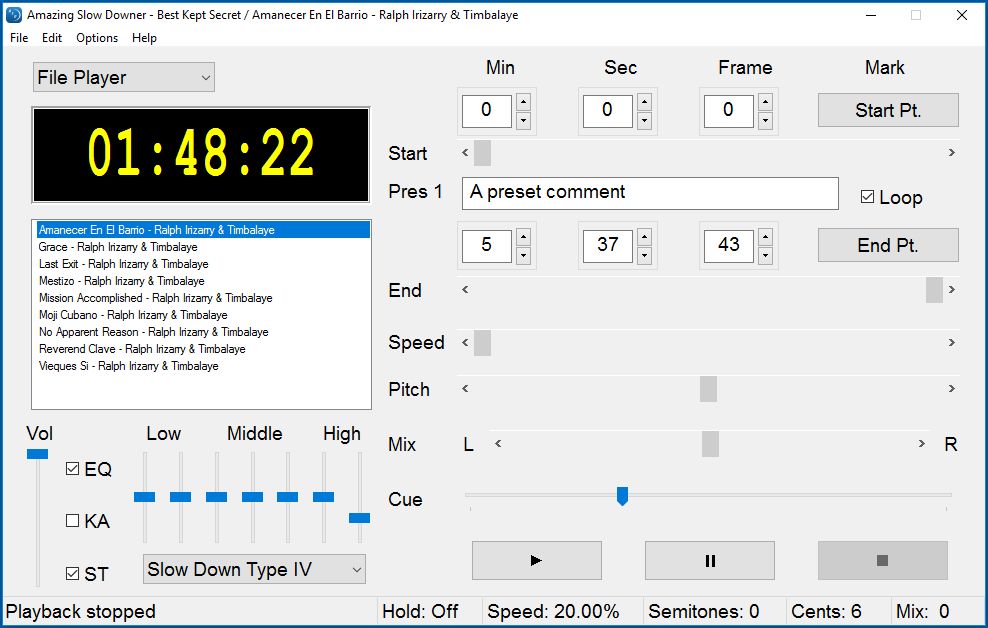
Stepping into Amazing Slow Downer feels akin to flipping a switch that grants you backstage access to your favorite songs. The interface strikes a balance between simplicity and functionality: a sleek window with minimal clutter, where buttons for play, pause, tempo adjustment, and looping are intuitively placed. Adjusting speed is as easy as sliding a bar — a gentle glide that makes you feel in control, like fine-tuning a musical instrument.
Performance-wise, the app operates smoothly even with lengthy tracks or multiple loops active. Transitions are seamless, ensuring no distracting audio glitches break your concentration. For new users, the learning curve is shallow; most features are self-explanatory, and a straightforward layout invites quick mastery. To seasoned users, the precision controls satisfy the need for detailed analysis, whether you're slowing down a complex jazz improvisation or speeding up a vocal line during practice.
Standing Out in a Crowd: Unique Strengths
In a market populated with basic audio players and slow-down apps, Amazing Slow Downer distinguishes itself primarily through its meticulous preservation of audio quality at varied speeds. Unlike some competitors that introduce distortion or unnatural timbres when changing playback rates, this app leverages advanced algorithms to keep the sound natural and intelligible.
Furthermore, the app's ability to assess rhythm pattern variety and manage test input latency tolerance makes it particularly valuable for musicians aiming to learn complex, syncopated pieces or irregular meter tracks. Its nuanced control and faithful reproduction enable users to analyze rhythm intricacies and tempo variations more accurately than many alternatives, which tend to simplify or distort rhythmic details.
Recommendations and Final Thoughts
All things considered, Amazing Slow Downer for Windows offers a reliable, high-quality tool for anyone serious about music practice and analysis. Its standout feature—the capacity to maintain audio fidelity at various speeds—serves as a true differentiator. I'd recommend this app to musicians seeking precision, educators needing effective tools for instruction, and curious listeners eager to understand music on a deeper level.
While it may lack some bells and whistles found in more multimedia-oriented apps, its specialized focus and robust performance make it a valuable addition to your musical toolkit. Whether you're dissecting a intricate guitar solo or practicing rhythmic patterns, Amazing Slow Downer is worth trying out. It's like having a personal music mentor guiding your ear and timing – a subtle yet powerful presence in your musical journey.
Pros
- Intuitive interface that is easy to navigate
- High-quality pitch and speed adjustments
- Supports a wide range of audio formats
- Excellent playback stability during slowdowns
- Offline functionality available after download
Cons
- Limited editing features in the free version
- Occasional minor bugs on specific devices
- Interface could be more modern and customizable
- Help and documentation could be more comprehensive
- Audio quality may slightly degrade at very slow speeds










