
- Category Productivity
- Available on PC
- OS Windows 10 version 0.0 or higher
- Keyboard Integrated Keyboard
- Mouse Integrated Mouse
- languages English
Black Screen Software for Windows: A Minimalist Solution for Focused Workspace
Black Screen is a straightforward yet powerful application designed to create a distraction-free, pitch-black workspace on Windows. Ideal for users seeking enhanced focus during work or study, it offers a clean interface that turns your screen into an immersive black canvas at the click of a button.
About the Developer: MurGoo.com's Precision Tool for Digital Clarity
Developed by MurGoo.com, a team renowned for crafting practical and user-centric software solutions, Black Screen emphasizes simplicity and effectiveness. As part of their suite of productivity tools, this application is tailored for users who prioritize concentrating on tasks without visual clutter.
Key Features That Shutter Distractions
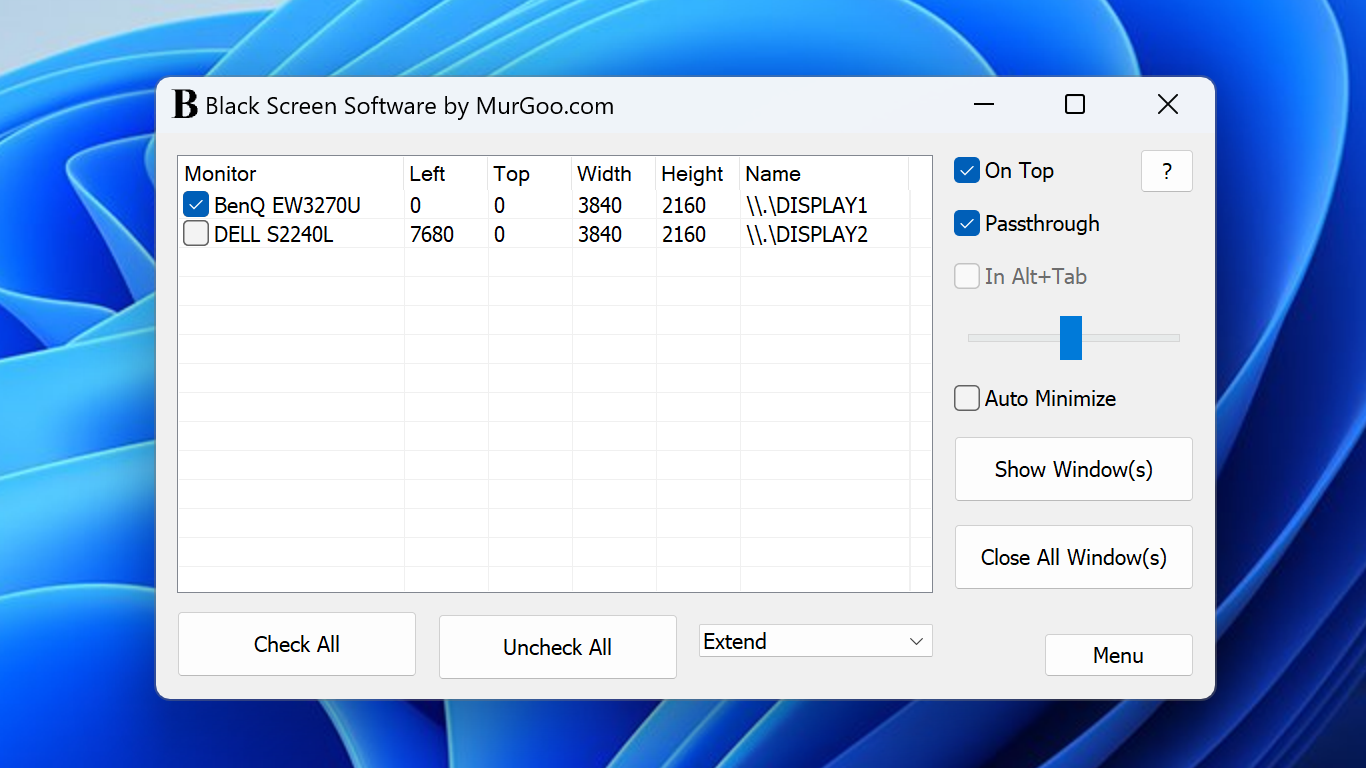
- One-Click Blackout Mode: Instantly toggles the entire screen into a deep black, blocking out all on-screen distractions, perfect for deep work sessions or brief mental resets.
- Customizable Hotkeys: Allows users to assign quick keyboard shortcuts for toggling the blackout, enabling seamless control without interrupting workflow.
- Minimal System Footprint: Compact and lightweight, it consumes minimal system resources, ensuring smooth operation alongside other applications.
- Automatic Resume & Sleep Mode: Can be set to auto-resume or pause upon certain actions or times, providing flexibility for varied work patterns.
Engaging the User: A Fresh Perspective on Focus
Imagine staring at a cluttered desktop suddenly transformed into a sleek, blank canvas—black as the night sky—drawing your entire attention onto one task. Black Screen Software acts as your digital cloak of silence, offering a sanctuary where visual noise is eliminated. It's as if you've placed a velvet curtain over your entire workspace, inviting you to concentrate more deeply, whether you're coding, writing, or meditating on complex ideas.
Breaking Down the Core Functionalities
Seamless Blackout Activation with a Single Click
The primary charm of Black Screen lies in its ability to switch your display into a monochromatic abyss in an instant. This feature is extremely useful for quick mental resets during long work sessions or for those who need an immediate visual break. The toggle is incredibly responsive; simply click the icon or press a hotkey, and your screen transitions smoothly into total blackness, akin to flipping a switch on a darkened room.
Custom Hotkeys for Effortless Control
One of the standout features is the ability to assign personalized hotkeys—think of them as your magic spells—making it effortless to hide or reveal your workspace without fumbling through menus. This is especially valuable for users who frequently need quick focus shifts, such as during presentations or intense study periods, ensuring the functionality feels natural and integrated with your workflow.
Lightweight Yet Steady: System Efficiency and Reliability
Unlike some productivity tools that bloat with features and burdens, Black Screen maintains a minimalist design. Its resource lightness guarantees that your system remains responsive, even during extended use. This efficiency translates into less cognitive load, allowing users to focus entirely on their tasks without worrying about software lag or system crashes.
How It Differs from Other Productivity Apps
Compared to other distraction-blocking tools or full-screen apps, Black Screen's key differentiation is its laser focus on visual simplicity and workflow integration. Instead of bombarding users with multifaceted functionalities or notifications, it emphasizes rapid activation and deactivation, reducing the cognitive effort needed to engage it. This design choice effectively cuts down on feature complexity, enabling users to maintain high mental clarity. It's akin to having a dedicated switch that instantly dims your visual noise, rather than a multi-button device—less cognitive load, more focus.
Final Verdict: A Clear Choice for Focused Work
Black Screen Software for Windows earns a confident recommendation for anyone seeking an unobtrusive, efficient way to manage visual distractions. Its most remarkable features—instant toggle and customizable hotkeys—work together to streamline your workflow, reducing mental clutter and enabling sustained concentration. Whether you're a student, developer, or creative professional, this app is a handy tool to incorporate into your productivity arsenal. For those who value simplicity and quick control over their workspace, Black Screen is certainly worth trying out.
Pros
- Simple and User-Friendly Interface
- Effective in Resolving Common Black Screen Problems
- Fast Scan and Repair Process
- Support for Multiple Software and System Configurations
- Regular Updates for Compatibility
Cons
- Occasional Inconsistent Fixes
- Limited Troubleshooting Features
- Potential False Positives
- Requires Repeated Runs for Persistent Issues
- Interface Could Use More Visual Guidance











