

- Category Multimedia design
- Available on PC, Mobile, Surface Hub, HoloLens
- OS Windows 10 version 17763.0 or higher
- languages English (United States)
BLE-MIDI Connect for Windows: Your Wireless MIDI Bridge
Imagine seamless wireless communication between your MIDI devices and your PC—BLE-MIDI Connect for Windows by Locomorange makes this possible with a streamlined, user-friendly app designed for musicians, producers, and tech enthusiasts alike.
Basic Information and Core Highlights
Positioning and Purpose
This application serves as a dedicated Bluetooth Low Energy (BLE) MIDI connection tool, enabling users to link BLE-enabled MIDI hardware directly to their Windows computer without cumbersome cables.
Developer
Developed by Locomorange, a team focused on innovative audio and MIDI connectivity solutions.
Main Features & Highlights
- Supports wireless MIDI data transmission via Bluetooth LE, reducing clutter and increasing flexibility.
- Intuitive pairing process with minimal setup—connect in just a few taps or clicks.
- Real-time MIDI data transfer with stable, low-latency performance ideal for live performances or studio work.
- Compatibility with a broad range of BLE MIDI devices, extending its versatility across various brands and models.
Target Audience
Musicians, producers, sound designers, and hobbyists who seek a reliable wireless MIDI connection solution for their Windows setup, whether in studio environments or live performances.
Vivid Insights into the App
An Easy-to-Use Gateway to Wireless MIDI
Imagine a conductor gently waving their baton, seamlessly coordinating a symphony—BLE-MIDI Connect acts as that conductor, orchestrating wireless MIDI data flow with elegance. Setting up is straightforward; the app guides you through pairing your BLE MIDI devices, making disconnects or complicated configurations a thing of the past. It's a breath of fresh air for anyone tired of tangled cables and hardware limitations.
Core Functionality 1: Effortless Wireless Connection
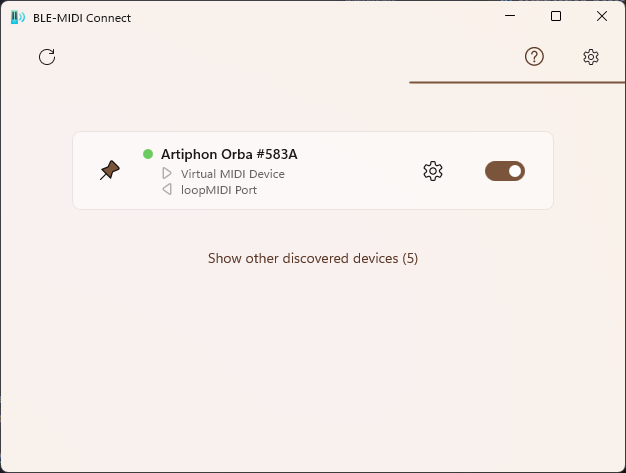
The primary allure lies in its robust wireless connection capabilities. Unlike traditional MIDI setups requiring intricate cabling, BLE-MIDI Connect leverages Bluetooth LE to deliver stable, low-latency data transmission. The pairing process is swift—simply put the device into pairing mode, click 'Connect' in the app, and voilà, your MIDI hardware is speaking directly with your PC. The app's seamless connection stability ensures your musical flow remains uninterrupted, whether during studio recordings or on-stage improvisations.
Core Functionality 2: Dynamic Multi-Device Management
One standout feature is its capacity to handle multiple BLE MIDI devices simultaneously. Visualize connecting a synthesizer, a drum pad, and a control surface—each with its own dedicated sidebar or connection indicator within the app. This multi-device management simplifies complex setups, saving you time and frustration. The app intelligently manages concurrent connections without sacrificing responsiveness, making it a versatile hub for your wireless MIDI network.
Interface and User Experience: Friendly Yet Professional
Design-wise, the interface strikes a balance between minimalism and functionality—think of it as a well-organized music studio console, uncluttered but informative. Buttons and menus are intuitively placed, allowing users to quickly initiate pairing or troubleshoot issues. The app's responsiveness is commendable, with smooth transitions and instant feedback that enhances the overall user experience. Learning curve? Gentle enough for beginners yet feature-rich for seasoned users, making it an ideal tool for quick setups or detailed configurations alike.
What Sets BLE-MIDI Connect Apart?
While numerous MIDI apps exist, BLE-MIDI Connect's standout advantage is its dedicated focus on Bluetooth LE communication, offering lower latency and higher stability compared to traditional Bluetooth MIDI apps. Its capability to manage multiple devices seamlessly and its straightforward, no-fuss interface make it a compelling choice over bulkier, more complex solutions. Additionally, its tailored optimization for Windows ensures reliable performance without requiring additional driver installations or complicated configurations, distinguishing it from platform-limited counterparts.
Final Verdict and Recommendations
In summation, BLE-MIDI Connect for Windows is an understated yet powerful tool that brings wireless MIDI connectivity into a practical, accessible realm. Its core strength—producing reliable, low-latency connections—makes it particularly suitable for live performers and studio musicians eager to minimize cable clutter without sacrificing performance. For those venturing into wireless MIDI setups or upgrading existing configurations, this app offers a straightforward, dependable solution.
My recommendation? If you're seeking a lightweight, stable Bluetooth MIDI bridge that emphasizes ease of use and multi-device management, BLE-MIDI Connect deserves a place in your musical toolkit. It may not boast elaborate features or flashy interfaces, but its practical design ensures your musical ideas flow freely—wirelessly and effortlessly.
Pros
- Seamless BLE-MIDI Connectivity
- User-Friendly Interface
- Low Latency Data Transmission
- Broad Device Compatibility
- Reliable Connection Stability
Cons
- Limited Device Support in Free Version
- Occasional Connectivity Dropouts
- Insufficient Documentation for Troubleshooting
- UI Might Be Overwhelming for Beginners
- Limited Support for Some Older Devices











