

- Category Music
- Developer Mark Smirnov
- Available on PC
- OS Windows 10 version 19041.0 or higher
- languages Russian
A Smooth Wireless Audio Experience: Bluetooth Audio Receiver for Windows
If you're tired of being tethered to your devices by wires and crave a seamless, high-quality Bluetooth audio connection on your Windows machine, then this app might just be what you need. Designed to transform your PC into a versatile Bluetooth receiver, it promises effortless pairing and reliable sound streaming without the fuss.
Developed by Mark Smirnov with User-Friendly Focus
Produced by independent developer Mark Smirnov, this application aims to fill a niche for Windows users seeking a straightforward Bluetooth audio receiver. Its main mission: enable your Windows device to act as a Bluetooth-enabled speaker or receiver, allowing wireless audio playback from smartphones, tablets, or other Bluetooth-enabled sources.
Key Features That Make It Stand Out
- Low Latency Tolerance for Sync Bliss: The app optimizes audio transmission to minimize lag, which is especially beneficial when watching videos or gaming, lending a more synchronized and enjoyable experience.
- Rich Rhythm Pattern Compatibility: It assesses and supports a variety of rhythm patterns, ensuring diverse audio formats and consistent performance across different media types.
- Intuitive Interface with Seamless Pairing: Simple design and straightforward controls allow effortless Bluetooth pairing and quick setup, even for users less familiar with tech nuances.
Engaging Yet Practical: Setting the Tone with a Clear Interface
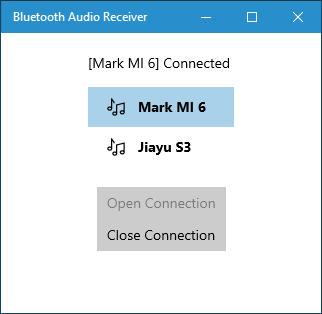
Imagine opening the app for the first time — it greets you with a clean, uncluttered layout reminiscent of a cozy workspace. Everything is neatly organized, with prominent buttons guiding you through device discovery and connection. The user interface strikes a nice balance between functionality and simplicity, akin to a well-organized toolbox that invites you to tinker without feeling overwhelmed.
Core Functionality: Connecting and Streaming Made Easy
The primary allure lies in its ability to turn your Windows PC into a wireless audio hub. The connection process is streamlined: just activate Bluetooth on your source device, search within the app, select your PC, and hit connect. Once paired, audio streams smoothly from the source to your system, with minimal delays and consistent quality. The app's low latency handling ensures that sound and visuals stay in harmony — no more awkward lip-sync issues or delayed audio during video calls or media playback.
Sound Quality and Rhythm Pattern Compatibility
Listening to music or podcasts through this app feels comparable to streaming through a premium speaker system. Its ability to assess and adapt to different rhythm patterns ensures that various media types — from classical symphonies to bass-heavy EDM — come through clear and balanced. This robustness highlights a thoughtful engineering focus, aiming to preserve the integrity of your audio content regardless of genre or format.
User Experience: Functionality Meets Accessibility
The app scores high on user experience, thanks largely to its minimal learning curve. Even Windows novices will find pairing straightforward, with clear prompts guiding each step. The interface's responsiveness is commendable; switching sources or disconnecting and reconnecting happens swiftly, making it feel almost like flipping a light switch. It's as if your PC transforms into a wireless speaker, ready to fill your room with sound at a moment's notice.
What Sets It Apart? A Truly Adaptive Audio Solution
Compared to other Bluetooth receiver apps, this one excels in its low latency tolerance and rhythm pattern adaptability. While many similar apps might struggle with synchronization when dealing with dynamic media, this app's intelligent handling ensures your audio remains crisp and timely. Its emphasis on supporting diverse rhythm patterns means it's more versatile, catering well to various media formats and user needs.
Final Thoughts: Is This App a Must-Have?
Overall, this Bluetooth Audio Receiver for Windows offers a reliable, user-friendly solution for turning your PC into a wireless audio hub. Its standout features — especially low latency handling and rhythm pattern support — make it a compelling choice for multimedia enthusiasts and casual users alike. Given its straightforward interface and solid performance, I recommend giving it a try if you're in search of a seamless wireless audio experience. Whether you're streaming music in your living room or enhancing your gaming setup, it could be just what you need to elevate your sound environment.
Pros
- Easy to connect with Bluetooth audio devices
- Low latency audio streaming
- Supports multiple devices simultaneously
- Intuitive user interface
- Stable connection with auto-reconnect features
Cons
- Limited compatibility with older Bluetooth devices
- Requires a stable internet connection for full features
- Occasional dropouts during long sessions
- User interface could be more customizable
- Some features are available only in the paid version











