

- Category Productivity
- Available on PC
- OS Windows 10 version 18362.0 or higher
- languages Chinese (Simplified), Dutch, English (United States), French, German, Italian, Japanese, Korean, Portuguese (Brazil), Russian, Spanish
A Fresh Take on File Compression: BreeZip's Elegant Approach to RAR & ZIP Management
If you've been navigating the labyrinth of compressed files with clunky tools and convoluted workflows, BreeZip offers a breath of fresh air—combining power, simplicity, and efficiency into a neat package designed for Windows users. Think of it as your reliable sidekick in handling those ever-present ZIPs and RARs, making file management less of a chore and more of a breeze.
Basic Information: Clear, Concise, and User-Focused
BreeZip on Microsoft Store a. Positioning Statement: BreeZip is a streamlined and user-friendly utility designed to easily create, extract, and manage compressed archives in RAR and ZIP formats, enhancing workflow efficiency for everyday users and professionals alike. b. Developer/Team: Developed by BreeZip, a dedicated team committed to developing lightweight yet powerful file compression tools optimized for Windows. c. Main Features Highlights: 1. **Dual-format support**: Seamlessly handle ZIP and RAR archives within a single application. 2. **Drag-and-Drop Simplicity**: Intuitive interface that allows quick extraction or creation of archives via drag-and-drop. 3. **Batch Processing**: Manage multiple files or archives simultaneously to save time. 4. **Secure Compression Options**: Incorporate password protection easily to safeguard your files. d. Target User Group: BreeZip caters to a broad spectrum—ranging from casual users who need quick compression tools to professionals requiring efficient archive management integrated into their workflows.A User-Friendly Experience: Learning and Navigating BreeZip
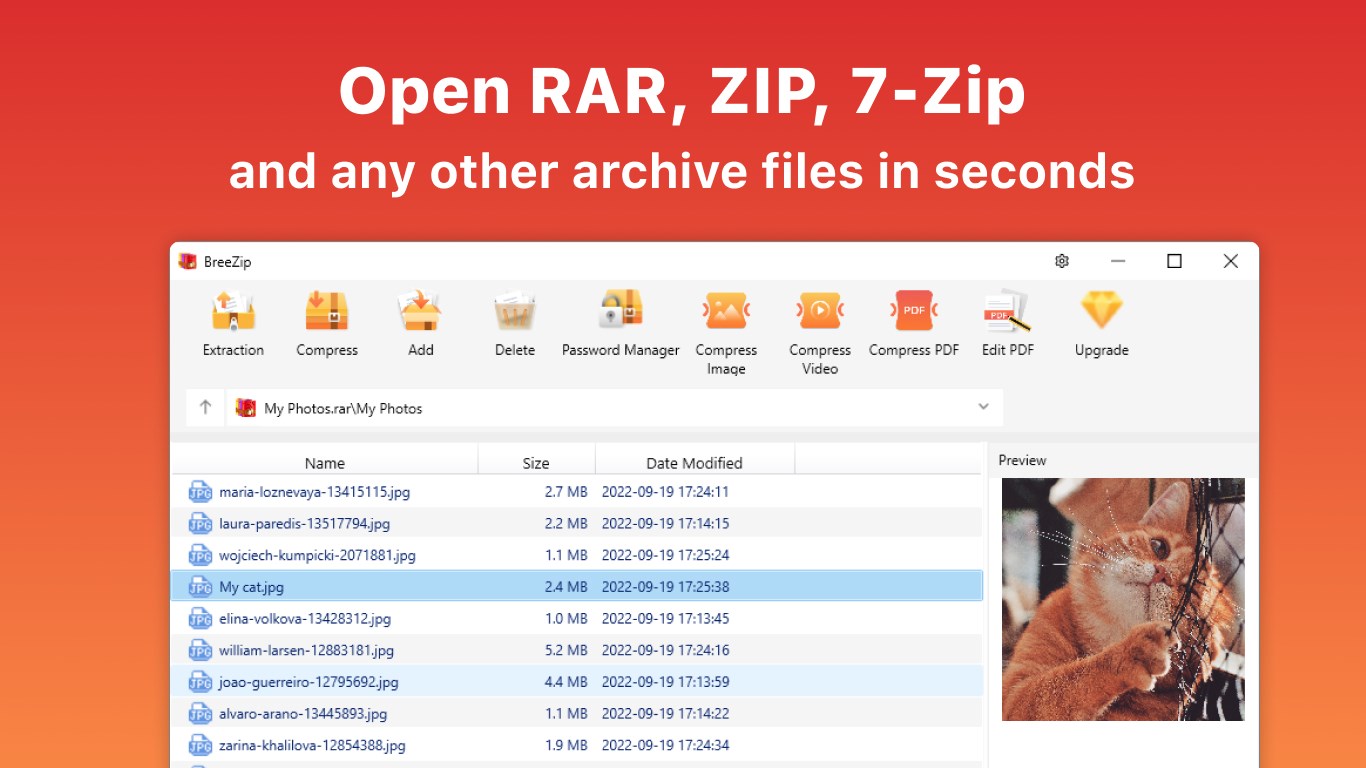
Imagine having a trusty toolbox that opens with a gentle touch—BreeZip's interface embodies this simplicity. Its sleek, straightforward design removes the intimidation often associated with file management tools, making it accessible to users of all levels. The initial learning curve is gentle; most features are instantly recognizable, and guidance is minimal but effective, akin to having a well-organized drawer that invites you to start working immediately. Interaction is smooth and responsive, with operations like extraction and compression executing swiftly without lag, making the entire experience feel like a well-choreographed dance. The intuitive drag-and-drop functionality resembles placing a file into a folder, which minimizes cognitive load and boosts productivity—picture workers assembling a puzzle with ease rather than struggling with scattered pieces.Core Features in Focus: Power that's Simplified
Comprehensive Format Support and Security
One of BreeZip's standout features is its ability to handle both ZIP and RAR formats seamlessly. Unlike some competitors that only excel in one area, BreeZip acts like a universal adapter, bridging formats effortlessly. Moreover, its built-in password protection feature ensures your sensitive files stay private, blending security with ease of access.Streamlined Workflow with Drag-and-Drop and Batch Capabilities
The application's drag-and-drop interface is akin to sliding files into a digital filing cabinet, making archive creation and extraction feel almost subconscious. For heavy users managing multiple archives, batch processing reduces repetitive tasks, allowing users to compress or extract entire folders with a single action—imagine having a mover that handles the heavy lifting while you sip coffee.Balance of Features vs. Cognitive Load
What sets BreeZip apart from more feature-bloated alternatives is its commitment to simplicity that does not sacrifice functionality. It emphasizes essential tasks, reducing cognitive overload. As a result, users spend less time figuring out complex menus and more time accomplishing their goals—think of it as a GPS guiding you efficiently rather than bombarding you with an overload of options.Final Verdict: A Practical Companion for Your File Management Needs
Considering its clean interface, swift operations, and focus on core tasks, BreeZip earns a solid recommendation for users seeking a hassle-free yet capable archive manager. It's especially suitable for those who value workflow efficiency and prefer straightforward tools over feature-heavy applications, which often come with a steep learning curve. If your daily routine involves zipping up files or extracting from archives without fuss, BreeZip is a reliable partner that keeps things simple and effective. For users desiring an app that reduces their cognitive load and streamlines their workflow—this is a choice worth making.Pros
- User-friendly interface
- Supports multiple formats
- Fast processing speed
- Lightweight application
- Integrated file preview
Cons
- Limited advanced features
- Occasional extraction errors
- No built-in file sharing
- Lack of Windows Explorer integration
- Interface customization limited











