

- Category Productivity
- Developer iterate GmbH
- Available on PC
- OS Windows 10 version 15063.0 or higher
- Keyboard Integrated Keyboard
- Mouse Integrated Mouse
- languages Arabic, Bulgarian, Catalan, Chinese (Simplified), Chinese (Traditional), Czech, Danish, Dutch, English, English (United States), Finnish, French, Georgian, German, Greek, Hebrew, Italian, Japanese, Korean, Latvian, Norwegian, Polish, Portuguese (Brazil), Portuguese (Portugal), Romanian, Russian, Serbian (Latin), Slovak, Slovenian, Spanish, Swedish, Thai, Turkish, Ukrainian, Welsh
Cyberduck for Windows: A Modern Bridge to Cloud Storage
Cyberduck for Windows stands out as a sleek, user-friendly client that simplifies the often complex world of cloud and remote storage management. With its intuitive interface and robust features, it promises to be an essential tool for professionals who need seamless access to their files across various platforms.
Developed by Iterate GmbH: A Trustworthy Name in the Field
Created and maintained by iterate GmbH, a company known for its commitment to open-source projects and cross-platform solutions, Cyberduck for Windows benefits from a dedicated team focused on delivering efficiency and reliability in file transfer management.
Key Features That Make Cyberduck Shine
- Multi-Protocol Support: Compatible with numerous protocols including FTP, SFTP, WebDAV, Amazon S3, Azure Blob Storage, and Google Cloud Storage, providing a one-stop solution for different cloud environments.
- Easy Authentication & Secure Transfers: Supports multiple authentication methods, ensuring secure and smooth connections without fuss.
- Drag-and-Drop Simplicity: Enables effortless file uploads and downloads via simple drag-and-drop actions, streamlining routine workflows.
- Open-Source and Customizable: Allows users to tweak and extend features, fostering a community-driven approach to evolving the app.
An Engaging Dive into Cyberduck's User Experience
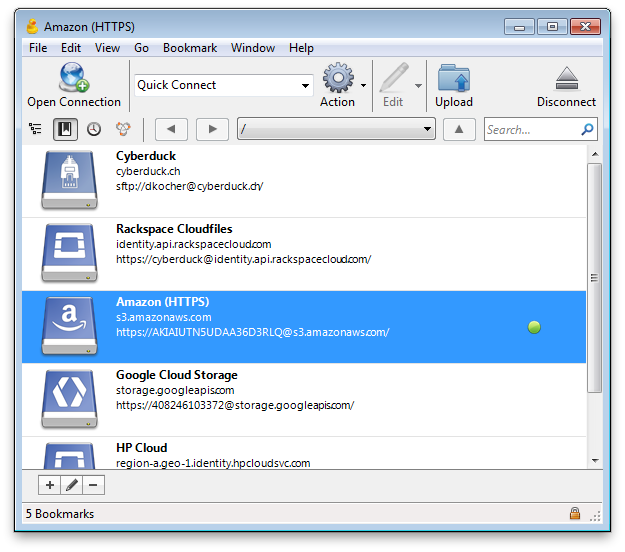
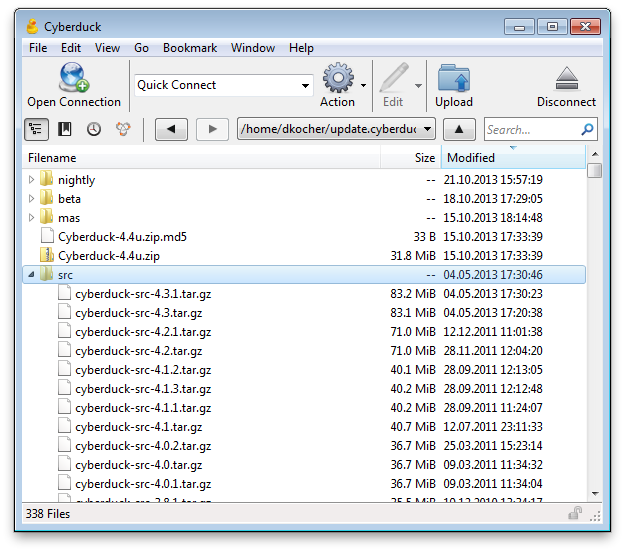
Imagine stepping into a well-organized digital closet where every file has its place and easy reach—Cyberduck for Windows offers just that. Its interface is reminiscent of a tidy file explorer, but with added capabilities to connect directly to cloud services or remote servers. The design strikes a fine balance between simplicity and power, ensuring new users aren't overwhelmed while seasoned pros can navigate swiftly.
Interface Design and Usability
Cyberduck's interface is minimalist yet functional, with a clean toolbar and a dual-pane layout that resembles a traditional file explorer, making adoption almost instinctive. The login process is straightforward, with stored credentials and quick access to recent connections. Its visual cues and icons are intuitive, reducing cognitive load and allowing users to focus on their tasks rather than fighting with the tool.
Performance and Workflow Integration
One of the app's most compelling features is its efficient workflow integration. By supporting drag-and-drop file operations and simultaneous connections to multiple storage endpoints, Cyberduck streamlines the process of managing files across cloud and remote servers—think of it as a digital highway that connects diverse data nodes seamlessly. Speed is maintained thanks to lightweight architecture, ensuring minimal lag even during bulk transfers.
Distinctive Features: Prioritizing Ease Over Complexity
Compared to other productivity tools that often pack in numerous features at the expense of usability, Cyberduck excels at prioritizing user flow. Its support for various protocols within a single interface reduces the cognitive burden of switching between different apps. Moreover, its open-source nature allows extended customization, meaning tech-savvy users can tailor the experience without complicating the core workflow. This focus on reducing mental load while maintaining rich functionality makes it uniquely suitable for users seeking efficiency without feature fatigue.
Is Cyberduck for You? Clear Recommendations
If your work involves regular management of files across multiple cloud services or remote servers, Cyberduck provides an uncluttered, reliable, and flexible platform. Its emphasis on workflow efficiency, combined with an easy learning curve and adaptable architecture, makes it an excellent choice for both individual professionals and teams aiming to streamline their data operations. For users seeking a straightforward, yet powerful, file transfer client that minimizes complexity, Cyberduck is highly recommended.
Pros
- Intuitive User Interface
- Supports a Wide Range of Protocols
- Open Source with Regular Updates
- Integrated Search and Bookmarks
- Cross-Platform Compatibility
Cons
- Limited Advanced Editing Features
- Slow Performance with Large Files
- Basic Synchronization Capabilities
- Limited Customer Support
- No Built-in Encryption for Data at Rest











