

- Category Business
- Available on PC, Mobile, Surface Hub, HoloLens
- OS Windows 10 version 17763.0 or higher
- Keyboard Integrated Keyboard
- Mouse Integrated Mouse
- languages English (United States)
A Modern Take on Document Management for Windows Users
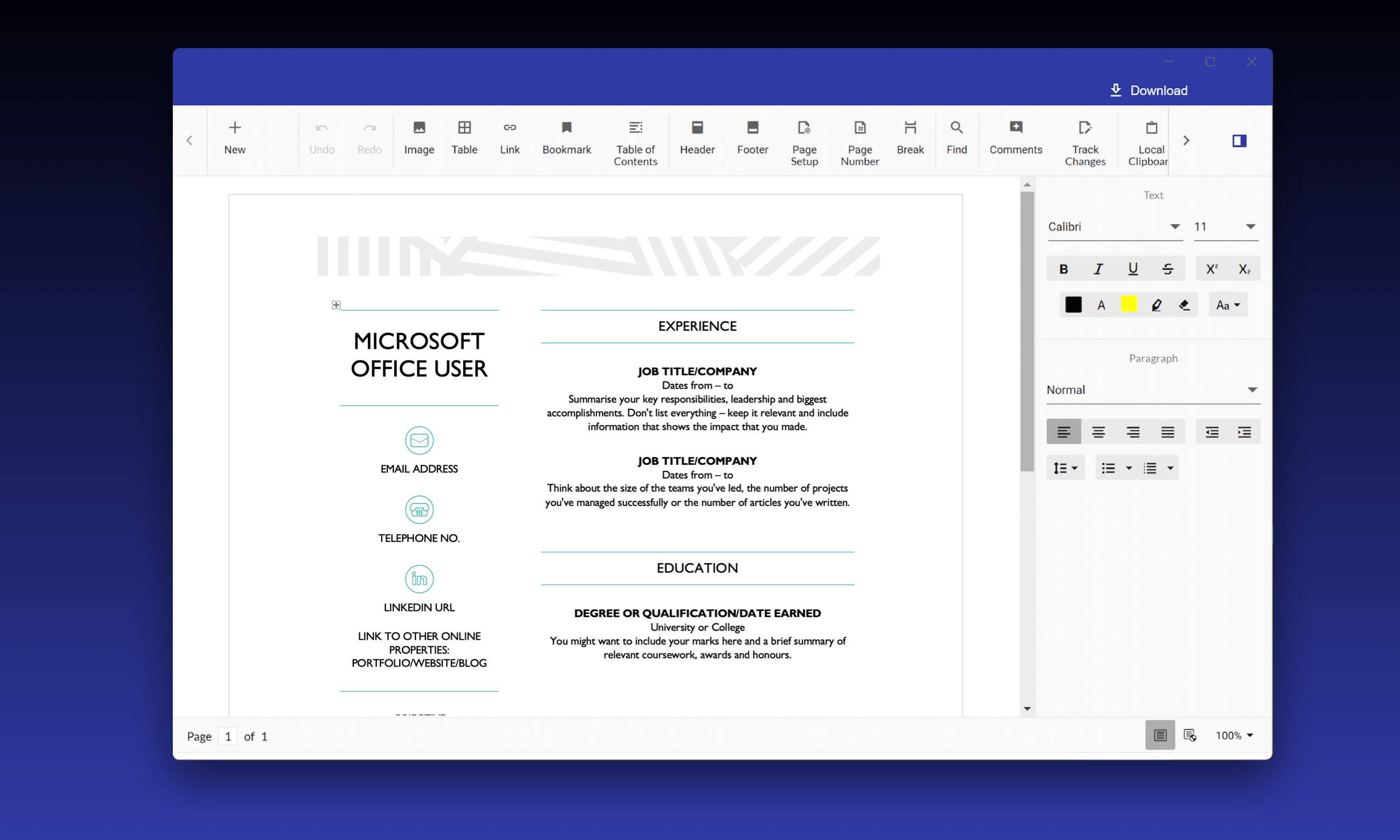
Docs App for Windows, developed by APP Software, positions itself as an efficient, user-friendly application designed to streamline how individuals and teams manage and collaborate on documents within the Windows environment. Whether you're a busy professional, a student juggling multiple tasks, or part of a collaborative team, this app aims to simplify your digital workspace with its thoughtful features.
Core Features That Make a Difference
Seamless Collaborative Editing
One of the standout aspects of Docs App is its integrated collaborative work feature. Think of it as a digital co-actor—multiple users can effortlessly edit, comment, and brainstorm within the same document in real time. Unlike traditional document editors that require cumbersome share-and-send processes, this app enables instant collaboration, making teamwork almost feel like a face-to-face discussion. This feature is particularly beneficial for remote teams who need to stay aligned without the chaos of version control issues.
Intuitive Task and Project Management
Beyond simple document editing, the app incorporates task management tools within the workspace. Users can create to-do lists, assign tasks to team members, and set deadlines—all integrated seamlessly into the document interface. Imagine managing a project's entire lifecycle without ever leaving your document; it's like having a personal assistant embedded inside your workspace. This integration ensures that your collaborative efforts stay organized and on schedule, reducing the need to switch between multiple apps.
Clean and User-Friendly Interface
The design of Docs App mirrors the minimalistic elegance of a well-organized desk. Its interface is clear, uncluttered, and optimized for ease of use. Navigating through documents or access to collaboration features feels natural, akin to flipping open your favorite notebook. The app's responsiveness guarantees smooth operation even with larger files or multiple concurrent users, creating an experience that feels swift rather than sluggish—a true ergonomics win.
Delving Deeper Into User Experience
Starting with the interface, Docs App boasts a sleek, modern look—think of it as the minimalist design of a high-end workspace. It eschews unnecessary frills, focusing instead on clarity and accessibility. The layout is intuitive, reducing the learning curve for new users, much like slipping into a tailored pair of shoes that fit just right. This ease of navigation encourages users to dive right into their work without wrestling with complicated menus or obscure features.
When it comes to operation speed, the app doesn't disappoint. Its smooth workflow—whether creating a new document, editing collaboratively, or managing tasks—feels seamless, akin to gliding down a well-paved road. Users will appreciate the rapid response times and stability, which contribute to a frictionless work experience.
Compared to other business or productivity apps, Docs App's fusion of document management and project collaboration sets it apart. Many competitors either focus solely on editing or task management; this app's strength lies in integrating both within a single, cohesive platform. Its real-time collaborative features are particularly robust, making it a compelling choice for teams across different locations aiming for synchronized workflows.
Is It Worth Your Attention? Our Take
Based on its features and user experience, Docs App for Windows is recommended for users looking for an all-in-one document and task management tool that combines simplicity with power. It's especially suited for small to mid-sized teams, remote workers, or anyone who values streamlined workflows without switching between multiple apps. For individual users, it offers a neat solution to keep notes, documents, and tasks organized in one place.
While it might not replace more feature-rich enterprise solutions for very large organizations, its ease of use and collaborative strengths make it a notable contender in the productivity app landscape. If you often find yourself juggling documents and team collaborations, giving this app a try could be a worthwhile move—it might just become your new digital desk.
Pros
- User-friendly interface
- Seamless integration with Microsoft services
- Offline access capability
- Regular updates and improvements
- Broad file format support
Cons
- Occasional synchronization delays
- Limited advanced formatting options
- Performance issues on older devices
- Few customization options for UI
- Offline editing functionalities can be limited for large documents











