

- Category Productivity
- Developer JGraph Ltd
- Available on PC
- OS Windows 10 version 14316.0 or higher
- Keyboard Integrated Keyboard
- Mouse Integrated Mouse
- languages English (United States)
An Intuitive Diagramming Companion for Windows Users
Draw.io Diagrams for Windows, developed by JGraph Ltd and published by draw.io Ltd, is a versatile diagramming tool that seamlessly integrates with Windows environments, making it an ideal choice for professionals and students seeking easy-to-create visualizations. Its streamlined interface and robust features aim to elevate your diagramming experience beyond basic sketches.
Who's Behind the Magic?
JGraph Ltd, the creative force behind draw.io Diagrams, has built a reputation for delivering user-friendly, reliable diagramming solutions. Their focus on accessibility and performance ensures that users get a powerful tool without unnecessary complexity.
Core Features That Shine
- Comprehensive Diagram Library: Access hundreds of pre-designed templates and shapes spanning flowcharts, UML diagrams, network diagrams, and more—saving time and inspiring creativity.
- Offline & Cloud Compatibility: Work seamlessly offline with local files or integrate with cloud services like Google Drive and OneDrive, ensuring your diagrams are always accessible and safely stored.
- Real-time Collaboration: Collaborate with teammates in real-time, making teamwork more predictable and reducing misunderstood versions or lost edits.
- Intuitive User Interface: The clean layout combined with drag-and-drop functionality simplifies the diagram creation process, even for newcomers.
A Deep Dive into User Experience and Unique Strengths
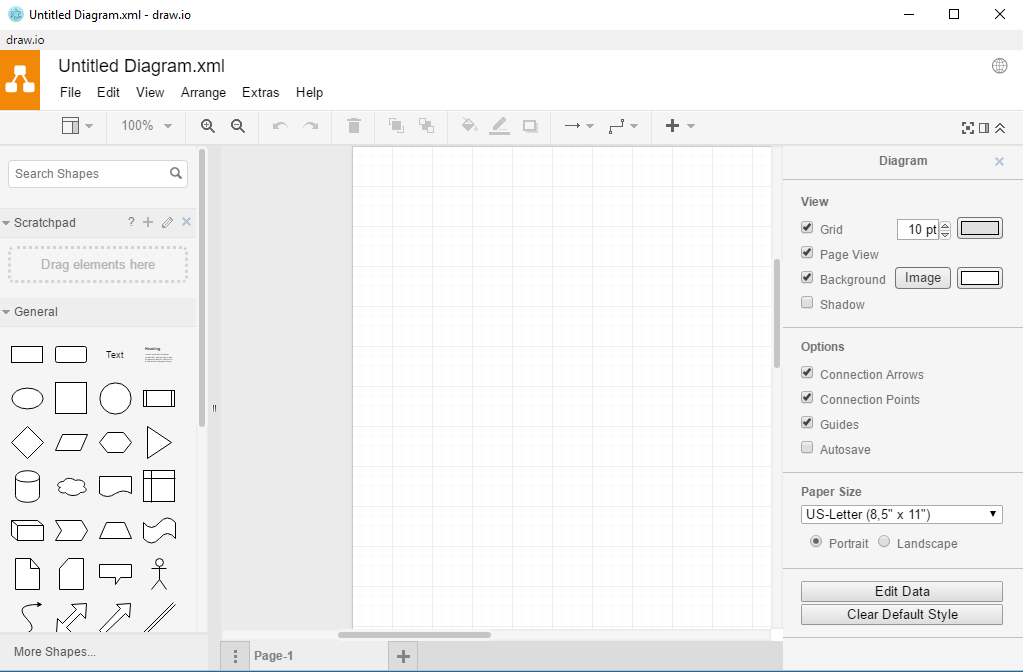
Imagine sitting at your desk, ready to sketch out a complex network architecture or that new user flow—the interface greets you like a well-organized studio, where every tool is within arm's reach. The application boasts a sleek, modern design that balances simplicity with depth, much like a good workspace that encourages creativity without chaos.
Design & Navigation
The user interface is thoughtfully crafted—minimalistic yet informative. The toolbar sits neatly atop, providing clear icons for common functions such as shape insertion, connectors, and formatting tools. Navigating through layers of diagrams is as smooth as gliding over ice—no annoying lag or unresponsive buttons, which is crucial when you're trying to quickly iterate on an idea.
Performance & Learning Curve
Draw.io Diagrams for Windows excels in responsiveness. Large diagrams load quickly, and drag-and-drop actions feel fluid. For new users, setting up and understanding core features is straightforward, thanks to in-app tutorials and contextual tips. For experienced diagrammers, the depth of options allows for customization without overwhelming the interface.
Workflow Integration & Differentiation
What truly sets this app apart from other productivity tools is its focus on streamlining your workflow. Unlike complex diagramming suites that require steep learning curves, draw.io's emphasis on reducing cognitive load makes diagram creation feel almost intuitive—like sketching on a napkin, but with digital precision. Its ability to effortlessly sync with cloud storage services means your work isn't siloed; instead, it integrates smoothly into your existing digital ecosystem, saving time and mental effort.
Moreover, its feature set is thoughtfully curated—offering just enough functionality without drowning users in unnecessary options. This clear focus on workflow efficiency ensures you spend more time on your ideas, not on navigating the tool.
Final Verdict & Recommendations
Overall, draw.io Diagrams for Windows is a reliable, user-centric diagramming application that appeals to a wide audience—from casual users to professionals. Its standout features are its intuitive interface paired with powerful collaboration and cloud integration, making it a practical choice for teams and individuals alike.
I recommend this app to anyone needing a straightforward yet capable diagramming tool that fits neatly into their workflow. Whether you're mapping out project processes, designing software architecture, or simply visualizing ideas, draw.io offers a balanced blend of usability and depth. It's like having a digital whiteboard that keeps up with your thoughts—simple, effective, and ready to assist at a moment's notice.
Pros
- Intuitive drag-and-drop interface
- Wide range of diagram templates
- Real-time collaboration features
- Seamless integration with Microsoft services
- Cross-platform compatibility
Cons
- Limited offline editing capabilities
- Occasional lag with large diagrams
- Basic customization options
- Learning curve for advanced features
- Limited export formats











