

- Category Business
- Available on PC
- OS Windows 10 version 17763.0 or higher
- languages English (United States)
Discovering the World in 3D: An Introduction to Earth 3D Maps & Street View for Windows
Imagine walking through a cityscape or exploring a remote mountain trail—all from the comfort of your desk. Earth 3D Maps & Street View for Windows by Hung APP offers an immersive planetary adventure, bringing detailed, globe-spanning imagery directly to your computer. Whether you're planning a trip, studying geography, or just satisfying your curiosity, this app promises to make digital exploration engaging and accessible.
A Closer Look at Its Core Features
Stunning 3D Globe Navigation
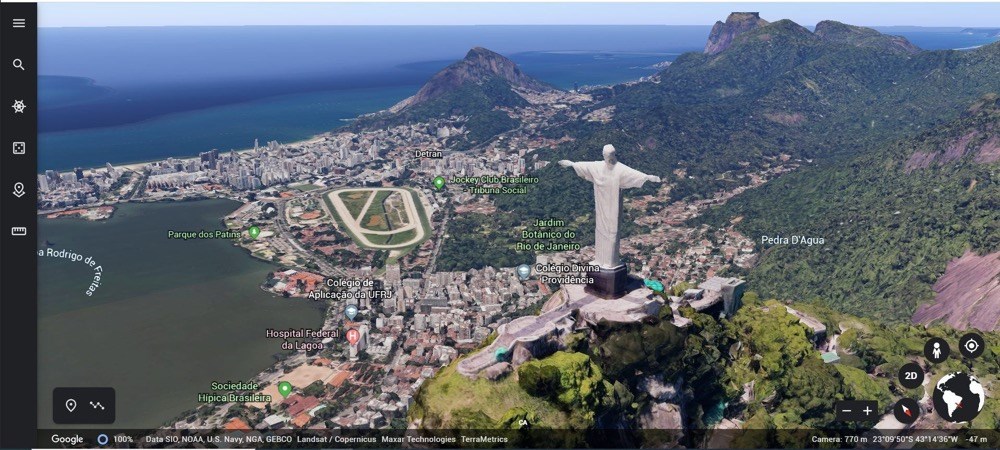
At the heart of this application lies its vibrant 3D globe interface. Users can spin, zoom, and tilt the Earth with intuitive controls, replicating the sensation of holding a physical globe but far more dynamic. The rendering quality allows for life-like visualization of continents, cities, and natural landmarks, making exploration a delightful visual journey. It's akin to having a mini planet in your desktop—perfect for students, educators, or tourists planning their future adventures.
Street View and Local Details
Ever wished you could stroll down the streets of Paris or see the skyline of New York without leaving home? This app integrates Street View-like imagery, offering a detailed window into thousands of locations worldwide. Whether examining a tourist attraction or checking out an upcoming neighborhood, this feature enhances realism and contextual understanding. The seamless transition from globe to street-level view is smooth and straightforward, enriching user engagement and learning.
Customizable Tours and Points of Interest
An outstanding feature that sets this app apart is its ability to create personalized virtual tours. Users can mark favorite locations, plot routes, and plan explorations—all within a user-friendly interface. This makes it not only a passive viewing tool but also a practical resource for educational projects, travel planning, or collaborative work. It's like having a digital travel companion that keeps your points of interest organized and accessible.
Design, Usability, and User Experience
The app boasts a clean, uncluttered interface reminiscent of a sleek control panel for planetary exploration. The visuals are sharp, and navigation controls are responsive, allowing for fluid movements as if the Earth itself responds to your commands. The learning curve is gentle—new users will find themselves zooming and rotating within minutes, while advanced users can leverage shortcuts for efficient navigation. Overall, the user experience strikes a great balance between visual appeal and functional ease, transforming what could be a technical tool into an intuitive digital safari.
What Sets It Apart? Unique Strengths in a Crowded Market
Compared to other geographic applications or virtual globes, Earth 3D Maps & Street View emphasizes collaborative features and task management. Its ability to create and share custom tours enables users to work together, making it ideal for classroom settings or remote teams. You can annotate points of interest, save route plans, and even export data for presentations, which elevates its utility beyond mere visualization. This collaborative and project-oriented focus is what distinctly positions it against traditional geospatial apps that often lack integrated sharing or task coordination capabilities.
Should You Download It? Final Thoughts and Recommendations
If you're seeking an engaging, easy-to-use globe exploration tool with the added benefit of street-level insights and collaborative functionalities, this app is worth a try. It suits educators, travel enthusiasts, students, and casual explorers alike. While it may not replace professional GIS software for technical analysis, it excels in providing an accessible, visually rich experience designed to inspire curiosity and facilitate basic planning or learning activities.
Overall, I recommend this application as a valuable addition for anyone interested in discovering our world from a new perspective, especially if collaborative planning or sharing is essential to your workflow. Give it a shot—you might find yourself losing track of time as you zoom across continents and city streets in this miniature planet.
Pros
- High-Quality 3D Visualizations
- Street View Integration
- User-Friendly Interface
- Regular Updates with New Data
- Free Access to Extensive Map Data
Cons
- Limited City Coverage for Street View
- Occasional Inaccuracies in 3D Models
- High Data Consumption
- Slow Loading Times in Some Areas
- Limited Offline Features










