
- Category Photo & video
- Developer Kidibli
- Available on PC
- OS Windows 10 version 17763.0 or higher
- languages English (United States)
Final Cut Camera-photo Editor for Windows: A Robust Yet User-Friendly Editing Companion
As digital photography continues to surge, capturing special moments and transforming them into stunning visuals is more essential than ever. Final Cut Camera-photo Editor for Windows positions itself as a versatile tool that bridges the gap between simple photo enhancement and more intricate editing, all within an accessible interface designed for a broad spectrum of users—from hobbyists to aspiring professionals.
Developer and Core Features in a Nutshell
Developed and published by Kidibli, Final Cut Camera-photo Editor for Windows is tailored for users seeking an all-in-one photo editing experience. Its standout qualities include intuitive photo adjustments, creative filters, and an integrated cropping tool that streamlines your editing workflow. Whether transforming a snapshot into a vibrant memory or polishing a professional shot, this app offers practical features that get the job done efficiently. Its target audience primarily encompasses casual photographers, social media enthusiasts, and small businesses aiming to produce polished images without investing in expensive, complex software.
Welcome to the World of Creative Photo Editing!
Imagine opening a window into a world where every picture tells a story, and every edit is just a few clicks away. Final Cut Camera-photo Editor feels like a friendly workshop—simple to navigate but packed with enough tools to bring your vision to life. Whether you're enhancing a family photo or crafting eye-catching visuals for your brand, this app aims to make the process enjoyable rather than daunting. Its seamless experience invites you to experiment without fear, akin to a painter blending colors on a canvas, only in this case, your canvas is your photo library.
Core Functionality: Easy and Effective Editing Tools
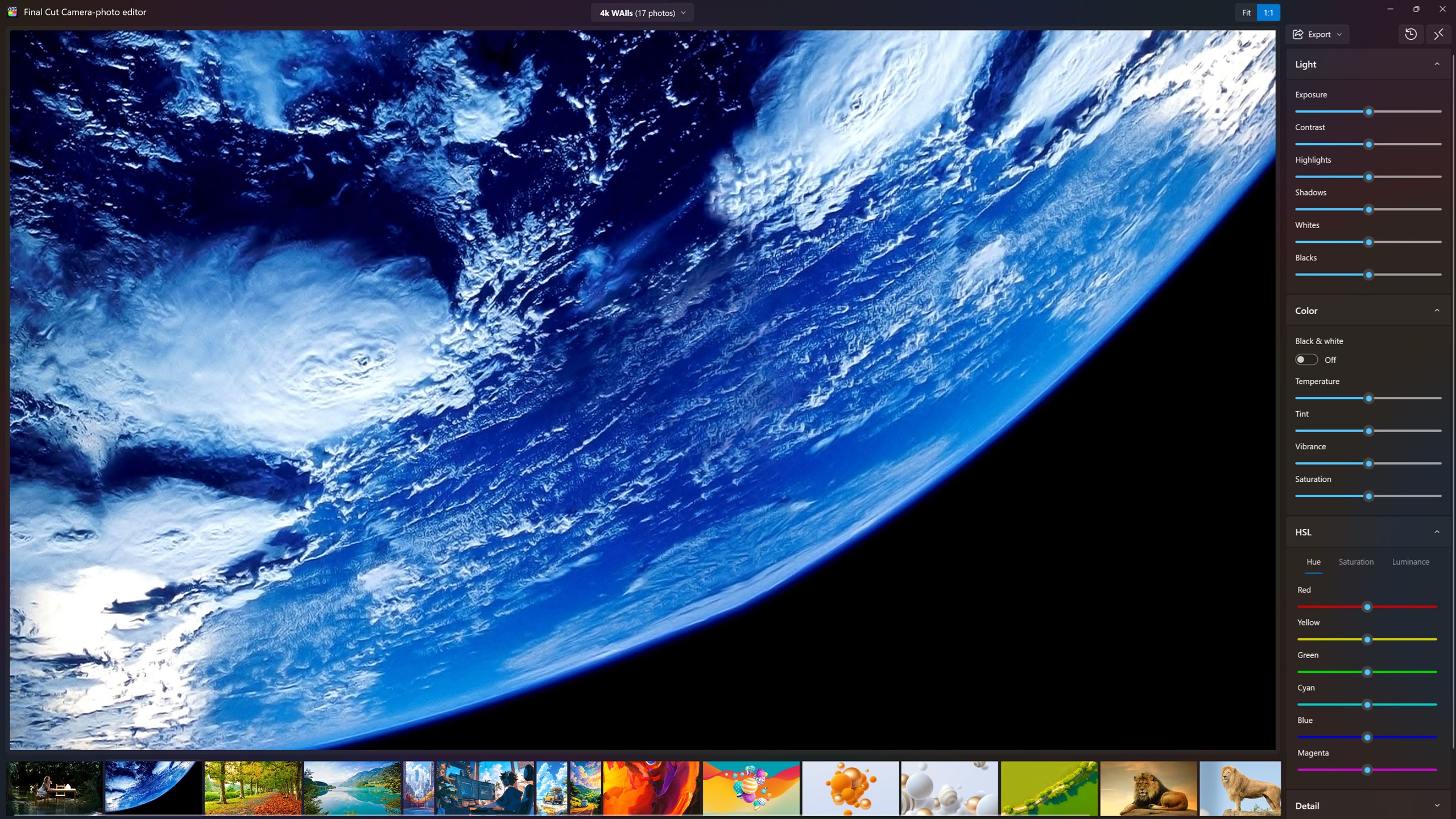
The app's core strength lies in its user-friendly editing suite. With a well-organized interface, users are greeted with sliders and toggles that allow for fine-tuning brightness, contrast, saturation, and more. One of its standout features is the real-time preview—so you can instantly see the impact of adjustments, making editing feel like a dynamic conversation with the image itself. Plus, the built-in filters are thoughtfully curated, providing a palette of artistic effects that help transform ordinary snapshots into magazine-worthy images in seconds.
Creative Filters and Effects: Unleashing Your Artistic Voice
This app truly shines in its emphasis on artistic expression. Featuring a variety of creative filters—from vintage aesthetics to modern minimalism—you can give your photos a distinct personality. The effects are easy to apply, and many come with customizable parameters, allowing for nuanced control. For instance, applying a “Sunset Glow” filter can imbue your image with warmth and charm, making it perfect for social media posts or personal albums. These effects set Final Cut Camera-photo Editor apart from some competitors by making professional-looking edits achievable for novices and experienced users alike.
Interface Design and User Experience: Friendly and Intuitive
Navigating the app feels like flipping through a well-organized photo album—everything is in its right place. The interface adopts a clean, modern design with minimal clutter, allowing users to focus on their creative process. Operation is fluid; transitions between editing modules are swift, with no noticeable lag, which maintains a smooth workflow even on modest hardware. The learning curve is gentle—most basic functions are accessible immediately, while advanced features can be explored at a comfortable pace. This thoughtful design ensures that users spend less time learning and more time creating.
Unique Selling Points: What Sets It Apart?
While many photo editors offer similar functionalities, Final Cut Camera-photo Editor's most distinctive feature is its emphasis on quick yet high-quality results, thanks to its optimized filters and real-time previews. Additionally, the app's minimalist design reduces complexity, making it ideal for users who occasionally want to enhance photos without dealing with overwhelming menus or complex layers. Its simplicity combined with effective tools makes it a compelling choice for those who want professional-looking edits without steep learning curves or subscription fees.
Final Thoughts and Usage Recommendations
Final Cut Camera-photo Editor for Windows is a practical, no-nonsense app that balances simplicity with powerful features. If you're someone who occasionally edits photos for social media, personal albums, or small-scale projects, this app serves as an excellent companion. Its intuitive design and swift performance mean you can produce polished images swiftly, making it especially suitable for quick edits on the go. For users seeking a straightforward yet capable photo editor without the clutter and complexity of professional-grade software, I confidently recommend giving this app a try.
Pros
- Intuitive editing interface
- Rich filter and effect options
- Fast processing speeds
- Supports high-resolution exports
- Regular updates with new features
Cons
- Limited advanced editing features
- Occasional app crashes during intensive edits
- Premium features require in-app purchases
- Limited export formats
- Resource intensive on lower-end devices











